New ESXCLI Commands in vSphere 7.0: What Changed in 7.0 GA, Update 1, Update 2 and Update 3

New ESXCLI namespaces in ESXi 7.0 GA vs 6.x, and what 7.0 U1, U2 and U3 added, verified against Broadcom’s ESXCLI command reference.

Short answer: ESXi 7.0 GA added the image-based esxcli software commands (baseimage, addon, component, apply, sources), the esxcli nvme namespace with NVMe over Fabrics, system ntp/system ptp, SMART daemon control, PCI passthrough and uplink attachment commands. Later updates added more. 7.0 U1 brought daemon, network nic hwCap, vm appinfo and vsan network security. 7.0 U2 brought system settings encryption, system health report and syslog logfilter. 7.0 U3 brought network ip hosts, NVMe telemetry logs and vsan hardware vcg.

The per-update lists below come from comparing Broadcom’s ESXCLI Command Reference for 7.0.0, 7.0.1, 7.0.2 and 7.0.3. Broadcom’s online reference starts at 7.0.0, so the “new in 7.0 GA” list is based on my own ESXCLI dump from an ESXi 6.x host (ESXCLI commands for ESXi 6.x). For every 7.0 command with a description, see ESXCLI commands for ESXi 7.0 and the ESXCLI 7.0 mindmap.

New ESXCLI commands in vSphere 7.0 GA (compared with 6.x)

NamespaceCommandsWhat it is for
software baseimage, software addongetShow the installed base image and vendor add-on (vLCM image model)
software componentapply, get, list, remove, signature verify, vib listManage components instead of individual VIBs
software apply(command)Apply a complete image from a software spec (base image, add-on, components)
software sources addon / baseimage / componentget, list, component vib listBrowse add-ons, base images and components in a depot
nvme adapter / controller / namespace / infolist, identify, getNVMe adapters, controllers, namespaces and host information
nvme fabricsenable, disable, discover, connect, disconnect, connection list/deleteNVMe over Fabrics discovery and persistent connections
system ntp, system ntp configget, setConfigure the ESXi NTP agent from ESXCLI
system ptp, system ptp statsget, setPrecision Time Protocol configuration and state
storage core device smart daemon, ... smart statusstart, stop, status get, get, setControl smartd and SMART statistics gathering per device
hardware pci pcipassthrulist, setConfigure a PCI device for passthrough
network nic attachmentadd, list, removeAttach a branch uplink to a trunk uplink with a VLAN ID
network nic dcb statusgetDCB information for a NIC
system settings advancedadd, removeUser-defined options under /UserVars/
system module parametersclearClear load-time parameters of a VMkernel module

Removed in 7.0: storage vflash cache get/list and storage vflash cache stats get/reset appear in the 6.x dump but not in the 7.0.0 reference.

ESXCLI commands added in vSphere 7.0 Update 1

  • daemon control start/stop/restart and daemon info get/list: manage daemons built with the DSDK, by solution ID.
  • network nic hwCap activated list and network nic hwCap supported list: activated and supported hardware capabilities of physical NICs.
  • rdma iser params set: change iSER kernel driver settings.
  • vm appinfo get/set: state of the appinfo component on the host.
  • vsan network security get/set: vSAN network security settings.
  • vsan cluster list and vsan cluster preferredfaultdomain list: the vSAN clusters the host is joined to, and the preferred fault domain of stretched clusters.

ESXCLI commands added in vSphere 7.0 Update 2

  • system settings encryption get/set and system settings encryption recovery list/rotate: host encryption mode and policy (require Secure Boot, executables only from installed VIBs), plus recovery keys.
  • system security keypersistence enable/disable: the key persistence daemon.
  • system health report get/list: health reports generated on the host.
  • system syslog config logfilter add/get/list/remove/set: syslog log filtering.
  • system settings gueststore repository get/set: the GuestStore repository URL.
  • storage vvol stats add/disable/enable/get/list/remove/reset: vVols statistics tracking.
  • nvme info set and vsan network security list: extensions of existing namespaces.

ESXCLI commands added in vSphere 7.0 Update 3

  • network ip hosts add/list/remove: static IP-to-hostname entries.
  • nvme device log persistentevent get, nvme device log telemetry controller get and ... telemetry host get: NVMe persistent event log and telemetry data.
  • system ntp stats get, system ntp test and system ptp test: operational state and a service check for NTP/PTP.
  • system slp get/set: SLP agent configuration.
  • vsan hardware vcg add/get: map an unidentified vSAN device to a VCG ID.
Reference releaseCommands listedAdded vs previous
7.0.0 (GA)692–
7.0.1 (U1)706+14
7.0.2 (U2)730+24
7.0.3 (U3)743+13

These counts come from the leaf commands on Broadcom’s reference pages. None of the 7.0 updates removed a command.

Quick examples (no options required)

# 7.0 GA: image-based software inventory
esxcli software baseimage get
esxcli software addon get
esxcli software component list
esxcli system ntp get

# 7.0 U2
esxcli system settings encryption get
esxcli system health report list

# 7.0 U3
esxcli network ip hosts list
esxcli system ntp stats get

What came next in vSphere 8.0

Several namespaces that are often described as “new in 8.0” were already in 7.0 U2/U3 (see above). The commands that first appear in the 8.0.0 reference include daemon entitlement, hardware devicecomponent, storage osdata and vsan storagepool. See New ESXCLI Commands Details in vSphere 8.0.

Sources

Related on vdan.cz

vRops – Data Retriever is not initialized yet. Please wait … -> Replace expired internal certificate in vRealize Operations (71018)

vROps stuck on “Data Retriever is not initialized yet” or admin login fails? Check for an expired internal certificate and replace it (KB 71018 PAK).

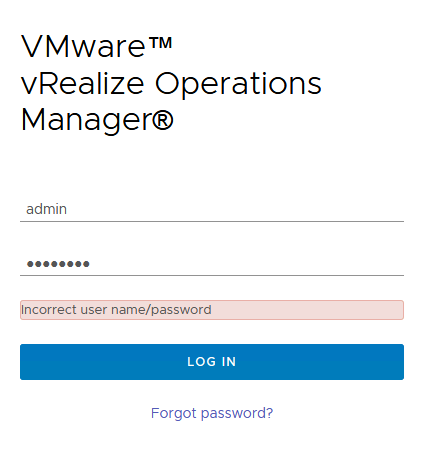
Short answer: if the vRealize Operations (vROps / Aria Operations) login page hangs on “Data Retriever is not initialized yet. Please wait …” or the admin login returns “Incorrect user name/password”, check for an expired internal certificate first. Grep the logs for CertificateExpiredException (command below). If it’s there, replace the internal certificate with the Certificate Renewal PAK from KB 71018, then bring the cluster online again. Resetting the admin password won’t help until the certificate is fixed.

Data Retriever is not initialized yet. Please wait … What is WRONG?

OK, I tries to login with vRops admin login but another message “Incorrect user name/password”.

No luck with How to reset the admin password in vRealize Operations (2078313)

My problem was with expired internal certificate in vRealize Operations.

# /bin/grep -E --color=always -B1 'java.security.cert.CertPathValidatorException: validity check failed|java.security.cert.CertificateExpiredException' $ALIVE_BASE/user/log/*.log | /usr/bin/tail -20

/usr/lib/vmware-vcops/user/log/web.log- at java.lang.Thread.run(Thread.java:748)
/usr/lib/vmware-vcops/user/log/web.log:Caused by: sun.security.validator.ValidatorException: PKIX path validation failed: java.security.cert.CertPathValidatorException: validity check failed
--
/usr/lib/vmware-vcops/user/log/web.log- ... 27 more
/usr/lib/vmware-vcops/user/log/web.log:Caused by: java.security.cert.CertPathValidatorException: validity check failed
--
/usr/lib/vmware-vcops/user/log/web.log- ... 35 more
/usr/lib/vmware-vcops/user/log/web.log:Caused by: java.security.cert.CertificateExpiredException: NotAfter: Sun Jan 1 10:42:20 EET 2021
--
/usr/lib/vmware-vcops/user/log/web.log-2021-01-10 14:45:19,988 ERROR [pool-2-thread-1] com.vmware.vcops.util.admin.HTTPSRequester.doHttpRequest - Sending 'GET' request to URL : https://vrops/casa/deployment/slice failed
/usr/lib/vmware-vcops/user/log/web.log:javax.net.ssl.SSLHandshakeException: sun.security.validator.ValidatorException: PKIX path validation failed: java.security.cert.CertPathValidatorException: validity check failed
--
/usr/lib/vmware-vcops/user/log/web.log- at java.lang.Thread.run(Thread.java:748)
/usr/lib/vmware-vcops/user/log/web.log:Caused by: sun.security.validator.ValidatorException: PKIX path validation failed: java.security.cert.CertPathValidatorException: validity check failed
--
/usr/lib/vmware-vcops/user/log/web.log- ... 27 more
/usr/lib/vmware-vcops/user/log/web.log:Caused by: java.security.cert.CertPathValidatorException: validity check failed
--
/usr/lib/vmware-vcops/user/log/web.log- ... 35 more
/usr/lib/vmware-vcops/user/log/web.log:Caused by: java.security.cert.CertificateExpiredException: NotAfter: Sun Jan 1 10:42:20 EET 2021

How to fix it? Internal Certificate Expired

  1. Snapshot the vRealize Operations nodes
  2. Download the Certificate Renewal PAK file for your version of vRealize Operations:

vRealize Operations 6.3 – 8.1.1
vRealize Operations 8.2 and later

Note: The file name indicates 8.0.0 but will work for vRealize Operations 6.x and 7.x. The original ftpsite.vmware.com download links have been retired; download the current PAK file from KB 71018 on the Broadcom support portal.

  1. Copy the vRealize Operations Certificate Renewal PAK file to the /tmp/ directory on all nodes in the vRealize Operations cluster using an SCP utility.
  2. Log into all nodes in the vRealize Operations cluster as root via SSH or Console.
  3. Run the following command on all nodes in the vRealize Operations cluster to make the necessary directories:
mkdir -p /data/db/pakRepoLocal/vRealize_Operations_Manager_Enterprise_Certificate_Renewal/extracted
  1. Unzip the vRealize Operations Certificate Renewal PAK file by running the following command on all nodes in the vRealize Operations cluster:
unzip /tmp/vRealize_Operations_Manager_Enterprise_Certificate_Renewal-8.0.0.15217416.pak -d /data/db/pakRepoLocal/vRealize_Operations_Manager_Enterprise_Certificate_Renewal/extracted
  1. The following command needs to be run in a particular order.  Follow each sub-step carefully.
$VMWARE_PYTHON_BIN /data/db/pakRepoLocal/vRealize_Operations_Manager_Enterprise_Certificate_Renewal/extracted/updateCoordinator.py EXPIRED
  • First, run the command on all Remote Collector nodes (if present) in the cluster, and wait for the task to complete.  Continue to step 7.2.
  • Next, run the command on all Data nodes, the Witness node (if present), and the Primary Replica node (if present) in the cluster; do not wait for each node to complete, just start the command on all nodes.  Once Waiting for certificate generation to complete appears on the last node, wait roughly 60 seconds, and continue to step 7.3.
  • Finally, run the command on the Primary node.

The expected behavior is for the command to finish, then shortly afterwards the pending tasks on the Data nodes and Primary Replica node (if present) will complete. To ensure that the command completes successfully check:

ls -l /var/vmware/_cert_generation_completed
  1. Run the following commands on all nodes in the vRealize Operations cluster:
chown admin:admin -R /storage/vcops/user/conf/ssl/ /storage/vcops/user/conf/ssl_bak/ /storage/db/casa/webapp/hsqldb/
chmod guo+r -R /storage/vcops/user/conf/ssl/
service vmware-casa restart
service vmware-vcops stop
sed -i 's/sliceonline\ \=\ true/sliceonline\ \=\ false/g' /usr/lib/vmware-vcopssuite/utilities/sliceConfiguration/data/roleState.properties
  1. Run the following commands on the Primary node, and Primary Replica node (if present):
service vmware-casa stop
sed -i -e 's/\"onlineState\"\:\"GOING\_OFFLINE\"/\"onlineState\"\:\"OFFLINE\"/g' -e 's/\"online\_state\"\:\"GOING\_OFFLINE\"/\"online\_state\"\:\"OFFLINE\"/g' -e 's/\"onlineState\"\:\"GOING\_ONLINE\"/\"onlineState\"\:\"OFFLINE\"/g' -e 's/\"online\_state\"\:\"GOING\_ONLINE\"/\"online\_state\"\:\"OFFLINE\"/g' -e 's/\"onlineState\"\:\"ONLINE\"/\"onlineState\"\:\"OFFLINE\"/g' -e 's/\"online\_state\"\:\"ONLINE\"/\"online\_state\"\:\"OFFLINE\"/g' -e 's/\"onlineState\"\:\"FAILURE\"/\"onlineState\"\:\"OFFLINE\"/g' -e 's/\"online\_state\"\:\"FAILURE\"/\"online\_state\"\:\"OFFLINE\"/g' /data/db/casa/webapp/hsqldb/casa.db.script
service vmware-casa start
service vmware-vcops-web restart
/etc/init.d/apache2 restart
  1. Log into the vRealize Operations Admin UI as the local admin user.
  2. Click Bring Online under Cluster Status.

Summary:

When I can see message “Data Retriever is not initialized yet. Please wait …” or “Incorrect user name/password”.

Try to check and fix for expired internal certificate in vRealize Operations.

Fast check command is here:

/bin/grep -E --color=always -B1 'java.security.cert.CertPathValidatorException: validity check failed|java.security.cert.CertificateExpiredException' $ALIVE_BASE/user/log/*.log | /usr/bin/tail -20

More info:

How to Reset the admin Password in vRealize Operations / Aria Operations / VCF Operations (KB 2078313)

Reset the admin password in vROps, Aria Operations or VCF Operations with vcopsSetAdminPassword.py, and fix the CERTIFICATE_VERIFY_FAILED error when it fails.

Short answer: to reset the admin password in vRealize Operations, VMware Aria Operations or VCF Operations, log in to the primary (master) node as root and run $VMWARE_PYTHON_BIN $VCOPS_BASE/../vmware-vcopssuite/utilities/sliceConfiguration/bin/vcopsSetAdminPassword.py --reset. The new password applies across all nodes in the cluster. If you get a Code 500 error, the password doesn’t meet the complexity or history rules. If the reset fails with CERTIFICATE_VERIFY_FAILED, the internal certificate has expired and must be replaced first (see below). Current reference: Broadcom KB 326391 (formerly VMware KB 2078313).

One day I reach vRops admin login message “Incorrect user name/password”. Here is a short info How to reset the admin password in vRealize Operations according KB 2078313. But I was unable to reset. My problem was with expired internal certificate in vRealize Operations.

Reset the OS admin Password

Note: Before resetting the admin password, ensure that the account is not locked out by this command:

pam_tally2 --user admin --reset

Note: If the admin password expires for the local OS, update the local OS version of the password before completing the below steps to reset the password across the Application:

  1. Log into the Master node as root via SSH or Console.
  2. Run the following command to reset the password, and password age of the local admin account:
passwd admin
  1. Repeat steps 1 and 2 on all nodes in the vRealize Operations Manager cluster, including Remote Collectors.

Reset the vRops admin Password

To reset the admin password, follow the steps below:

  1. Log in to the Master node as root via SSH or Console.
  2. Run this command and follow the prompts:

$VMWARE_PYTHON_BIN $VCOPS_BASE/../vmware-vcopssuite/utilities/sliceConfiguration/bin/vcopsSetAdminPassword.py --reset

Unable to reset – problem with expired internal certificate in vRealize Operations

localhost:~ # $VMWARE_PYTHON_BIN $VCOPS_BASE/../vmware-vcopssuite/utilities/sliceConfiguration/bin/vcopsSetAdminPassword.py --reset
Password:
Re-enter Password:
Saved existing admin user credentials into backup file
Call failed: <urlopen error [SSL: CERTIFICATE_VERIFY_FAILED] certificate verify failed (_ssl.c:726)>
Original admin credentials restored from backup

More info:

Cisco nenic Geneve Offload on VIC: Which Driver Introduced It (1.0.33.0 vs 1.0.35.0) and Current nenic for ESXi 8/9

Cisco nenic Geneve offload: introduced with VIC driver 4.1(2a)/nenic 1.0.33.0, extended in 1.0.35.0. How to enable, verify, and current nenic for ESXi 8.

Short answer: Cisco’s VIC driver release notes first list nenic Geneve offload for ESXi in the 4.1(2a) driver release, which shipped nenic 1.0.33.0 for ESXi 6.7 U3 and 7.0. The 4.1(3a) release shipped nenic 1.0.35.0, which added ESXi 7.0 U1, plus the first nenic_ens driver for the NSX Enhanced Datapath. In UCS Manager, Geneve offload is disabled by default. You enable it per adapter policy on VIC 1400, 14000 or 15000. For ESXi 8, Cisco’s current driver is nenic 2.0.17.0.

I wrote the original post in January 2021 from the VMware download page for nenic 1.0.35.0 (ESXi 6.7). That page listed “Enabled Geneve Offload support for VIC 14xx adapters” as a new feature. The page has since been retired, and Cisco’s own release notes put the Geneve feature one driver release earlier. This update, from September 2026, follows the Cisco documentation.

Which nenic version introduced Geneve offload

Cisco VIC driver releaseESXi nenicSupported ESXiGeneve note in the release notes
4.1(1a)1.0.31.06.5 U3, 6.7 U2/U3none
4.1(2a)1.0.33.06.5 U3, 6.7 U2/U3, 7.0New: “GENEVE Offload supports on ESX 6.7U3 and ESX 7.0”
4.1(3a)1.0.35.06.5 U3, 6.7 U2/U3, 7.0, 7.0 U1New: “GENEVE Offload is supported on ESX 7.0U1”. First nenic_ens drivers: 1.0.2.0 (ESXi 6.7 U3) and 1.0.4.0 (ESXi 7.0, 7.0 U1)

Cisco’s VIC 1400 best-practices white paper gives the same timeline from the firmware side. Geneve offload on the fourth-generation VIC is supported for ESXi “starting from Cisco UCSM and Cisco IMC release 4.1(2)”. Enhanced Datapath (ENS) support arrived with 4.1(3) and needs the additional nenic-ens driver.

So for NSX-T in standard (non-ENS) mode on VIC 1400, the minimum is the 4.1(2) firmware plus nenic 1.0.33.0. 1.0.35.0 is the version that brought ESXi 7.0 U1 support and the ENS path.

Enable nenic Geneve offload in UCS Manager

Per the UCS Manager 4.3 Network Management Guide, GENEVE offload is supported on ESXi with VIC 1400, 14000 and 15000 series adapters. It is present in all Ethernet adapter policies and disabled by default. Cisco’s recommended adapter policy for it:

SettingValue
Transmit queues / ring size1 / 4096
Receive queues / ring size8 / 4096
Completion queues16
Interrupts32
RSSEnabled
GENEVE offloadEnabled

For ENS, the VIC 1400 white paper recommends a single TX and RX queue with 4096 rings, and states that there is no RSS support on VIC 1400 for Geneve offload with ENS.

Limitations

  • Not supported on VIC 1200 and 1300 series.
  • External outer IPv6 is not supported with GENEVE offload.
  • RoCEv2 cannot be used with GENEVE offload. Azure Stack QoS is also excluded.
  • Remove the GENEVE offload configuration before downgrading to a release that does not support it.

Verify Geneve offload on the ESXi host

Broadcom KB 397644 shows how to confirm it. Look for VMNET_CAP_GENEVE_OFFLOAD under “Device Hardware Cap Activated”. In vmkernel.log, look for the nenic lines showing geneve yes and Geneve: Overlay offload enabled, udp_port = 6081:

vsish -e get /net/pNics/vmnic0/properties | grep "Driver\|Device Hard\|Device Soft"
# then check /var/log/vmkernel.log for the nenic Geneve lines

The same KB notes that the RX queue filter class for Geneve (the NetQueue Geneve filter) is not configured on nenic. That is expected: the filter is supported only by nenic_ens, and it is separate from checksum offload.

Current nenic versions for ESXi 8 and 9

Cisco VIC driver release notesnenicnenic_ensESXi
4.3(2), 4.3(4)2.0.11.0 (2.0.10.0 for 7.0 Ux)1.0.6.08.0, 8.0 U1 (7.0 U1–U3)
4.3(6)2.0.17.01.0.9.07.0 U1–U3, 8.0 and above
6.0(1)2.0.17.01.0.9.07.0 U1–U3, 8.0 and above
6.0(2)2.0.17.01.0.18.08.0 and above

Cisco’s VIC driver release notes say “ESX 8.0 and above” for nenic but do not name ESX 9.0 for it (the same document names ESX 9.0 for the fnic driver). Before you deploy on VCF 9, check the Broadcom Compatibility Guide for the exact nenic and VIC firmware pair certified for your ESX build.

Where to download nenic now

The old my.vmware.com download link no longer works. Async drivers are now on the Broadcom Support Portal, which requires a Broadcom account (see Broadcom KB 142814 on downloading Broadcom products). Use the Broadcom Compatibility Guide to pick the version.

Sources

Related on vdan.cz