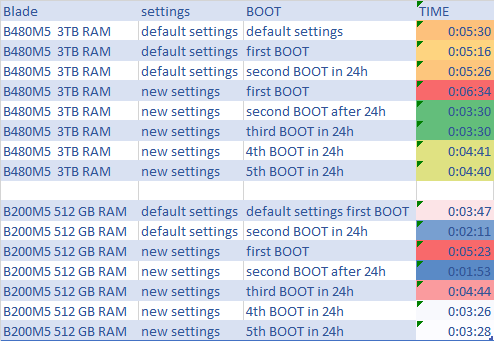
Short answer: Three BIOS tokens cut Cisco UCS M5 boot time. Adaptive Memory Training = Enabled reuses saved memory training results if the server reboots within 24 hours. OptionROM Launch Optimization = Enabled launches Option ROMs only for controllers in the boot policy. BIOS Techlog Level = Minimum logs only critical messages. From UCS Manager 4.0(2a) these are the M5 defaults, so check that nothing overrides them. On a B480 M5 with 3 TB RAM, each boot after the first was about 2 minutes faster.
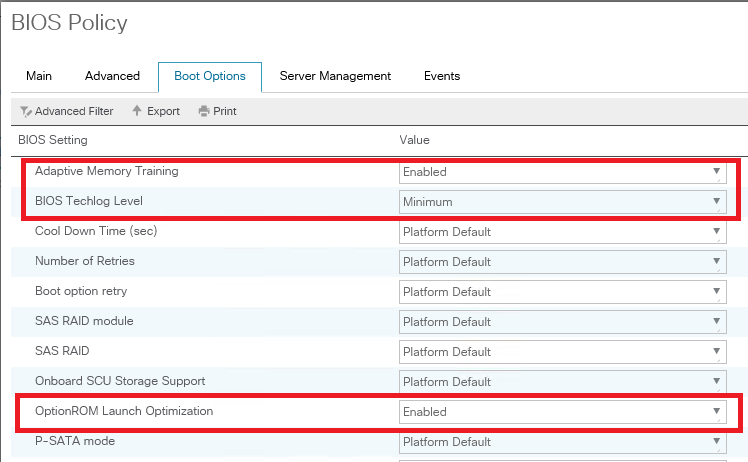
Cisco UCS M5 boot time BIOS tokens
| Token (UCS Manager BIOS policy) | Supported values on M5 | Default on M5 (4.0(2a) and later) | Value for faster boot |
|---|---|---|---|
| Adaptive Memory Training | Enabled, Disabled | Enabled | Enabled |
| OptionROM Launch Optimization | Enabled, Disabled | Enabled | Enabled |
| BIOS Techlog Level | Maximum, Normal, Minimum | Minimum | Minimum |
Cisco’s BIOS token guide lists Adaptive Memory Training for B200 M5, B480 M5, C220 M5, C240 M5, C480 M5, C480 M5 ML and S3260 M5. It lists the other two tokens for all M5 servers. The tokens appear from the 4.0(2a) section of the guide onwards. Older firmware may not have them, or may use different defaults.
Adaptive Memory Training
From the UCS Manager Server Management Guide (Boot Options BIOS Settings): when this token is enabled, the BIOS saves the memory training results (optimized timing and voltage values) together with the CPU and memory configuration, and reuses them on later reboots to save boot time. The saved results are used only if the reboot happens within 24 hours of the last save. In my experience it has the biggest effect on large-memory hosts.
OptionROM Launch Optimization
Option ROM launch is controlled per PCI slot and is enabled by default. With many network controllers and storage HBAs, every Option ROM may launch even though only a few controllers take part in booting. With this token enabled, Option ROMs launch only for the controllers listed in the boot policy. So keep the boot policy accurate: a device that is missing from it will not get its Option ROM.
BIOS Techlog Level
This sets which messages go to the BIOS tech log. Minimum logs critical messages only and is the default. Normal adds warning and loading messages, and Maximum adds informational messages. Keep Minimum in production and raise it only when Cisco TAC asks for verbose BIOS logs.
Correction to my 2020 version: I described the “BIOS Techlog Level” token as an Enabled/Disabled switch that makes the tech log more granular. That description belongs to a different token, BIOS Tech Message Level Control, which the guide lists for the C125 M5.
How to set the tokens in UCS Manager
- Open the BIOS policy that your service profiles or templates use (Servers > Policies > root > BIOS Policies).
- On the Boot Options settings, set Adaptive Memory Training and OptionROM Launch Optimization to Enabled, and BIOS Techlog Level to Minimum. “Platform Default” gives the same result on 4.0(2a) and later firmware. Set them explicitly if you want the policy to show the intent.
- Check the boot policy. It should contain every device you really boot from (for example the SAN or M.2 boot device and any PXE vNIC).
- BIOS changes take effect at the next server reboot. Put the ESXi host into maintenance mode and reboot it according to the service profile’s maintenance policy.
Results on a B480 M5 with 3 TB RAM
- The first boot after the change took about 1 to 2 minutes longer.
- From the second boot on, each boot was about 2 minutes shorter.
- After 24 hours without a reboot, the saved training data is no longer used, so the next boot is a full-training boot again.
Other tokens that affect boot time
- Quiet Boot controls only what is displayed during POST (logo vs messages and Option ROM information).
- Enhanced Memory Test (the M6 name; Cisco notes it was renamed from Advanced Memory Test) runs extended memory tests during boot and “increases the boot time based on the memory”. Cisco recommends leaving it at Auto.
Sources
- Cisco UCS Server BIOS Tokens, Release 4.0 (M5 defaults and supported values)
- Cisco UCS Server BIOS Tokens, Release 4.3
- Cisco UCS Manager Server Management Guide 4.3: Server-Related Policies (Boot Options BIOS Settings)
Related on vdan.cz
- FN70432: improved memory RAS features for UCS M5 platforms
- How to boot ESXi 7.0 on the UCS M.2 HWRAID boot-optimized controller
- Intel Skylake CPUs reaching end of support in vSphere releases after 8.x
- UCS Manager CLI interactive mindmap: the BIOS policy scopes (
/org/bios-policy, token settings) and every other UCSM CLI command from Cisco’s CLI guides