Short answer: if the vRealize Operations (vROps / Aria Operations) login page hangs on “Data Retriever is not initialized yet. Please wait …” or the admin login returns “Incorrect user name/password”, check for an expired internal certificate first. Grep the logs for CertificateExpiredException (command below). If it’s there, replace the internal certificate with the Certificate Renewal PAK from KB 71018, then bring the cluster online again. Resetting the admin password won’t help until the certificate is fixed.
Data Retriever is not initialized yet. Please wait … What is WRONG?

OK, I tries to login with vRops admin login but another message “Incorrect user name/password”.
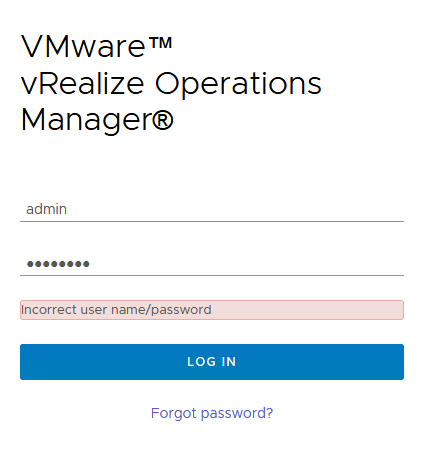
No luck with How to reset the admin password in vRealize Operations (2078313)
My problem was with expired internal certificate in vRealize Operations.
# /bin/grep -E --color=always -B1 'java.security.cert.CertPathValidatorException: validity check failed|java.security.cert.CertificateExpiredException' $ALIVE_BASE/user/log/*.log | /usr/bin/tail -20

/usr/lib/vmware-vcops/user/log/web.log- at java.lang.Thread.run(Thread.java:748)
/usr/lib/vmware-vcops/user/log/web.log:Caused by: sun.security.validator.ValidatorException: PKIX path validation failed: java.security.cert.CertPathValidatorException: validity check failed
--
/usr/lib/vmware-vcops/user/log/web.log- ... 27 more
/usr/lib/vmware-vcops/user/log/web.log:Caused by: java.security.cert.CertPathValidatorException: validity check failed
--
/usr/lib/vmware-vcops/user/log/web.log- ... 35 more
/usr/lib/vmware-vcops/user/log/web.log:Caused by: java.security.cert.CertificateExpiredException: NotAfter: Sun Jan 1 10:42:20 EET 2021
--
/usr/lib/vmware-vcops/user/log/web.log-2021-01-10 14:45:19,988 ERROR [pool-2-thread-1] com.vmware.vcops.util.admin.HTTPSRequester.doHttpRequest - Sending 'GET' request to URL : https://vrops/casa/deployment/slice failed
/usr/lib/vmware-vcops/user/log/web.log:javax.net.ssl.SSLHandshakeException: sun.security.validator.ValidatorException: PKIX path validation failed: java.security.cert.CertPathValidatorException: validity check failed
--
/usr/lib/vmware-vcops/user/log/web.log- at java.lang.Thread.run(Thread.java:748)
/usr/lib/vmware-vcops/user/log/web.log:Caused by: sun.security.validator.ValidatorException: PKIX path validation failed: java.security.cert.CertPathValidatorException: validity check failed
--
/usr/lib/vmware-vcops/user/log/web.log- ... 27 more
/usr/lib/vmware-vcops/user/log/web.log:Caused by: java.security.cert.CertPathValidatorException: validity check failed
--
/usr/lib/vmware-vcops/user/log/web.log- ... 35 more
/usr/lib/vmware-vcops/user/log/web.log:Caused by: java.security.cert.CertificateExpiredException: NotAfter: Sun Jan 1 10:42:20 EET 2021
How to fix it? Internal Certificate Expired
- Snapshot the vRealize Operations nodes
- Download the Certificate Renewal PAK file for your version of vRealize Operations:
vRealize Operations 6.3 – 8.1.1
vRealize Operations 8.2 and later
Note: The file name indicates 8.0.0 but will work for vRealize Operations 6.x and 7.x. The original ftpsite.vmware.com download links have been retired; download the current PAK file from KB 71018 on the Broadcom support portal.
- Copy the vRealize Operations Certificate Renewal PAK file to the /tmp/ directory on all nodes in the vRealize Operations cluster using an SCP utility.
- Log into all nodes in the vRealize Operations cluster as root via SSH or Console.
- Run the following command on all nodes in the vRealize Operations cluster to make the necessary directories:
mkdir -p /data/db/pakRepoLocal/vRealize_Operations_Manager_Enterprise_Certificate_Renewal/extracted- Unzip the vRealize Operations Certificate Renewal PAK file by running the following command on all nodes in the vRealize Operations cluster:
unzip /tmp/vRealize_Operations_Manager_Enterprise_Certificate_Renewal-8.0.0.15217416.pak -d /data/db/pakRepoLocal/vRealize_Operations_Manager_Enterprise_Certificate_Renewal/extracted- The following command needs to be run in a particular order. Follow each sub-step carefully.
$VMWARE_PYTHON_BIN /data/db/pakRepoLocal/vRealize_Operations_Manager_Enterprise_Certificate_Renewal/extracted/updateCoordinator.py EXPIRED- First, run the command on all Remote Collector nodes (if present) in the cluster, and wait for the task to complete. Continue to step 7.2.
- Next, run the command on all Data nodes, the Witness node (if present), and the Primary Replica node (if present) in the cluster; do not wait for each node to complete, just start the command on all nodes. Once Waiting for certificate generation to complete appears on the last node, wait roughly 60 seconds, and continue to step 7.3.
- Finally, run the command on the Primary node.
The expected behavior is for the command to finish, then shortly afterwards the pending tasks on the Data nodes and Primary Replica node (if present) will complete. To ensure that the command completes successfully check:
ls -l /var/vmware/_cert_generation_completed- Run the following commands on all nodes in the vRealize Operations cluster:
chown admin:admin -R /storage/vcops/user/conf/ssl/ /storage/vcops/user/conf/ssl_bak/ /storage/db/casa/webapp/hsqldb/
chmod guo+r -R /storage/vcops/user/conf/ssl/
service vmware-casa restart
service vmware-vcops stop
sed -i 's/sliceonline\ \=\ true/sliceonline\ \=\ false/g' /usr/lib/vmware-vcopssuite/utilities/sliceConfiguration/data/roleState.properties- Run the following commands on the Primary node, and Primary Replica node (if present):
service vmware-casa stop
sed -i -e 's/\"onlineState\"\:\"GOING\_OFFLINE\"/\"onlineState\"\:\"OFFLINE\"/g' -e 's/\"online\_state\"\:\"GOING\_OFFLINE\"/\"online\_state\"\:\"OFFLINE\"/g' -e 's/\"onlineState\"\:\"GOING\_ONLINE\"/\"onlineState\"\:\"OFFLINE\"/g' -e 's/\"online\_state\"\:\"GOING\_ONLINE\"/\"online\_state\"\:\"OFFLINE\"/g' -e 's/\"onlineState\"\:\"ONLINE\"/\"onlineState\"\:\"OFFLINE\"/g' -e 's/\"online\_state\"\:\"ONLINE\"/\"online\_state\"\:\"OFFLINE\"/g' -e 's/\"onlineState\"\:\"FAILURE\"/\"onlineState\"\:\"OFFLINE\"/g' -e 's/\"online\_state\"\:\"FAILURE\"/\"online\_state\"\:\"OFFLINE\"/g' /data/db/casa/webapp/hsqldb/casa.db.script
service vmware-casa start
service vmware-vcops-web restart
/etc/init.d/apache2 restart- Log into the vRealize Operations Admin UI as the local admin user.
- Click Bring Online under Cluster Status.
Summary:
When I can see message “Data Retriever is not initialized yet. Please wait …” or “Incorrect user name/password”.
Try to check and fix for expired internal certificate in vRealize Operations.
Fast check command is here:
/bin/grep -E --color=always -B1 'java.security.cert.CertPathValidatorException: validity check failed|java.security.cert.CertificateExpiredException' $ALIVE_BASE/user/log/*.log | /usr/bin/tail -20More info:
