After deploying the new VMware Cloud Foundation 9.0 Installer appliance, the first thing you must setup is the software depot which is where the VCF Installer will go to download the software binaries for deploying either VMware vSphere Foundation (VVF) or VMware Cloud Foundation (VCF). Users […]
What “vSphere Cluster Services are disabled by retreat mode” means, what breaks in 7.0/8.0 vs 9.0, and how to enter or exit vCLS Retreat Mode.
Retreat Mode removes the vSphere Cluster Services (vCLS) VMs from one cluster. In vSphere 7.0 and 8.0 that has a price: DRS stops working and HA placement becomes suboptimal, which is exactly what the banner “vSphere Cluster Services are disabled by retreat mode” warns you about. From vSphere 9.0, vCLS can be disabled without any impact on DRS or HA. On 7.0 U3o, 8.0 U2 and later you switch it in the vSphere Client in a few clicks.
What “vSphere Cluster Services are disabled by retreat mode” means
When a cluster is in Retreat Mode, vCenter shows one of these messages on the cluster:
vSphere Cluster Services are disabled by retreat mode. vSphere DRS is not functioning and vSphere HA will not perform optimally.

vSphere Cluster Services are disabled by retreat mode. vSphere HA will not perform optimally.
The exact wording depends on which cluster services are enabled. Both mean the same thing: someone (or a script) put the cluster into Retreat Mode, the vCLS VMs were removed, and the cluster is running without them. If that wasn’t intentional, exit Retreat Mode and the vCLS VMs are redeployed automatically.
What vCLS and Retreat Mode are
vCLS runs small agent VMs in every vSphere cluster to keep cluster services such as DRS running independently of vCenter. There are two implementations:
External vCLS (vSphere 7.0 U1 to 8.0 U2): agent VMs deployed and managed by the ESX Agent Manager (EAM), up to three per cluster.
Embedded vCLS (vSphere 8.0 Update 3 and later): vCLS VMs based on vSphere Pod technology, managed internally by vpxd instead of EAM, with a redundancy of two VMs per cluster and a minimum of one powered-on VM for DRS (TechDocs: Embedded vCLS).
Retreat Mode tells vCenter to stop running vCLS VMs on one cluster. Embedded vCLS keeps the same per-cluster activate/deactivate capability, so Retreat Mode works the same way on 8.0 U3.
What breaks in Retreat Mode, by version
vSphere version
DRS
HA
vSAN cluster health
7.0.x and 8.0.x
Does not function on the cluster
Restarts VMs, but placement is not optimal (HA relies on DRS for placement)
Cluster Service health shows Degraded
9.0 and later
No impact
No impact
–
Source: Broadcom KB 316514. On 7.0 and 8.0, use Retreat Mode only for a specific task, such as storage maintenance or troubleshooting, and exit it as soon as you’re done.
How to enable Retreat Mode
vSphere 7.0 U3o, 8.0 U2 and later (vSphere Client)
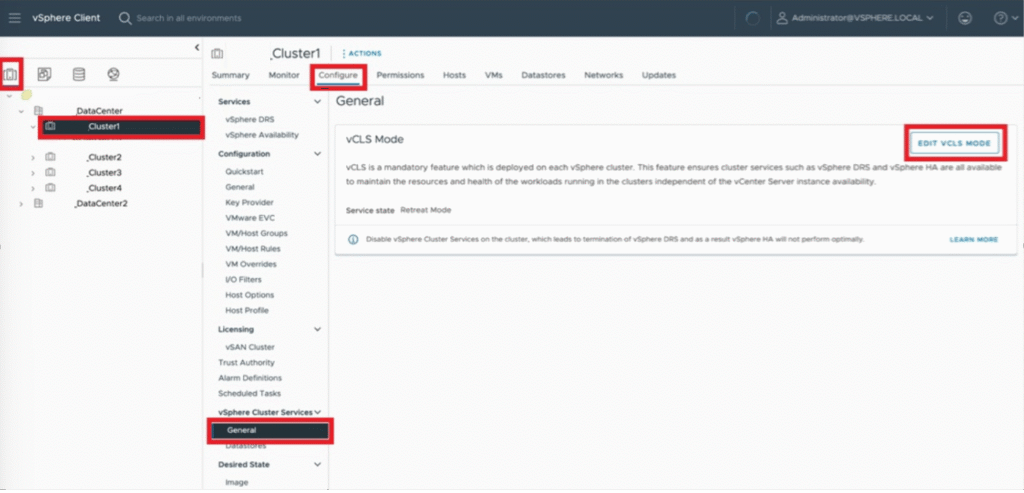
In the vSphere Client, go to Hosts and Clusters and select the cluster.
Open Configure → vSphere Cluster Services → General.
Click EDIT VCLS MODE (top right).
Select Retreat Mode (the second option) and click OK.
vCenter removes the vCLS VMs from the cluster automatically.
Select the cluster in the vSphere Client and copy its domain ID from the browser URL, for example domain-c1006. Use only the domain-c<number> part; a wrong ID can break vCenter.
Select the vCenter Server and open Configure → Advanced Settings → Edit Settings.
Add the setting below and click Save. vCenter removes the vCLS VMs automatically.
vSphere Client (7.0 U3o / 8.0 U2 and later): open EDIT VCLS MODE again and select the first (default) option instead of Retreat Mode.
Advanced setting: set config.vcls.clusters.domain-c<number>.enabled back to True.
Script: run retreatModeConfiguration.py with the opposite option.
vCenter redeploys the vCLS VMs, and on 7.0/8.0 DRS resumes once they are running. Check that the banner has disappeared from the cluster.
How to identify vCLS VMs
vCLS VMs are named vCLS-{UUID}, where the UUID is the UUID of the ESXi host, and sit in the vCLS folder in the VMs and Templates view.
Embedded vCLS VMs (8.0 U3 and later) carry the extra config option vCLSCRX.agent = true.
You can also check which extension manages a VM in the Managed Object Browser, for example https://<vCenter>/mob/?moid=vm-1004&doPath=config.managedBy. On vSphere 9 the MOB is disabled by default: see how to enable the MOB in vSphere 9.
Summary
vSphere 9.0 and later: you can disable vCLS without affecting DRS or HA.
vSphere 7.0 and 8.0: Retreat Mode also stops DRS and weakens HA placement. Use it for a specific task, then exit it.
One of the features that transformed how virtualization is used is vSphere vMotion. During a vMotion task, one or more VMs are migrated to a different host while still powered on and available to users. The application running in the VM is unaware of this process. The VM goes through a very […]
vSphere Standard and Enterprise Plus stop at 8.0 U3; vSphere 9.1 ships only in VVF and VCF. See what each edition includes and which one fits you.
There is no vSphere 9 Standard or Enterprise Plus. Broadcom’s vSphere 9.1 Product Line Comparison states that the standalone vSphere Standard and vSphere Enterprise Plus editions are available only up to 8.0 Update 3, and that vSphere 9.1 features ship only in VMware vSphere Foundation (VVF) 9.1 and VMware Cloud Foundation (VCF) 9.1. So the real choice is between staying on 8.0 U3 or moving to VVF or VCF. The tables below show what separates them.
Which vSphere editions exist today
Edition
Latest vSphere version
What it is
vSphere Standard
8.0 Update 3
Standalone vSphere for basic consolidation: vCenter Standard, vMotion, HA, no DRS or Distributed Switch
vSphere Enterprise Plus
8.0 Update 3
Standalone vSphere with DRS, Distributed Switch and the advanced resource-management features
VMware vSphere Foundation (VVF)
9.1
vSphere 9.1 bundled with vSAN (0.25 TiB per core), Supervisor / Kubernetes services and VCF Operations for monitoring, logs and compliance
VMware Cloud Foundation (VCF)
9.1
The full private-cloud platform: vSphere, vSAN, NSX, vSphere Kubernetes Service, VCF Operations, VCF Automation, HCX and VCF Private AI services
No. Standard and Enterprise Plus end at 8.0 Update 3. If you need anything from vSphere 9.x, you need VVF 9.1 or VCF 9.1. Staying on Standard or Enterprise Plus means staying on the 8.0 line, so check its support dates in the Broadcom product lifecycle matrix before you commit to it.
Key differences between the editions
A selection of the features that most often decide the choice. For the complete matrix (storage protocols, vSAN data services, security features), use the official datasheet.
✔ included, – not included. The Standard, Enterprise Plus and VVF columns follow the Broadcom datasheet; the VCF column reflects that VCF includes vSphere and the components listed in the VCF 9.1 FAQ.
Which edition fits your environment
Your situation
Edition
Why
Small site, a few hosts, no need for DRS or a Distributed Switch, and 8.0 is fine
vSphere Standard
Covers vMotion and HA; no path to 9.x
You need DRS, a Distributed Switch or NIOC, and plan to stay on 8.0 for now
vSphere Enterprise Plus
Full resource management on 8.0 U3; no path to 9.x
You want vSphere 9.x, Kubernetes via Supervisor/VKS, or built-in operations and compliance monitoring
VVF 9.1
The smallest bundle that includes vSphere 9.1
You need software-defined networking and security (NSX), self-service automation, or migration with HCX
VCF 9.1
The full private-cloud stack
Licensing terms and core minimums change between Broadcom announcements, so confirm them with your Broadcom partner before you size a purchase. Included vSAN capacity, per KB 313548 at the time of writing: 0.25 TiB per core with VVF and 1 TiB per core with VCF.
What VCF 9.1 adds on top of VVF
According to the VCF 9.1 FAQ, VCF 9.1 includes vSphere, vSAN, NSX, vSphere Kubernetes Service, VCF Operations, VCF Automation, HCX and VCF Private AI services. In practice, the step from VVF to VCF is about the network (NSX), automation and multi-site operations rather than about vSphere features themselves. Note that vSAN is not VCF-only: VVF includes 0.25 TiB of vSAN entitlement per licensed core, and VCF includes 1 TiB per core (KB 313548).
What vSphere Supervisor is in VCF 9: VM Service, vSphere Pods, VKS, Zones, Namespaces and Supervisor Services, walked through in hands-on lab HOL-2633-01-VCF-L.
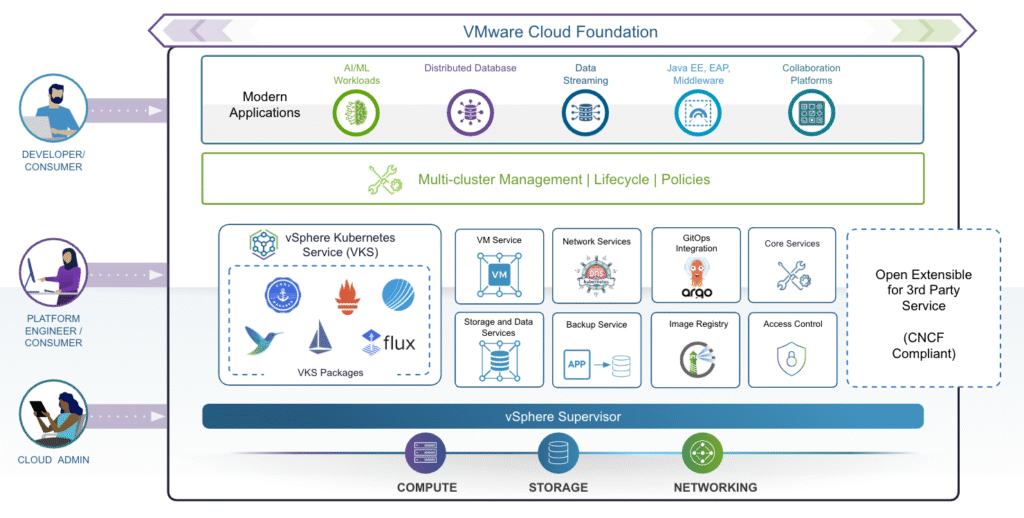
Short answer:vSphere Supervisor turns a vSphere cluster into a Kubernetes control plane, so the same cluster can run VMs through the VM Service, vSphere Pods directly on ESX hosts, and full Kubernetes clusters through vSphere Kubernetes Service (VKS). In VCF 9 it is organised with vSphere Zones and Namespaces and extended with Supervisor Services such as Harbor or Velero. Supervisor is part of VVF and VCF, not of standalone vSphere Standard or Enterprise Plus. Below is my walkthrough of Broadcom’s hands-on lab HOL-2633-01-VCF-L.
Modern IT teams are increasingly challenged to manage both traditional virtual machines (VMs) and modern Kubernetes workloads side-by-side. VMware Cloud Foundation 9.0 rises to this challenge by tightly integrating vSphere Supervisor, transforming your vSphere clusters into a robust hybrid platform for VMs and Kubernetes.
In this Hands-On Lab (HOL-2633-01-VCF-L), you’ll get guided, practical experience on how to unify VM and Kubernetes management using vSphere Supervisor, from foundational concepts to deploying real workloads.
📚 Lab Modules at a Glance
Module
Title
Duration
Level
1
What is the vSphere Supervisor?
15 min
Beginner
2
How does the vSphere Supervisor work?
30 min
Beginner
Let’s break down each module.
⚙️ Module 1: vSphere Supervisor Concepts and Components
✅ What is vSphere Supervisor?
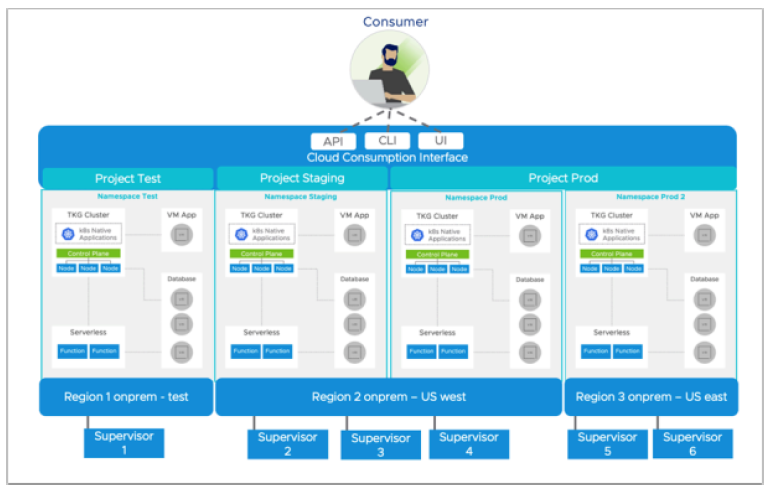
vSphere Supervisor introduces a declarative Kubernetes control plane natively into your vSphere cluster. This means your cluster can now run:
VMs via the VM Service
Kubernetes Pods directly on ESXi hosts (as vSphere Pods)
Full upstream Kubernetes clusters using vSphere Kubernetes Service (VKS)
This hybrid model enables a consistent cloud-like experience for both traditional and modern workloads. Supervisor is part of VVF and VCF, not of standalone vSphere Standard or Enterprise Plus (see the vSphere editions comparison).
🔑 Key Components
vSphere Zone: Logical boundary to provide high availability. Clusters are mapped to Zones for resilience against failures.
vSphere Namespace: Think of it as a resource pool with policy-based limits (CPU, memory, storage) for workloads. It maps to Kubernetes namespaces but adds vSphere-specific governance.
Supervisor Networking: Uses either vSphere networking or NSX. Load balancers ensure external access for workloads.
Supervisor Storage: Utilizes storage policies to manage placement for VMs, Pods, persistent volumes, and container images.
🧩 Extensible Services
vSphere Supervisor comes with base services like:
VM Service
Kubernetes Service
Velero for backup
Additional services (like Grafana, Harbor, DNS, and vDPP) can be installed modularly to enhance the Supervisor’s capabilities.
🛠️ Module 2: Enabling and Configuring vSphere Supervisor
This module is all about getting your hands dirty — you’ll step through setting up vSphere Supervisor, deploying Namespaces, provisioning VMs and Kubernetes clusters, and expanding functionality with services.
⚡ Key Steps:
🔑 1️⃣ Prerequisites
Prepare clusters with vSAN or shared storage.
Define storage policies for control plane, VMs, Pods, and VKS clusters.
🔑 2️⃣ Enable vSphere Supervisor
Connect to the Management vCenter.
Create vSphere Zones for high availability.
Use the wizard to configure networking (NSX or vSphere stack), management network, and workload network.
Select control plane size and storage policy.
(Note: The lab walks through these steps but does not deploy a live Supervisor due to time constraints.)
🔑 3️⃣ Deploy & Configure a Namespace
Create a new Namespace and bind it to the Supervisor.
Assign VM Classes (defining VM sizing options).
Attach storage policies for workloads.
Create and associate a Content Library to provide VM templates.
🔑 4️⃣ Deploy Workloads
Deploy a VM using the VM Service and Consumption Interface.
Attach persistent storage and a Load Balancer.
Deploy a Kubernetes cluster (VKS) by specifying node pools and cluster config.
Validate external access via network service cards.
🔑 5️⃣ Add Services
Expand functionality by uploading YAMLs to register services like Grafana, Harbor, etc.
Supervisor and VKS troubleshooting: symptom → fix
The lab shows the happy path. These are the failures I have documented from real Supervisor and VKS environments, each with its cause and the fix:
Symptom
Cause
Fix
Supervisor stays in Configuring with “ERROR – Configured Core Supervisor Services”, services show ReconcileFailed
The Supervisor’s HTTPS proxy blocks access to the internal registry
✔️ Unified Operations: Manage VMs and Kubernetes side-by-side in the same cluster with consistent policies. ✔️ Self-Service for DevOps: Namespaces, storage, and VM classes empower developers with agility. ✔️ Resilience and Scalability: Zones and Supervisor Services ensure HA and modularity.
vSphere 9 features in VCF 9.0, tested in the lab: Memory Tiering, vLCM, Live Patch, mixed-vendor clusters and more.
If you’re ready to unlock the full power of VMware’s latest vSphere release, the HOL-2630-01-VCF-L hands-on lab is your perfect starting point. This lab provides a practical deep dive into the newest features, enhancements, and operational improvements in vSphere 9.0, all seamlessly integrated into VMware Cloud Foundation (VCF) 9.0.
In this walkthrough, I’ll break down what you’ll learn, module by module, to help you get the most out of your lab experience.
🗂️ Module 1: What’s New in vSphere 9 Overview
Kick things off with a comprehensive overview of what’s new in vSphere 9:
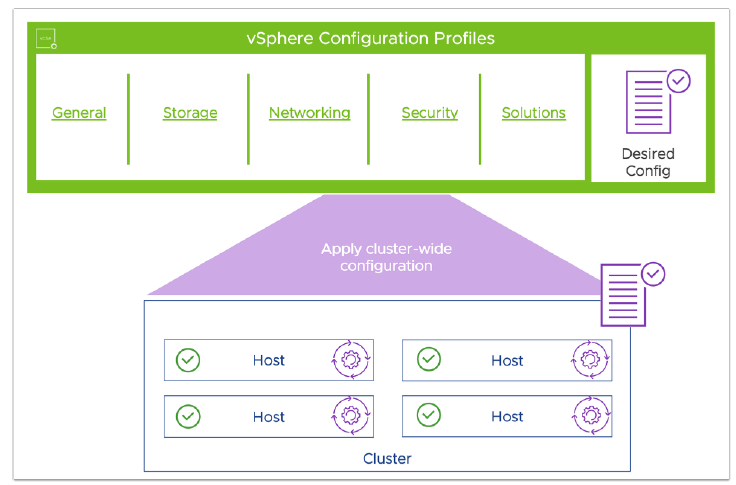
✅ Memory Tiering — Officially introduced, this feature allows NVMe devices to be used as tiered memory, expanding your host’s memory footprint while optimizing costs. ✅ Virtual Hardware Version 22 — Unlocks support for up to 960 logical processors, enhanced device support, and performance improvements for demanding workloads. ✅ VPC in vCenter — Create flexible Virtual Private Clouds and manage public/private networking seamlessly. ✅ Unified Licensing — Say goodbye to license keys — a new secure license file model simplifies lifecycle management. ✅ vSphere Configuration Profiles — The next-gen replacement for Host Profiles, offering cluster-wide desired state config at scale.
You’ll also experience the updated ESX Host Client UI, now with dark mode and deep customization options.
🔹 Staged Updates — Push update payloads to hosts before remediation to minimize maintenance downtime. 🔹 Parallel Remediation — Remediate multiple hosts simultaneously for faster patch cycles — perfect for large clusters. 🔹 Standalone Host Support — Manage isolated hosts via API or the new config profiles.
⚙️ Module 3: Resource Management — Enhanced DRS, vMMR, CPU Topology, and Latency
Efficiency meets performance:
✨ Enhanced DRS (Distributed Resource Scheduler) — Smarter load balancing with new automation levels and predictive DRS for proactive resource allocation. ✨ vMMR (vSphere Memory Monitoring & Remediation) — Gain granular insights into memory usage and performance impact. ✨ Simplified Virtual NUMA — New CPU topology tools simplify configuring vNUMA for VMs, improving latency for sensitive workloads.
🧩 Module 4: Guest OS and Workloads
Modern workloads, fully supported:
🔑 Virtual TPM (vTPM) Policies — Clone Windows 11 VMs securely by auto-replacing TPM devices. 📈 Virtual Hardware Upgrades — Upgrade clusters to the latest hardware version in bulk. 🔒 Device Virtualization Extensions — Expanded framework for vendors to build hardware-backed virtual devices with better live migration support.
🤝 Module 5: Mixed Vendor Clusters
In vSphere 9, clusters can mix hosts from multiple hardware vendors while still managing updates with cluster-based images. This makes infrastructure more flexible and vendor-agnostic.
🔄 Module 6: Live Patch
Zero downtime patching is here:
⏱️ Live Patch — Apply updates to ESXi hosts without reboots or maintenance mode. Improve security posture while keeping workloads running.
🧮 Module 7: Introduction to Memory Tiering
Dive deeper into Memory Tiering:
📚 Learn how to set up NVMe drives as cost-effective memory extensions, boosting capacity and lowering DRAM costs. 📊 See how this impacts workload density and CPU utilization.
🔑 Module 8: vSphere Licensing and Operations
Simplify your day-to-day management:
🗝️ Unified License Management — Use the VCF Business Services Console to license your entire Software Defined Data Center with a single license file. 📋 One Pane of Glass — Link vCenter instances for holistic operations and monitoring.
vSphere 9 is only available in VVF and VCF; standalone vSphere Standard and Enterprise Plus stop at 8.0 Update 3. See the vSphere editions comparison for 9.1 for what each edition includes.
Hands-on with the new operations capabilities in VMware Cloud Foundation 9.0, module by module, in lab HOL-2610-03-VCF-L.
Ready to elevate your VMware Cloud Foundation (VCF) operations game? In the latest Hands-On Lab HOL-2610-03-VCF-L, you’ll get practical experience with all the new operational capabilities in VMware Cloud Foundation 9.0, learning how to monitor, secure, troubleshoot, and manage your private cloud infrastructure efficiently.
Below is a deep dive into each module so you know exactly what to expect.
📊 Module 1: Monitoring Private Cloud Infrastructure with Diagnostic Findings and VCF Health
Kick off by mastering the new Diagnostic Findings and VCF Health tools.
Diagnostic Findings offers real-time checks for security advisories (VMSAs), vulnerabilities (CVEs), and best practice deviations. It categorizes issues as Critical, Immediate, or Warning and includes easy links to relevant KB articles.
VCF Health gives you a clear, unified view of the entire environment—instances, vCenters, clusters, hosts, and NSX. You can quickly pinpoint trouble spots and drill down into domains and specific components.
Use powerful filters, historical findings, and export features to stay on top of the operational state of your cloud.
🔑 Takeaway: Get proactive issue detection and a health dashboard for streamlined troubleshooting.
🌐 Module 2: Monitoring Network Operations
The new Network Operations Dashboard integrates NSX and vSphere network monitoring right into VCF Operations—no more jumping between consoles!
View the network inventory at a glance: NSX Instances, Edge Clusters, Transport Nodes, and more.
Check out NSX Health, analyze business application flows, and dig into traffic patterns.
Use the interactive vSphere Network Inventory to see object relationships visually, expand views, and trace connections down to distributed virtual switches.
🔑 Takeaway: Gain deep insights into your network’s health, traffic, and relationships—all in one place.
🗄️ Module 3: Monitoring Storage Operations
Next, manage your storage like a pro:
The Storage Operations Dashboard centralizes monitoring for vSAN and non-vSAN datastores.
Analyze storage alerts, usage trends, capacity distribution, and performance.
Dive into vSAN Clusters to see detailed configurations, efficiency metrics, and IOPS data.
You’ll learn to filter by storage type, run diagnostics, and use dashboards to ensure healthy storage across the environment.
🔑 Takeaway: Proactively monitor and troubleshoot storage issues before they impact workloads.
🔒 Module 4: Monitoring Security Operations
Security is a top priority in VCF 9.0—and the new Security Operations Dashboard puts control at your fingertips:
User Security: Track authentication activity, failed logins, and permission changes with detailed dashboards.
Infrastructure Security: Review host encryption status, vSAN cluster encryption, advisories, certificate health, and VM encryption in one unified view.
Use intuitive widgets and drill-down dashboards to manage compliance and spot risks fast.
🔑 Takeaway: Unified, real-time visibility into user actions and infrastructure security helps you strengthen compliance and reduce vulnerabilities.
💸 Module 5: Chargeback and Billing
Finally, master cost transparency and control:
Explore the enhanced Chargeback and Billing capabilities integrated into the unified operations console.
Dashboards let you view chargeback summaries by organizations, projects, region quotas, and running workloads.
Generate and manage bills seamlessly, and preview tenant-facing billing interfaces for greater transparency.
🔑 Takeaway: Simplify financial operations and ensure tenants have clear insights into their cloud usage and costs.
✅Summary
VMware Cloud Foundation 9.0 Operations introduces robust, integrated monitoring and management tools designed to:
Unify health checks, diagnostics, and security monitoring
Provide actionable insights across infrastructure, network, storage, and user activity
Streamline chargeback and billing for clearer financial accountability
What’s new in VCF 9.0 automation, walked through module by module in hands-on lab HOL-2610-02-VCF-L for self-service private cloud.
Ready to unleash true self-service private cloud automation? VMware Cloud Foundation (VCF) 9.0 is packed with robust automation features, and the HOL-2610-02-VCF-L lab is your guided hands-on tour to master them.
Whether you’re a cloud admin, service provider, or an automation enthusiast, this lab takes you from zero to hero, showing you exactly how VCF 9.0 streamlines infrastructure operations, enforces governance, and accelerates modern application deployment. Here’s an inside look at what you’ll experience.
🎓 Module 1: Getting Started with VCF Automation
⏱️ Length: 15 min | Level: Beginner
You’ll kick things off with the new Quick Start Wizard, a major usability boost in VCF 9.0. It offers both manual and automated workflows to configure your environment in minutes.
💡 Lab highlight: Experience an interactive simulation that mimics a real deployment—perfect if you want to see the process without spinning up actual infrastructure.
🗂️ Module 2: Dive Into the Provider Portal
⏱️ Length: 15 min | Level: Beginner
The Provider Portal is your mission control. In this module, you’ll:
✅ Explore the Infrastructure Overview—see organizations, regions, supervisors, and content libraries at a glance.
✅ Configure Access Control—add users, assign or create custom roles, and manage permissions.
✅ Connect Identity Providers—integrate OIDC, LDAP, or SAML for centralized authentication. Bring your enterprise-grade security posture directly into VCF Automation.
✨ Content Libraries: Learn to create tenant-specific libraries to manage VM images and deployment blueprints. Unlike provider libraries, these are isolated per organization, supporting granular control.
🔑 IaaS Policies: Enforce compliance automatically. Create policies to govern how resources are provisioned and what users can do post-deployment. For example, the lab guides you through setting an IaaS Resource Policy to block unauthorized VM deployments—then tests it live to see policy enforcement in action.
🧭 Governance Tools: Leverage centralized billing, resource sharing, and collaboration while keeping strict security boundaries between tenants.
☁️ Module 4: Deploying Modern Applications
⏱️ Length: 30 min | Level: Advanced
This final module shows how VCF 9.0 transforms modern app delivery:
🐳 Supervisor Clusters: Understand how vSphere Supervisor and Namespaces abstract infrastructure complexity, letting users consume IaaS resources through Kubernetes APIs.
A Virtual Machine using a pre-defined blueprint and YAML.
A Kubernetes Cluster with just a few clicks.
🔍 Day 2 Operations: Explore post-deployment operations—view resources, manage them through intuitive interfaces, and understand the cloud-native approach to scaling and managing workloads.
✅ Why This Lab is a Must-Try
By the end of HOL-2610-02-VCF-L, you’ll have practical experience with:
A module-by-module guide to hands-on lab HOL-2610-01-VCF-L and the platform changes in VMware Cloud Foundation 9.0.
If you’re ready to level up your understanding of modern cloud infrastructure, the HOL-2610-01-VCF-L Hands-on Lab is your best launchpad into VMware Cloud Foundation (VCF) 9.0. In this detailed guide, I’ll walk you through the lab’s structure, key learning points, and the new features it reveals — straight from VMware’s latest release.
📌 Lab Overview
This lab is perfect for beginners and experienced admins alike. In about 75 minutes, it covers:
✅ Module 1: VCF Constructs, Components, Operations, and Identity ✅ Module 2: How to Deploy VCF — from scratch or by converging existing infrastructure ✅ Module 3: How to boost productivity with Virtual Private Clouds (VPCs)
By the end, you’ll know how to build, manage, and scale a robust private cloud platform with the very latest VMware tools.
🔑 Module 1 — VMware Cloud Foundation Overview
👉 Key Constructs
At the core of VCF 9.0 are a few new concepts:
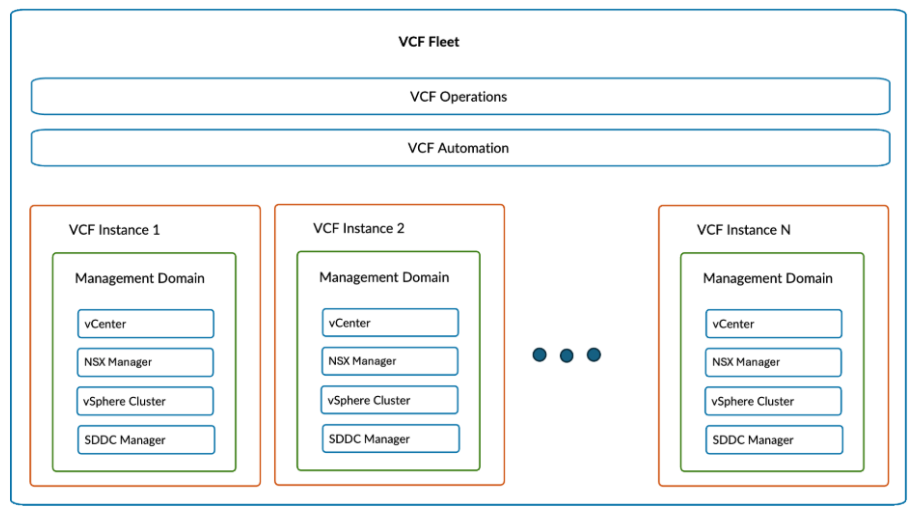
VCF Private Cloud: The top-level logical unit, representing your entire managed cloud.
VCF Fleet: A set of resources managed together — including VCF Operations & Automation.
VCF Instance: The building block of a Fleet — includes a Management Domain (for control) and optional Workload Domains (where user apps run).
Availability Zones & Regions: Logical segments for fault tolerance and geo-distribution.
A major highlight of VCF 9.0 is its native VPC and Transit Gateway support:
VPCs provide a consistent, multi-tenant network model, visible directly in vCenter.
Admins and end-users can deploy, manage, and monitor VPCs alongside compute and storage.
It simplifies cloud-like networking inside your private cloud — no need to hop between tools.
🔒 Day 2 Capabilities
Beyond setup, the lab also covers:
Lifecycle Depots: Online/Offline binaries for flexible upgrades.
Password & Certificate Management: Update, remediate, or auto-renew easily from the console.
Config Drift & Tags: Monitor deviations from desired configs and keep objects organized.
Security & Compliance: Visualize your fleet’s security posture, audit events, and remediate risks — all in one dashboard.
📚 Key Takeaway
The HOL-2610-01-VCF-L lab is more than an overview — it’s a practical sandbox to test VMware’s latest unified operations, automation, and networking innovations for private cloud. Whether you’re modernizing existing clusters or starting fresh, VCF 9.0’s new tools streamline every step.
🎓 Try It Yourself
✅ Duration: ~75 mins ✅ Free & self-paced ✅ Includes guided interactive simulations
A guided tour of the VMware Hands-on Labs for VCF 9.0: which lab covers which new capability, and where to start.
Ready to dive into the exciting world of VMware Cloud Foundation (VCF) 9.0? The latest release brings powerful new capabilities for modern, unified private cloud environments — and the best way to get hands-on is with the updated VMware HOLs.
Below, I’ve rounded up the top new labs covering Platform, Automation, Operations, vSphere updates, and Kubernetes integration — so you can quickly see what’s new and where to start.
VMware Cloud Foundation Overview (30 min) – Get familiar with core concepts like Private Clouds, Fleets, and Instances.
Deploying VMware Cloud Foundation (30 min) – Walk through planning, deployment, and convergence of existing infrastructure with the VCF Installer.
Increase Productivity with Virtual Private Clouds (15 min) – Explore how VPCs and Transit Gateways enable flexible, multi-tenant networking, tightly integrated with vCenter.
✅ Why take this lab? It’s your foundational guide to the new VCF Operations interface and the deployment workflow — great for newcomers or those upgrading from older VCF versions.
Getting Started with Automation (15 min) – Learn to set up tenant orgs using the quick start wizard.
Provider Portal (15 min) – Get to know infrastructure overview, access control, and identity providers.
Organization Management and Governance (30 min) – Dive deep into content libraries, IaaS policies, and governance.
Deploying Modern Applications (30 min) – Practice deploying VMs and Kubernetes clusters for modern apps.
✅ Why take this lab? Automate self-service private clouds, enforce governance, and speed up application delivery — key skills for cloud admins and SREs.
✅ Why take this lab? Master health monitoring, flow analysis, vSAN management, security operations, and cost transparency with chargeback — all with the new unified Operations interface.
✅ Why take this lab? Learn how vSphere 9.0 simplifies license management with Unified Licensing, enhances performance with Memory Tiering, enables Live Patching with zero downtime, and makes cluster lifecycle operations smoother — even across mixed hardware vendors.
✅ Why take this lab? See how vSphere Supervisor bridges VMs and Kubernetes, get hands-on with configuration, and deploy Kubernetes clusters alongside traditional VMs — all from vCenter.
🎓 Ready to Learn?
All these labs are free, self-paced, and available right now in the VMware Hands-on Labs catalog. Whether you’re planning a fresh deployment, modernizing operations, or integrating Kubernetes, these labs ensure you’re ready to make the most of VMware Cloud Foundation 9.0.