Short answer: vSphere Supervisor turns a vSphere cluster into a Kubernetes control plane, so the same cluster can run VMs through the VM Service, vSphere Pods directly on ESX hosts, and full Kubernetes clusters through vSphere Kubernetes Service (VKS). In VCF 9 it is organised with vSphere Zones and Namespaces and extended with Supervisor Services such as Harbor or Velero. Supervisor is part of VVF and VCF, not of standalone vSphere Standard or Enterprise Plus. Below is my walkthrough of Broadcom’s hands-on lab HOL-2633-01-VCF-L.
Modern IT teams are increasingly challenged to manage both traditional virtual machines (VMs) and modern Kubernetes workloads side-by-side. VMware Cloud Foundation 9.0 rises to this challenge by tightly integrating vSphere Supervisor, transforming your vSphere clusters into a robust hybrid platform for VMs and Kubernetes.
In this Hands-On Lab (HOL-2633-01-VCF-L), you’ll get guided, practical experience on how to unify VM and Kubernetes management using vSphere Supervisor, from foundational concepts to deploying real workloads.
📚 Lab Modules at a Glance
| Module | Title | Duration | Level |
|---|---|---|---|
| 1 | What is the vSphere Supervisor? | 15 min | Beginner |
| 2 | How does the vSphere Supervisor work? | 30 min | Beginner |
Let’s break down each module.
⚙️ Module 1: vSphere Supervisor Concepts and Components
✅ What is vSphere Supervisor?
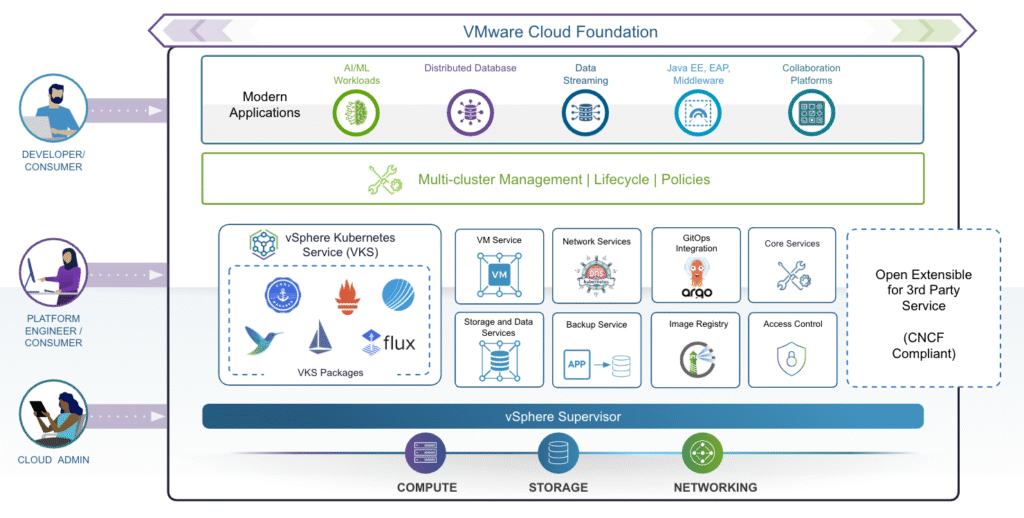
vSphere Supervisor introduces a declarative Kubernetes control plane natively into your vSphere cluster. This means your cluster can now run:
- VMs via the VM Service
- Kubernetes Pods directly on ESXi hosts (as vSphere Pods)
- Full upstream Kubernetes clusters using vSphere Kubernetes Service (VKS)
This hybrid model enables a consistent cloud-like experience for both traditional and modern workloads. Supervisor is part of VVF and VCF, not of standalone vSphere Standard or Enterprise Plus (see the vSphere editions comparison).
🔑 Key Components
- vSphere Zone: Logical boundary to provide high availability. Clusters are mapped to Zones for resilience against failures.
- vSphere Namespace: Think of it as a resource pool with policy-based limits (CPU, memory, storage) for workloads. It maps to Kubernetes namespaces but adds vSphere-specific governance.
- Supervisor Networking: Uses either vSphere networking or NSX. Load balancers ensure external access for workloads.
- Supervisor Storage: Utilizes storage policies to manage placement for VMs, Pods, persistent volumes, and container images.
🧩 Extensible Services
vSphere Supervisor comes with base services like:
- VM Service
- Kubernetes Service
- Velero for backup
Additional services (like Grafana, Harbor, DNS, and vDPP) can be installed modularly to enhance the Supervisor’s capabilities.
🛠️ Module 2: Enabling and Configuring vSphere Supervisor
This module is all about getting your hands dirty — you’ll step through setting up vSphere Supervisor, deploying Namespaces, provisioning VMs and Kubernetes clusters, and expanding functionality with services.
⚡ Key Steps:
🔑 1️⃣ Prerequisites
- Prepare clusters with vSAN or shared storage.
- Define storage policies for control plane, VMs, Pods, and VKS clusters.
🔑 2️⃣ Enable vSphere Supervisor
- Connect to the Management vCenter.
- Create vSphere Zones for high availability.
- Use the wizard to configure networking (NSX or vSphere stack), management network, and workload network.
- Select control plane size and storage policy.
(Note: The lab walks through these steps but does not deploy a live Supervisor due to time constraints.)
🔑 3️⃣ Deploy & Configure a Namespace
- Create a new Namespace and bind it to the Supervisor.
- Assign VM Classes (defining VM sizing options).
- Attach storage policies for workloads.
- Create and associate a Content Library to provide VM templates.
🔑 4️⃣ Deploy Workloads
- Deploy a VM using the VM Service and Consumption Interface.
- Attach persistent storage and a Load Balancer.
- Deploy a Kubernetes cluster (VKS) by specifying node pools and cluster config.
- Validate external access via network service cards.
🔑 5️⃣ Add Services
- Expand functionality by uploading YAMLs to register services like Grafana, Harbor, etc.
Supervisor and VKS troubleshooting: symptom → fix
The lab shows the happy path. These are the failures I have documented from real Supervisor and VKS environments, each with its cause and the fix:
| Symptom | Cause | Fix |
|---|---|---|
| Supervisor stays in Configuring with “ERROR – Configured Core Supervisor Services”, services show ReconcileFailed | The Supervisor’s HTTPS proxy blocks access to the internal registry | Configured Core Supervisor Services fix |
| Deployment or upgrade hangs at “Installed and Started Kubernetes Node Agent on the ESXi Host” | Hosts are not compliant with the cluster’s vLCM image, so the spherelet VIB can’t be installed | Kubernetes Node Agent vLCM fix |
| Supervisor unhealthy after a year: kubectl Unauthorized, ESXi worker nodes NotReady | Kubernetes and spherelet certificates expired (one-year lifetime) | Rotate Supervisor certificates with certmgr |
| VKS cluster stuck provisioning, workers never power on, “POST /vsanHealth: 503” | The CNS volume service in vmware-vsan-health on vCenter isn’t answering | VKS /vsanHealth 503 fix |
| vsphere-csi-node pods in CrashLoopBackOff with “Unauthorized” | The CSI controller in the VKS cluster uses an old token | vSphere CSI CrashLoopBackOff fix |
| VKS cluster upgrade stuck draining a node | A Pinniped kube-cert-agent pod is recreated on the draining node (VKS 3.3+) | VKS upgrade Pinniped drain fix |
| vSphere Pod to ClusterIP times out (VDS Supervisor), ErrImagePull while installing services | Traffic is hairpinned through the workload network gateway or firewall | ClusterIP timeout on VDS Supervisor |
| TKG or VKS nodes can’t resolve names ending in .local | systemd-resolved sends .local to Multicast DNS | .local DNS resolution fix |
🎓 Summary
✔️ Unified Operations: Manage VMs and Kubernetes side-by-side in the same cluster with consistent policies.
✔️ Self-Service for DevOps: Namespaces, storage, and VM classes empower developers with agility.
✔️ Resilience and Scalability: Zones and Supervisor Services ensure HA and modularity.