These are the VCF 9.1 known issues I pulled out of Broadcom’s knowledge base for September 2026. In total, 973 articles about VCF 9.x were last updated that month, all created since the VCF 9.1 release. Below are the patterns behind them, the issues to act on now, the upgrade paths that are blocked, and twelve how-to articles with the commands you need. Every KB number links to the public article on knowledge.broadcom.com.
If you are still planning the upgrade, start with my VCF 9.1 supported upgrade paths guide and the VCF 9.1 pre-deployment checklist.
Key takeaways
- Before going from 9.0.x to 9.1, run the health checks in KB 454898 and follow the upgrade order in KB 450430.
- Treat 9.1.1 as one ordered change. Patch VCF Operations before SDDC Manager, and the Services Runtime before VCF Automation.
- Never delete the License Server or let the evaluation license expire. Either one locks the cluster.
- Before the maintenance window, check NSX service-account passwords and certificate SANs.
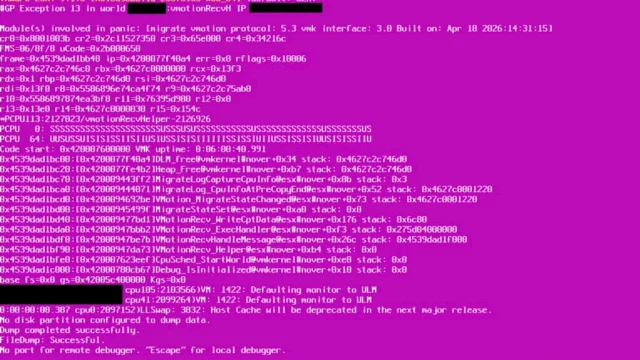
- On ESX 9.1, apply the vMotion stream helper workaround from KB 455306 until a fix ships.
VCF 9.1 known issues: the September trends
1. The 9.0.x to 9.1 upgrade breaks most often in VCF Services Runtime
The VCF Management Services layer (VCF Services Runtime, also called VMSP) causes the most failed upgrades. The precheck error VCFMS-HEALTH-002 has at least five unrelated causes:
- wrong vCenter folder placement (KB 450997);
- a missing VM template (KB 454821);
- fluentd buffers (KB 455732, KB 449659);
- a suspended package deployment (KB 449852);
- a Prometheus out-of-memory loop (KB 456103);
- a missing control-plane label (KB 453318).
New installs and upgrades also fail at “Failed to bootstrap VCF services runtime” (KB 446391, KB 455244, KB 452799, KB 450277, KB 451484, KB 452428). Similarly, full disks and DNS problems cause failures:
- the database pgdata volume fills up (KB 454688);
- the LCM database volume fills up (KB 455523);
- the Log Management VIP is not excluded from the IP pool (KB 455410; see my VCFMS IP allocation post);
- the DNS search domain is wrong (KB 452264).
What to do: before the window, run the readiness checks in KB 454898 (how-to #1 below). Then follow the upgrade order in KB 450430, because KB 451644 shows that upgrading components out of order fails.
2. VCF 9.1.1 enforces a strict component order
9.1.1 cannot be applied component by component in any order:
- The Identity Broker precheck needs Services Runtime 9.1.1 or later (KB 457245).
- VCF Automation 9.1.1 needs a matching runtime (KB 449628), with the Migration service engine upgraded first (KB 455559).
- The SDDC Manager 9.1.0 to 9.1.1 precheck needs VCF Operations patched first (KB 455171, KB 455225).
- ESX 9.1.1 hosts patched before VCF Operations or the License Server reject host-scoped licenses (KB 456235).
- VCF Operations for Networks older than 9.1.1 stops certificate collection (KB 454096).
- Management packs built with MP Builder stop collecting (KB 454434), and the Dell Storage pack blocks the admin login (KB 455335).
What to do: plan 9.1.1 as one ordered change. My VCF Upgrade Planner helps you write down the sequence.
3. Credentials and certificates drift between SDDC Manager, NSX, vCenter and Avi
This is the most common repeat failure, and it blocks upgrades, prechecks and cluster creation:
- NSX service accounts get out of sync or locked (KB 456203, KB 449684, KB 450589, KB 454557, KB 456013, KB 457594).
- NSX “password expired” alarms block the upgrade (KB 453339).
- vCenter presents different certificates on ports 443 and 8089 (KB 454127, KB 456152).
- A cached SDDC Manager certificate expires (KB 454660).
- Certificates are missing SANs (KB 446674, KB 453793, KB 455417).
What to do: before the window, check service-account passwords, the NSX lockout state and the SANs on every certificate. For expired certificates, use the VCF Certificate Tool Navigator.
4. Licensing in 9.1 can cause a hard outage
If you delete the License Server or let the evaluation period expire, the cluster locks and no new workloads can start (KB 456295, KB 455974, KB 453149, KB 457074). In addition, watch for these licensing problems:
- Disconnected mode needs usage data submitted within 180 days (KB 453026).
- VCF Operations rejects private license files (KB 457633, KB 445137, KB 455505).
- Used capacity shows higher than allocated after the upgrade (KB 456459, KB 447674).
- Licenses cannot be assigned to vCenter for at least six different reasons (KB 444477, KB 455873, KB 454287, KB 455948, KB 454892, KB 455548).
What to do: deploy the License Server and confirm the license assignment well before any evaluation period ends.
5. Identity Broker and SSO problems after the upgrade
The Identity Broker (vIDB) handles logins to vCenter, NSX and VCF Operations, so when it breaks, all of those logins break:
- After the upgrade, the SSO secret resets or the health adapters are duplicated (KB 452420, KB 452701, KB 454733, KB 442433, KB 453544).
- The database fills up (KB 454592) or its PostgreSQL certificate expires (KB 456908).
- Replacing the vIDB certificate breaks NSX SSO (KB 455733).
- NSX 9.1.0 needs vIDB instead of vIDM, so vIDM logins loop (KB 454567, KB 455402).
- Logins fail when the AD domain has the same name as the SSO domain (KB 457267).
- Out-of-band MFA makes LDAP time out (KB 455243).
What to do: keep working local break-glass accounts, so that these VCF 9.1 known issues cannot lock you out completely.
6. Manual changes cause failures that are easy to avoid
Many of these failures start with a change made outside VCF:
- moving Services Runtime VMs, folders or resource pools (KB 441260, KB 455864, KB 450997);
- deleting bootstrap or vCenter VMs by hand (KB 454670, KB 454467);
- disabling SSH on the runtime nodes (KB 455288);
- leaving automated Storage DRS on for the runtime disks (KB 452247; fixed in 9.1.0 EP2 and 9.1.1).
Finally, backups cause the rest. SFTP targets on Windows and DOMAIN\user accounts break the backup precheck, and a failed backup precheck blocks the upgrade (KB 450561, KB 454215, KB 454135, KB 454601, KB 456790, KB 453300).
What to do: use a Linux SFTP target with plain user names.
Urgent VCF 9.1 known issues to act on now
These issues can hit you even if you are not upgrading. The status column shows what each KB said in September. Check the linked article for the current status.
| KB | Issue | Status and action |
|---|---|---|
| KB 455306 | ESX 9.1 PSOD (GP Exception 13) in the vMotion receive helper | No fix yet. Workaround: limit vMotion stream helpers with esxcli system settings advanced set -o /Migrate/VMotionStreamHelpers -i 16. Details: ESX 9.1 vMotion PSOD |
| KB 457159 | ESX 9.1.0 PSOD in Vmxnet3VMKDevClearMemoryRegions | Fixed in ESX 9.1.1 |
| KB 454800 | ESX 9.0.2 hosts cannot authenticate Active Directory users | No workaround. Upgrade the hosts to 9.1 |
| KB 452951 | ESX 9.x PSOD on boot when Sub-NUMA Clustering (SNC) is enabled | No fix yet. Disable SNC in the BIOS |
| KB 448955 | NSX Enhanced Network Stack (ENS) disabled on uplinks after a host reboot | No fix yet. The KB has steps to clear the mismatch in maintenance mode |
| KB 442855 | NSX Manager high CPU from a proton thread leak when onboarding Avi | Fixed in a later NSX release. Temporary fix: systemctl restart proton (that node’s management plane is briefly down) |
| KB 451540 | NSX Edges upgraded from 4.x lose connectivity because of a wrong vNIC mapping | No fix yet. Keep the fp-eth order with no gaps, or correct it with the Edge transport node API |
| KB 455830, KB 454101, KB 446412, KB 456539 | PSOD during vMotion with NSX, VM panic after migration, OpenShift VIP failover, EVPN routes missing after a TOR reboot | Fixed in 9.1.1 or NSX 4.2.5 |
Blocked upgrade paths: VCF 9.1 known issues to check before scheduling
- Aria Operations 8.18.7 cannot be upgraded to VCF Operations 9.1.0.x (KB 455088). Also, VCF Operations rejects 8.18.3 PAK files, so the minimum is 8.18.6 (KB 455991).
- NSX 4.1.x cannot be upgraded to 9.1 in one step (KB 449282).
- After vCenter is patched to 8.0 U3k, 9.1.0 counts as a back-in-time upgrade and is blocked. 9.1.1 is supported (KB 454369, KB 448135).
- ESXi 8.0 U3i cannot be upgraded directly to 9.0.2.0 because of release-date order (KB 457561).
- vSphere 8 Essentials Plus lacks the VDS and DRS entitlements that VCF 9.1 requires (KB 455787).
- Moving a cluster from baselines to images fails while Live Patch is enabled (KB 456672). See my ESXi Live Patch post.
- A vSAN witness on 9.1 with data nodes still on 8.0 U3 is not supported (KB 454454).
For a full, version-by-version view of these paths, try the interactive VCF 9.1 upgrade planning tool.
How-to: 12 useful KBs with short resolution steps
These twelve KBs fix VCF 9.1 known issues that come up often in operations. The steps below are summaries, not replacements for the KBs. Take a snapshot or backup first, and read the full KB before you change anything in production.
1. Health checks before the VCF 9.1 upgrade (KB 454898)
On SDDC Manager, SSH in as vcf, switch to root and run SoS. Fix anything marked FAILED or CRITICAL. Then run the vSphere Diagnostic Tool (VDT) on each vCenter, and check that the Services Runtime is healthy and its service accounts are in sync.
/opt/vmware/sddc-support/sos --health-check2. Precheck fails with “LCM Bundle folder disk space” (KB 447248)
The /nfs/vmware/vcf/nfs-mount partition on SDDC Manager is full. Take a snapshot of SDDC Manager first. Then remove old or already installed bundles one at a time and re-run the precheck. If NSX backs up to SDDC Manager, delete old NSX backups too (KB 318268).
df -h /nfs/vmware/vcf/nfs-mount
python /opt/vmware/vcf/lcm/lcm-app/bin/bundle_cleanup.py <bundle-id>
3. VCF Automation audit log table is too big for the upgrade (KB 450004)
When ebs_audit_log has more than about 2 million rows, the schema update times out (LCMVMSP10002) and ebs-app goes into CrashLoopBackOff. Take an on-demand backup of VCF Automation first. Then connect to the Patroni leader and count the rows per year. The KB shows how to back up one year to a table and delete it.
export KUBECONFIG=/etc/kubernetes/admin.conf
kubectl -n prelude exec -it $(kubectl exec -n prelude vcfapostgres-0 -- patronictl list 2>/dev/null | awk '/Leader/ {print $2}') -c postgres -- psql -U postgres
\c ebs_db;
select count(*), partition_year from ebs_audit_log group by partition_year;
4. Services Runtime nodes moved to another resource pool (KB 455864)
If someone moved runtime nodes by hand in vCenter, VCF keeps the old references. On a control plane node (as vmware-system-user, then sudo su -), update cluster, clusterId, resourcePool and resourcePoolId in the platform descriptor to match vSphere. Saving restarts the service, and new machines are provisioned in the right place.
kubectl get pd -n vmsp-platform vmsp-platform -o yaml | grep vsphere
kubectl edit pd -n vmsp-platform vmsp-platform
kubectl get machine -A -w
5. vCenter port 3128 still shows the expired certificate (KB 451928)
After you replace the Machine SSL certificate, services keep the old one in memory until they restart. Restart all services (or reboot from the VAMI), then check the certificate on the port.
service-control --stop --all && service-control --start --all
openssl s_client -connect localhost:3128 -servername <vcenter_fqdn> 2>/dev/null | openssl x509 -noout -dates
6. One tool for expired certificates: vcf-cert-tool (KB 445742)
This tool replaces the mix of vCert, CARR and certmgr. You download it from the Broadcom Support Portal: VMware Cloud Foundation 9, your release, Drivers & Tools, “VCF certificate tool”. Then copy it to a launch host and follow doc/quick_start.pdf. For the details, read my vcf-cert-tool guide, and use the Certificate Tool Navigator to find the right command.
7. vSAN “network partitioned” in the on-disk format precheck (KB 447524)
This usually means a new host has no VMkernel adapter tagged for vSAN. In that case esxcli vsan network list returns nothing. Enable the vSAN service on the right VMkernel adapter, test with vmkping, and re-run the precheck under vSAN > Disk Management. My interactive ESXCLI mindmap lists the other esxcli vsan commands.
esxcli vsan network list
vmkping -I vmkX <vsan-ip-of-other-host>
8. Removing a failed ESX host in VCF 9.1 (KB 455767)
When a host will not boot, force-remove it from the workload domain as described in the 9.1 TechDocs. Then free its IP addresses with the staleIpCleanup.py script attached to KB 316098.
9. Syncing a VDS created in vCenter with SDDC Manager (KB 451857)
SDDC Manager does not know about a VDS that was created directly in vCenter. Read the current state, run the remediation, then read it again to confirm. Port groups for non-system traffic added in vCenter cannot be synced.
GET  /v1/clusters/{clusterId}/vdses
POST /v1/clusters/{clusterId}/remediations/
GET  /v1/clusters/{clusterId}/vdses
10. PowerCLI login fails with user@upn-domain under VCF SSO (KB 454168)
The web UI authenticates through the Identity Broker, but the API and PowerCLI authenticate through vCenter. vCenter only accepts the login domain suffix registered for the identity source, so add that suffix after the UPN. For an existing service account, add it to User Provisioning in the Identity Broker directory settings, sync, and re-add its role in vCenter.
Connect-VIServer vcenter.rainpole.local -User 'svc-user@rainpole.com@rainpole.local'11. Triggering an inventory sync in VCF Operations (KB 444718)
- 9.1.x: Operate > Inventory > VCF instance > domain > Actions > Sync Inventory.
- 9.0.x: Fleet Management > Lifecycle > VCF Management > Components > Trigger Inventory Sync.
- If the sync fails, the cause is usually an expired certificate, a wrong password or a connectivity problem.
12. Shutting down VCF 9.1 in the right order (KB 451893)
- Customer workloads in the workload domains.
- Management components of the workload domains.
- Management domain components last, in the order given in Shutting Down VMware Cloud Foundation.
Related on vDan
- VCF 9.1 Supported Upgrade Paths
- VCF 9.1 Pre-Deployment Checklist
- VCF Upgrade Planner
- VCF Certificate Tool Navigator and the vcf-cert-tool guide
- VCF 9 Certificate Management: Custom CAs and Auto-Renewal
- VCF 9.1 Management Services IP Allocation
- ESXCLI Changes in ESX 9.0 and 9.1
- All vDan tools
Source: Broadcom knowledge base articles about VCF 9.x, including the VCF 9.1 known issues last published in September 2026. KB content changes often, so the linked article is always the current version.