DELL R610 or R710: How to Convert an H200A to H200I for Dedicated Slot Use

For my project involving the AI tool llama.cpp, I needed to free up a PCI slot for an NVIDIA Tesla P40 GPU. I found an excellent guide and a useful video from ArtOfServer.

Based on this helpful video from ArtOfServer:

ArtOfServer wrote a small tutorial on how to modify an H200A (external) into an H200I (internal) to be used into the dedicated slot (e.g. instead of a Perc6i)

ArtOfServer wrote a small tutorial on how to modify an H200A (external) into an H200I (internal) to be used into the dedicated slot (e.g. instead of a Perc6i)

Install compiler and build tools (those can be removed later)

# apt install build-essential unzip

Compile and install lsirec and lsitool

# mkdir lsi
# cd lsi
# wget https://github.com/marcan/lsirec/archive/master.zip
# wget https://github.com/exactassembly/meta-xa-stm/raw/master/recipes-support/lsiutil/files/lsiutil-1.72.tar.gz
# tar -zxvvf lsiutil-1.72.tar.gz
# unzip master.zip
# cd lsirec-master
# make
# chmod +x sbrtool.py
# cp -p lsirec /usr/bin/
# cp -p sbrtool.py /usr/bin/
# cd ../lsiutil
# make -f Makefile_Linux

Modify SBR to match an internal H200I

Get bus address:

# lspci -Dmmnn | grep LSI
0000:05:00.0 "Serial Attached SCSI controller [0107]" "LSI Logic / Symbios Logic [1000]" "SAS2008 PCI-Express Fusion-MPT SAS-2 [Falcon] [0072]" -r03 "Dell [1028]" "6Gbps SAS HBA Adapter [1f1c]"

Bus address 0000:05:00.0

We are going to change id 0x1f1c to 0x1f1e

Unbind and halt card:

# lsirec 0000:05:00.0 unbind
Trying unlock in MPT mode...
Device in MPT mode
Kernel driver unbound from device
# lsirec 0000:05:00.0 halt
Device in MPT mode
Resetting adapter in HCB mode...
Trying unlock in MPT mode...
Device in MPT mode
IOC is RESET

Read sbr:

# lsirec 0000:05:00.0 readsbr h200.sbr
Device in MPT mode
Using I2C address 0x54
Using EEPROM type 1
Reading SBR...
SBR saved to h200.sbr

Transform binary sbr to text file:

# sbrtool.py parse h200.sbr h200.cfg

Modify PID in line 9 (e.g using vi or vim):
from this:
SubsysPID = 0x1f1c
to this:
SubsysPID = 0x1f1e

Important: if in the cfg file you find a line with:
SASAddr = 0xfffffffffffff
remove it!
Save and close file.

Build new sbr file:

# sbrtool.py build h200.cfg h200-int.sbr

Write it back to card:

# lsirec 0000:05:00.0 writesbr h200-int.sbr
Device in MPT mode
Using I2C address 0x54
Using EEPROM type 1
Writing SBR...
SBR written from h200-int.sbr

Reset the card an rescan the bus:

# lsirec 0000:05:00.0 reset
Device in MPT mode
Resetting adapter...
IOC is RESET
IOC is READY
# lsirec 0000:05:00.0 info
Trying unlock in MPT mode...
Device in MPT mode
Registers:
DOORBELL: 0x10000000
DIAG: 0x000000b0
DCR_I2C_SELECT: 0x80030a0c
DCR_SBR_SELECT: 0x2100001b
CHIP_I2C_PINS: 0x00000003
IOC is READY
# lsirec 0000:05:00.0 rescan
Device in MPT mode
Removing PCI device...
Rescanning PCI bus...
PCI bus rescan complete.

Verify new id (H200I):

# lspci -Dmmnn | grep LSI
0000:05:00.0 "Serial Attached SCSI controller [0107]" "LSI Logic / Symbios Logic [1000]" "SAS2008 PCI-Express Fusion-MPT SAS-2 [Falcon] [0072]" -r03 "Dell [1028]" "PERC H200 Integrated [1f1e]"

You can now move the card to the dedicated slot 🙂

Thanks to ArtOfServer for a great video.

On-Demand session URLs for VMware Explore…

On-Demand session URLs for VMware Explore…

Hard to believe VMware Explore Barcelona just concluded a couple of days ago! Hats off to the VMware Explore production team who have already published a large majority of the breakout session recordings including the presentation PDF! On Friday, I had shared an update and out of […]


VMware Social Media Advocacy

ESXi support for Intel iGPU with SR-IOV

ESXi support for Intel iGPU with SR-IOV

Support for Single Root I/O Virtualization (SR-IOV) was first introduced back in 2012 with the release of vSphere 5.1 and enables for a physical PCIe device to be shared amongst a number of Virtual Machines. The networking industry was the first to take advantage of the SR-IOV technology […]


VMware Social Media Advocacy

Heads Up – Performance Impact with VMware…

Heads Up – Performance Impact with VMware…

There have been some recent reports from users observing performance issues when running VMware Workstation on Windows 11 along with using recent Intel (12th Gen and later) Hybrid CPUs, which introduces a new hybrid big.LITTLE architecture for Intel’s x86 consumer CPUs. This new Intel Hybrid CPU […]


VMware Social Media Advocacy

Add F1705 Alert to Cisco UCS Manager Plugin 4.0(0)

New Cisco UCS firmware brings possibility to have notification about F1705 Alerts – Rank VLS.

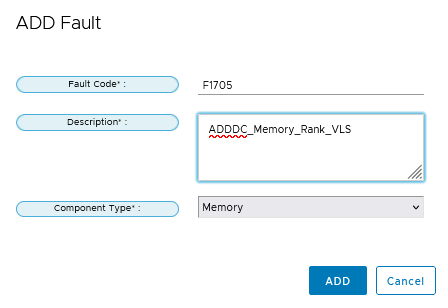
In latest version of Cisco UCS Manager Plugin for VMware vSphere HTML Client (Version 4.0(0)) we could add Custom fault addition for proactive HA monitoring. How to do it?

Cisco UCS / Proactive HA Registration / Registered Fault / Add / ADDDC_Memory_Rank_VLS

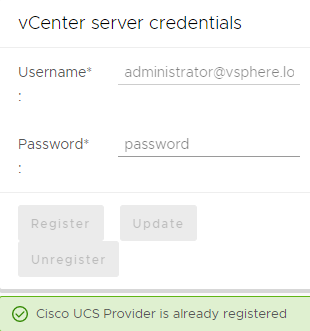
If You can’t Add, it is necessary to Unregister UCSM Manager Plugin.

Cisco UCS / Proactive HA Registration / Registered Fault / Add
Cisco UCS / Proactive HA Registration / vCenter server credentials / Register
Cisco UCS / Proactive HA Registration / Register
How Could I check it? Edit Proactive HA / Providers
It is better use Name “ADDDC_Memory_Rank_VLS” without spaces. On my picture I used “My F1705 Alerts”

Adding Custom Alert is only possible with unregistered Cisco UCS Provider, it is better to do it immediatly after Cisco UCS Manager Plugin instalation.

Now I can deceided If I will block F1705 or NOT. I personaly preffer to have F1705 Alert under Proactive HA. Then I only restart Blades with F1705. During reboot Hard-PPR permanently remaps accesses from a designated faulty row to a designated spare row.

Links:

vSphere 8.0 Update 2: Introducing Azure Active Directory Federated Authentication

At the 2023 VMware Explore event in Barcelona. I was on presentation with Viviana Miranda relates to the way users authenticate to vCenter.

vSphere 8.0 Update 2 update heralds a number of groundbreaking features, with one standout enhancement in user authentication methods for vCenter. vCenter Server 8.0 Update 2 has now incorporated federated authentication capabilities with Azure Active Directory.

Dive into the details of this integration and discover how to activate it.

The Advantages of External Identity Providers

Organizations that leverage external identity providers can expect to reap substantial benefits:

- Integration with existing identity provider infrastructure to streamline processes.
- Implementation of Single Sign-On to simplify access across services.
- Adherence to the best practices of role separation between infrastructure management and identity administration.
- Utilization of robust multi-factor authentication options that come with their chosen identity providers.

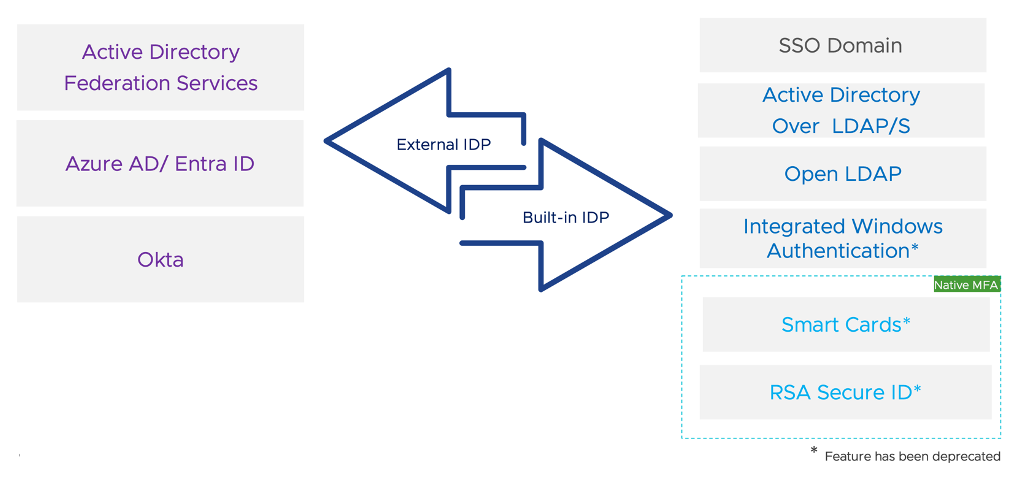
Supported Identity Providers in vSphere 8.0 U2

While our focus here is the Azure Active Directory integration, it’s essential to highlight the comprehensive range of authentication methods now supported with vCenter Server 8.0 U2.

More info: https://core.vmware.com/resource/vCenterAzureADFederation#Intro

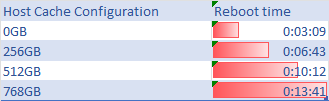
Host Cache can significantly extend reboot times

Exploring the vSphere environment, I’ve found that configuring a large Host Cache with VMFS Datastore can significantly extend reboot times.

It’s a delicate balance of performance gains versus system availability. For an in-depth look at my findings and the impact on your VMware setup, stay tuned.

Host Cache can significantly extend reboot times

OpenVINO

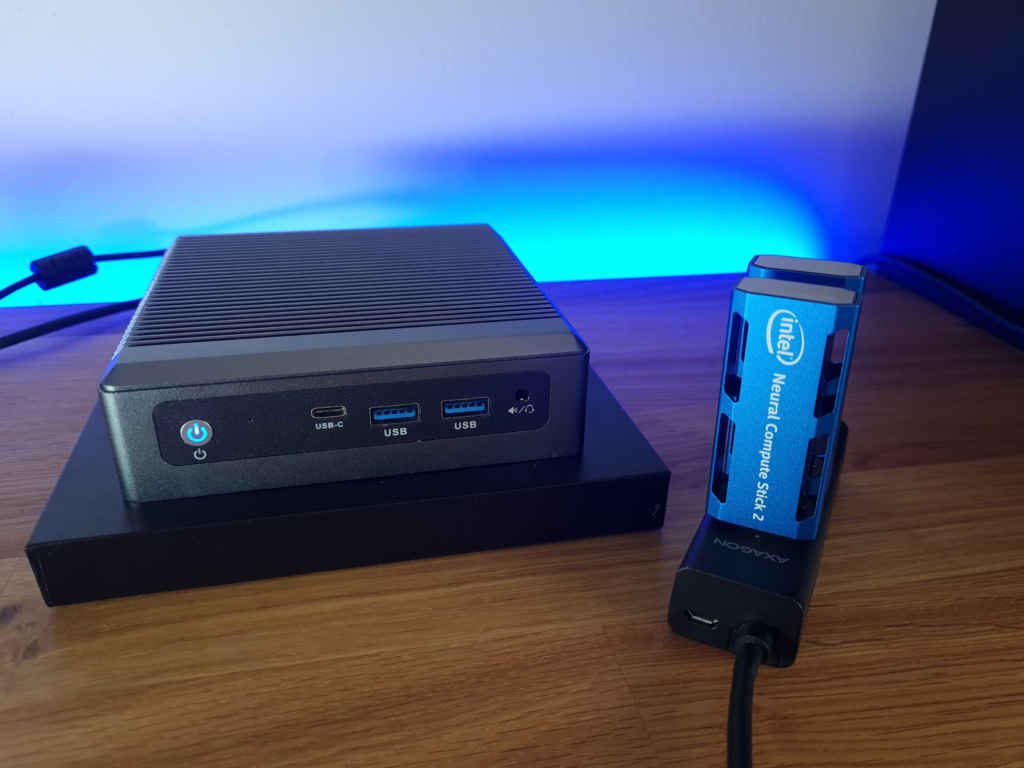
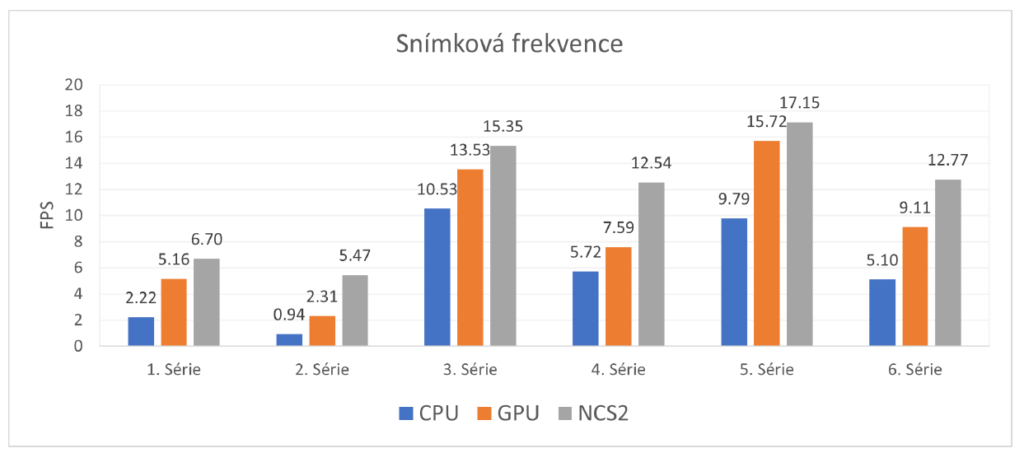
VMware Private AI with Intel is a very interesting support for OpenVINO. To illustrate what all OpenVINO enables, here is a summary of the thesis ACCELERATION OF FACE RECOGNITION ALGORITHM WITH NEURAL COMPUTE STICK 2 by my daughter Eva Micankova, with her permission here is a brief summary. The acceleration speed using NCS2, the Facenet model accuracy 97,08 % achieved a frame rate of 15.35 FPS and a latency of 65.164 ms – NUC Maxtang NX6412.

OpenVINO tools

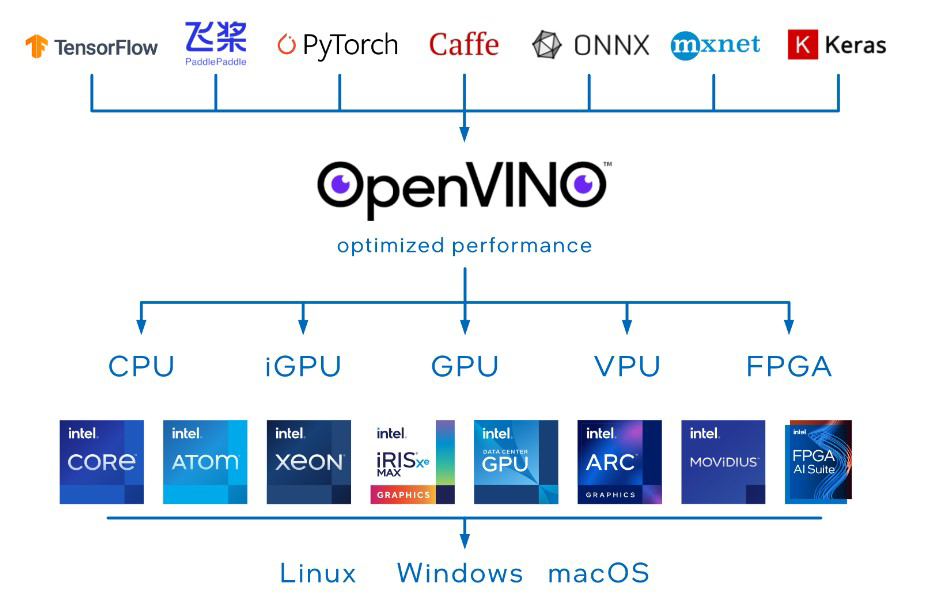
Intel’s suite of OpenVINO tools. This open-source set of tools offers development tools for the optimization and deployment of deep learning models. It delivers better performance for vision, audio, and language models from popular frameworks such as TensorFlow, Caffe, PyTorch, and others. OpenVINO optimizes deep learning pipelines through memory reuse, graph fusion, load balancing, and inference parallelism across CPUs, GPUs, VPUs, and others, as seen in the figure. Accelerators can have additional operations for pre-processing and post-processing transferred or integrated to reduce latency between endpoints and improve throughput.

Popular algorithms FaceNet, SphereFace, and ArcFace, which differ in architecture and training procedures, all aim to learn a vector representation of the face that is robust to changes in conditions.

FaceNet

The FaceNet model was developed by Google’s research group in 2015. The model maps faces of individuals into clusters of geometric points (Euclidean spaces) referred to as an embedding, which is obtained from the measure of similarity and difference of faces.

SphereFace

The authors of SphereFace introduced a loss function A-Softmax, derived from the softmax loss function, in their work published in 2017. The A-Softmax (Angular Softmax) loss function was designed to learn discriminative facial features with a clear geometric interpretation, which no available face recognition algorithm offered until then.

ArcFace

ArcFace (Additive Angular Margin loss) is a loss function first introduced in 2018. It builds on the previous work of SphereFace, which introduced the concept of angular margin, which helps improve class separability and thereby the performance of face recognition. However, their loss function required a series of approximations, which led to unstable network training. In addition, the standard softmax loss function dominated training, meaning that the concept of angular margin was not fully utilized. ArcFace introduces a new loss function that aims to address these shortcomings. It introduced the Additive Angular Margin loss function, which allows for better class separability and more stable training without the need for approximations used in SphereFace.

VPU

Vision Processing Unit (VPU) accelerators are chips created to accelerate image processing using computer vision and deep learning algorithms. The Intel Neural Compute Stick 2 is a powerful, affordable, and compact solution, with low power consumption, for accelerating neural networks. It is designed to run deep neural networks at high speeds with low energy consumption without losing accuracy, enabling real-time computer vision processing.

Result

One Intel NSC2 was used for accelerating face detection and a second Intel NSC2 was utilized for face recognition

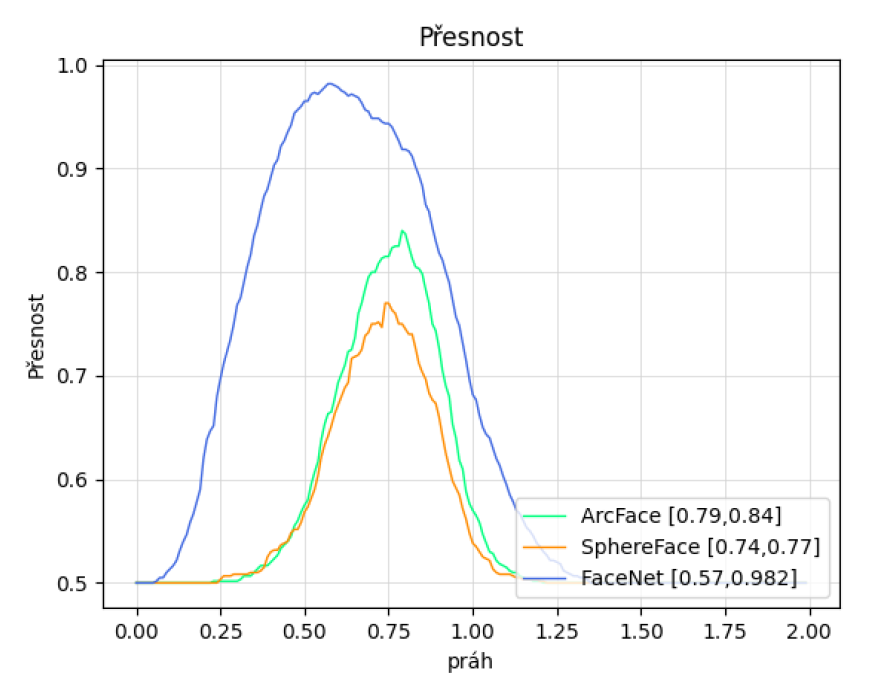
Figure A.4

Graph showing the accuracy of all validated models depending on the changing threshold. ArcFace achieved the highest accuracy of 0.84 at a threshold value of 0.79. SphereFace achieved the highest accuracy of 0.77 for a threshold of 0.74. FaceNet achieved the best accuracy of all the compared models, at 0.982 for a threshold value of 0.57.

Figure 6.13

Graph comparing the achieved frame rate for each series.

  • 1st series – ArcFace model, one person
  • 2nd series – ArcFace model, two people
  • 3rd series – FaceNet model, one person
  • 4th series – FaceNet model, two people
  • 5th series – SphereFace model, one person
  • 6th series – SphereFace model, two people

Conclusion

The best results were achieved by the FaceNet model, which reached an accuracy of 97.08%. The second part of the experiments focused on evaluating the speed of recognition on different platforms. The experiments provided answers to questions about the accuracy achieved by each model, the results of system acceleration using CPU, GPU, and NCS2, which configuration is most suitable for each model, and which configuration achieves the highest frame rate and lowest latency among the compared models. The best frame rates and latency were achieved by the SphereFace model, accelerated using NCS2, with 17.15 FPS and a latency of 58.293 ms. The FaceNet model achieved a frame rate of 15.35 FPS and a latency of 65.164 ms. For achieving a balance between accuracy and speed, the best system configuration is with the FaceNet model, accelerated using NCS2.

Abstract

ACCELERATION OF FACE RECOGNITION ALGORITHM WITH NEURAL COMPUTE STICK 2 thesis focuses on the issue of facial recognition in a face image using neural networks and its acceleration. It provides an overview of previously used techniques and addresses the use of currently dominant convolutional neural networks to solve this issue. The work also focuses on acceleration mechanisms that can be used in this area. Based on the knowledge of the issue, a system based on the concept of edge computing was created, which can be used as a home security system connected to an IP camera, which sends a notification about the presence of an unknown person in a guarded area.

https://www.vut.cz/studenti/zav-prace/detail/141562

Index