Short answer: the fastest way to run Llama 2 locally today is llama.cpp with a GGUF model file. Install llama.cpp (prebuilt release, Docker, or build from source with CMake), then run llama-cli -hf TheBloke/Llama-2-7B-Chat-GGUF: it downloads the Q4_K_M quantized model from Hugging Face and starts a chat. Add -ngl all to offload layers to an NVIDIA GPU. You no longer need Meta’s download script, convert.py or make.
Updated September 2026. The original 2023 version of this guide used commands that no longer exist in llama.cpp. The steps below follow the current ggml-org/llama.cpp documentation. A table mapping the old commands to the new ones is at the end.
What you need
- OS: Linux, Windows (native or WSL 2) or macOS.
- Memory: a 4-bit (Q4_K_M) Llama 2 7B GGUF file is about 4 GB, so plan for at least 8 GB of RAM or VRAM for the 7B model, and more for 13B and 70B.
- GPU (optional): an NVIDIA GPU with the CUDA toolkit for the CUDA backend. Vulkan, Metal (Apple Silicon) and plain CPU also work.
- To build from source: Git, CMake and a C/C++ compiler (on Windows, Visual Studio 2022 with the C++ workload).
Step 1: Install llama.cpp
The project documents four install options:
- Guided setup at llama.app.
- Prebuilt binaries from the GitHub releases page. This is the easiest option on Windows: pick the archive that matches your backend (CPU, CUDA, Vulkan).
- Docker, for example the
ghcr.io/ggml-org/llama.cpp:server-cudaimage for an NVIDIA GPU server. - Build from source with CMake (below). Use this when you need a specific CUDA version or GPU architecture, as with a homelab Tesla P40.
Build for CPU
git clone https://github.com/ggml-org/llama.cpp
cd llama.cpp
cmake -B build
cmake --build build --config Release
The binaries (llama-cli, llama-server, llama-quantize, llama-bench and others) end up in build/bin. On Windows, run the commands from the Developer Command Prompt for VS 2022. With the Visual Studio generator, the binaries are in build\bin\Release.
Build with NVIDIA CUDA
cmake -B build -DGGML_CUDA=ON
cmake --build build --config Release
To build only for your GPU (a faster build and a smaller binary), set the compute capability explicitly. For example, -DCMAKE_CUDA_ARCHITECTURES="86;89" covers RTX 30xx and 40xx. For a Tesla P40 (Pascal, compute capability 6.1), use -DCMAKE_CUDA_ARCHITECTURES=61 and a CUDA 12.x toolkit, because CUDA 13 dropped support for Pascal GPUs. My Tesla P40 homelab article covers ESXi passthrough and benchmarks, and CUDA support for WSL 2 explains the WSL setup.
Step 2: Get a Llama 2 model in GGUF format
llama.cpp loads models in the GGUF format, with quantization from 1.5-bit to 8-bit. You have two options.
Option A: download a ready GGUF (recommended). The -hf flag downloads a model straight from Hugging Face and caches it. The quant tag is optional and defaults to Q4_K_M:
llama-cli -hf TheBloke/Llama-2-7B-Chat-GGUF:Q4_K_MOption B: convert the original Meta weights yourself. The official meta-llama/Llama-2-7b-chat-hf repository on Hugging Face is gated: accept Meta’s license on the model page, then set an access token in HF_TOKEN. Convert the model to GGUF and quantize it:
pip install -r requirements.txt
python convert_hf_to_gguf.py --outfile llama-2-7b-chat-f16.gguf --outtype f16 --remote meta-llama/Llama-2-7b-chat-hf
./build/bin/llama-quantize llama-2-7b-chat-f16.gguf llama-2-7b-chat-Q4_K_M.gguf Q4_K_M
Step 3: Run Llama 2 locally
Interactive chat in the terminal
./build/bin/llama-cli -m llama-2-7b-chat-Q4_K_M.gguf -ngl all -c 4096-ngl(--n-gpu-layers) sets how many layers go to VRAM: a number,auto(the default) orall. Lower it if you run out of GPU memory.-csets the context size. Llama 2 was trained with a 4,096-token context.-sys "You are a helpful assistant"sets a system prompt.--list-devicesshows which GPUs llama.cpp can use.
Newer releases also include a unified llama launcher, so llama cli and llama serve do the same as the standalone binaries.
OpenAI-compatible API server
./build/bin/llama-server -m llama-2-7b-chat-Q4_K_M.gguf -ngl all --host 0.0.0.0 --port 8080llama-server provides a built-in web UI at http://<host>:8080 and an OpenAI-compatible /v1/chat/completions endpoint, so existing OpenAI client libraries and tools can use your local model:
curl http://localhost:8080/v1/chat/completions \
  -H "Content-Type: application/json" \
  -d '{"messages":[{"role":"user","content":"Explain vSphere HA in two sentences."}]}'
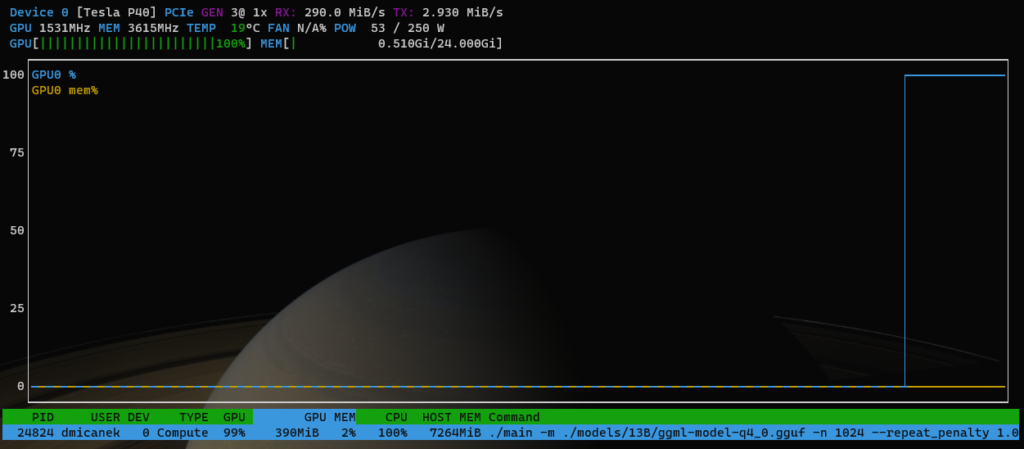
While the model runs, you can watch GPU utilisation and VRAM use with nvtop or nvidia-smi:
Install Llama 2 on Windows
On Windows you have two options. The first is to download the CUDA or CPU build from the releases page, unzip it and run llama-cli.exe -hf TheBloke/Llama-2-7B-Chat-GGUF from PowerShell. The second is to use WSL 2 with the NVIDIA Windows driver and follow the Linux steps above. For a source build, use the Developer Command Prompt for VS 2022.
What changed since the 2023 version of this guide
| 2023 (old) | 2026 (current) |
|---|---|
| github.com/ggerganov/llama.cpp | github.com/ggml-org/llama.cpp |
make / LLAMA_CUBLAS=1 make | cmake -B build -DGGML_CUDA=ON + cmake --build build --config Release |
Meta download script + python3 convert.py | -hf download of a GGUF, or convert_hf_to_gguf.py |
./quantize … q4_0 | llama-quantize … Q4_K_M |
./main -m … --n-gpu-layers 3800 | llama-cli -m … -ngl all |
GGML .bin files | GGUF files |
Llama 2 still works well for learning and testing. For new projects, compare it with newer open-weight models on Hugging Face, since the same -hf workflow runs any GGUF model.
Further reading
- llama.cpp build guide (CPU, CUDA, Vulkan, Metal)
- llama-server documentation
- meta-llama/Llama-2-7b-chat-hf on Hugging Face (gated)
- Run Llama-2 Models (O’Reilly)
