Short answer: On Cisco UCS, NSX Edge VMs usually go on a small, dedicated ESX edge cluster. Give each Edge a pair of vNICs, one pinned to Fabric A and one to Fabric B, with UCS fabric failover disabled. Redundancy then comes from the Edge’s fp-eth active/standby mapping, not from the Fabric Interconnect. Keep TEP MTU consistent: 1700 or more, ideally 9000 end to end. Enable Geneve offload in the VIC adapter policy for the host transport nodes. For VCF 9, follow the VCF Edge Cluster design library.
I wrote this in 2021 for NSX-T 3.x, because Cisco’s design guides did not cover Edge placement. This September 2026 refresh covers NSX 4.2 and VCF 9.0/9.1, checked against Broadcom TechDocs and Cisco documentation. Parts that apply only to the 2021 design are labelled.
Where is the NSX-T design guide now?
| Version | Design reference |
|---|---|
| NSX-T 3.x (2021, this post’s original basis) | VMware NSX-T Reference Design Guide. The old communities.vmware.com links no longer work. |
| NSX 4.2 standalone / VCF 5.2 | NSX Reference Design Guide 4.2 (linked from Broadcom KB 412786) |
| VCF 9.x | VCF design library: NSX Edge Cluster Detailed Design, plus the VCF Virtual Networking Technical Reference, which replaces the NSX Design Guide from VCF 9.0 |
NSX Edge VM vs bare-metal Edge on Cisco UCS
| Edge VM | Bare-metal Edge | |
|---|---|---|
| Deployment in VCF 9 | From vCenter / NSX. Passwords managed by VCF Operations. | Installed from ISO or PXE, then registered manually with NSX Manager |
| Data path interfaces | 4 datapath vNICs | Up to 16 physical interfaces |
| Strengths | Easy to scale up, vSphere HA recovery, enough performance for most cases | Better small-packet performance, can use several 100G links |
| UCS specifics | Runs on any UCS ESX host. Uses VIC vNICs through the VDS. | The VCF 9.0 NIC list includes Cisco VIC 1300 and 1400 series (VIC 15000 is not listed). You must configure enough RX/TX queues in UCS Manager for one queue per datapath core. The CPU needs AES-NI and 1 GB huge pages. |
Edge VM sizes (VCF 9.0 docs): Small 2 vCPU / 4 GB (proof of concept only), Medium 4 vCPU / 8 GB (L2 to L4 under 2 Gbps), Large 8 vCPU / 32 GB (2 to 10 Gbps, L7 load balancing, TLS inspection), Extra Large 16 vCPU / 64 GB (VPN, IDS/IPS, URL filtering, malware prevention). All sizes use a 200 GB disk.
NSX Edge design on Cisco UCS: uplinks and TEPs on vNICs
The VCF 9.1 edge cluster design recommends a dedicated vSphere cluster for Edges. It limits Edges per host to the number of available physical NICs and gives each Edge its own pair of pNICs. fp-eth0 maps to pNIC 1 active / pNIC 2 standby, and fp-eth1 maps to pNIC 2 active / pNIC 1 standby. Each Edge peers BGP only with the ToRs in its own rack, with BFD. On an FI-attached UCS server, “pNIC 1 / pNIC 2” means a Fabric A vNIC and a Fabric B vNIC:
- Create a vNIC pair per Edge (for example
edge1-Aon Fabric A andedge1-Bon Fabric B), plus separate vNICs for host management, vMotion and storage. If ESX numbers the vmnics in a different order than the UCS vNIC placement, fix that first: vNIC order not matching Cisco UCS placement. - Disable fabric failover on these vNICs. Cisco’s teaming guidance for FI-attached servers says to use either fabric failover or OS/vSwitch teaming, never both. The VDS/Edge active/standby mapping is the teaming here.
- On the VDS, use two trunk port groups: one with the Fabric A uplink active and Fabric B standby, and one with the reverse. Connect fp-eth0 and fp-eth1 to them. Cisco supports only “Route based on originating port ID” and “source MAC hash” on FI-attached VICs. IP hash is not supported.
- In the Edge uplink profile, use two TEPs (multi-TEP) and add named teaming policies that pin each Tier-0 uplink VLAN to one uplink. The Fabric Interconnects run in end-host mode, so the BGP peers are the upstream switches, not the FIs. If a session stays down, see NSX BGP neighbor down: Tier-0 to ToR troubleshooting.
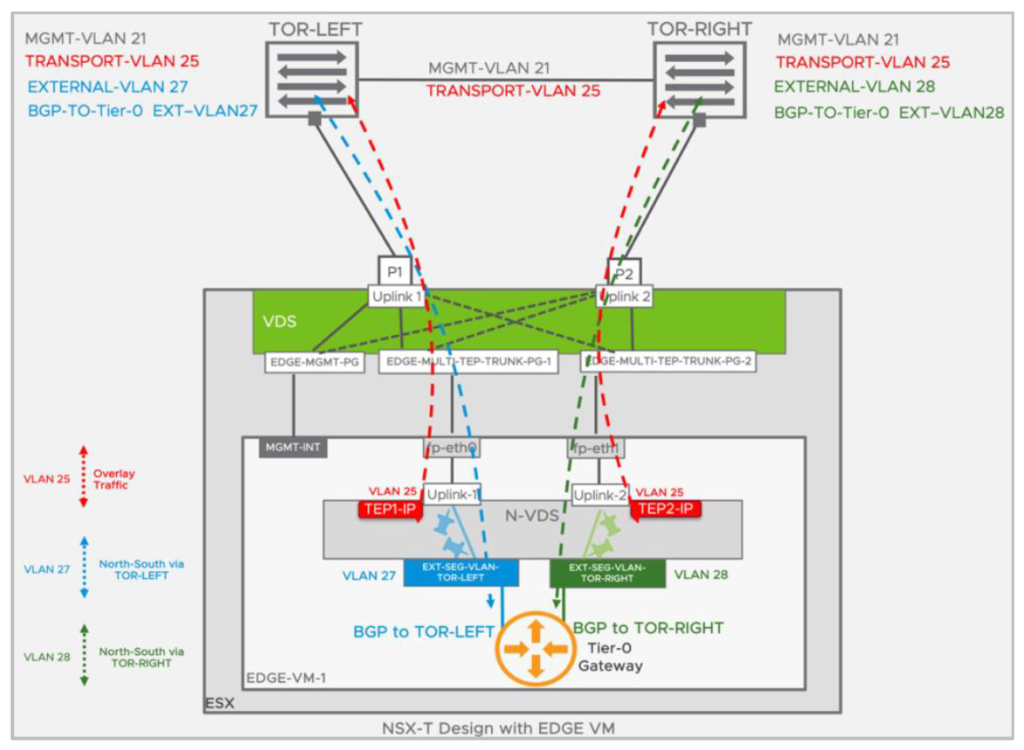
The 2021 named teaming example still applies: two policies, PIN-TO-TOR-LEFT (“uplink-1” active) and PIN-TO-TOR-RIGHT (“uplink-2” active), one per external VLAN segment. On UCS, left and right become Fabric A and Fabric B.
MTU for NSX on UCS
NSX requires an MTU of at least 1600 bytes and recommends 1700 to allow for Geneve header growth. For better throughput, set the global TEP MTU, uplink profile MTU and VDS MTU to 9000 when the underlay supports jumbo frames. VCF also requires the Edge TEP MTU to match the host TEP MTU in the same overlay transport zone. On UCS, set the vNIC MTU to 9000, as Cisco’s VIC best practices recommend. The QoS system class and the upstream switches must also carry jumbo frames. Guest VMs can use up to 8800 on a 9000 underlay. If overlay traffic between hosts fails, start with the checks in NSX east-west traffic fails across hosts: TEP and MTU.
VIC adapter policy and Geneve offload
- Supported on VIC 1400 from UCSM/IMC 4.1(2) (NSX standard mode) and 4.1(3) (Enhanced Datapath,
nenic-ensdriver). Supported on VIC 15000 from 4.2(3). Not supported on VIC 1200/1300. Geneve offload is disabled by default. - Recommended Ethernet adapter policy with Geneve offload (UCSM 4.3 guide): TX queues 1, TX ring 4096, RX queues 8, RX ring 4096, completion queues 16, interrupts 32, RSS on, GENEVE offload enabled. RoCEv2 cannot be used with it. Remove the Geneve setting before downgrading firmware.
- Geneve offload is used by ESX host transport nodes (the
nenicdriver). Check it on the host per Broadcom KB 397644:
vsish -e get /net/pNics/vmnic0/properties | grep "Driver\|Device Hard\|Device Soft"
# look for VMNET_CAP_GENEVE_OFFLOAD in "Device Hardware Cap Activated"
# vmkernel.log: "nenic: ... Geneve: Overlay offload enabled, udp_port = 6081"
Use the nenic driver and VIC firmware pair listed in the Broadcom Compatibility Guide for your ESX release. The history (nenic 1.0.35.0 on ESXi 7.0) is covered in my nenic post linked below. A VIC 14xx bug where Geneve traffic leaves on the wrong vNIC is described in CSCvz43359. The newer optimized VIC adapter policy from UCSM 4.3(4a) is covered in VMware-v2 adapter policy for Cisco VIC.
2021 design: dedicated ESXi edge host on UCS C220 M5 (NSX-T era)
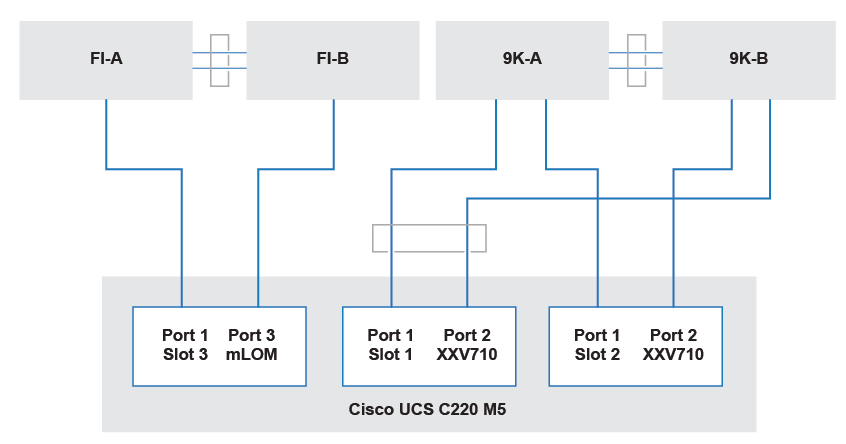
The 2021 Dell EMC VxBlock NSX-T design put the edge on a C220 M5 host. vmnic0/1 were a Cisco VIC 1457 to the FIs for management, vmnic2/3 an Intel XXV710 for TEP/overlay, and vmnic4/5 a second XXV710 for BGP peering, cabled directly to the Nexus 9000 pair. The pattern is still valid when Edge traffic should bypass the FI domain, and it fits VCF’s dedicated-host, dedicated-pNIC recommendation.
PoC or lab: FI uplink Ethernet interfaces
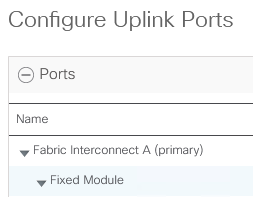
For a PoC or homelab, configure FI uplink Ethernet ports for the edge VLANs and bind a vNIC template to them. For production, use the vNIC pairs described above.
Sources
- VCF 9.1: Host Fault Tolerant NSX Edge Cluster Model and NSX Edge Cluster Models
- VCF 9.0: NSX Edge VM System Requirements and Bare Metal Requirements
- NSX 4.2: Guidance to Set Maximum Transmission Unit
- Broadcom KB 397644: How to confirm Geneve offload configuration on nenic driver
- Cisco UCS Manager Network Management Guide 4.3: Network-Related Policies (GENEVE offload)
- Cisco VIC 1400 best practices and VIC 15000 best practices
- Cisco: UCS team and bond options with the VIC connected to Fabric Interconnects
