Short answer: to create a bootable ESX 9 or ESXi 8 installer USB drive on Windows, download the ISO from the Broadcom Support Portal, open it in Rufus, select the USB drive, choose partition scheme GPT and target system UEFI, and press START. For a custom (OEM) ISO, choose Write in ISO → ESP mode when Rufus asks. Install in UEFI mode, because legacy BIOS boot is deprecated (see “Legacy boot detected” (KB 84233)).
Download the ESX / ESXi ISO
ESX and ESXi ISO images are downloaded from the Broadcom Support Portal. The old VMware Customer Connect links no longer work. Release notes are on Broadcom TechDocs. Where to find the ISO for 7.0, 8.0 and 9.x, and which build is which, is in ESXi download: ISO for every build. For server hardware, use the vendor’s custom ISO (Cisco, Dell, HPE, Lenovo) so the drivers for your NICs and storage controllers are included.
Create the ESXi installer USB with Rufus (Windows)
- Download Rufus (installer or portable) and start it.
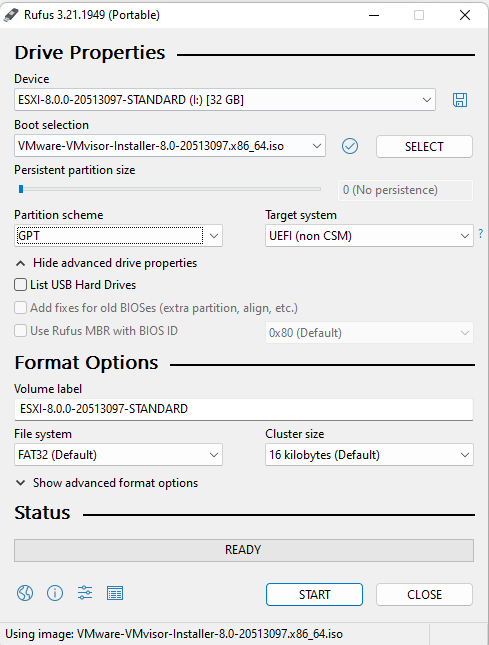
- Under Device, select the USB flash drive. Everything on it will be erased.
- Press SELECT and open the ESX / ESXi ISO.
- Check Partition scheme: GPT and Target system: UEFI (non CSM).
- Press START.
With a vendor custom ISO, Rufus asks how to write the image. Choose Write in ISO → ESP mode:

Several ISOs on one stick: Ventoy or rEFInd
Ventoy lists VMware ESXi among its tested images. You prepare the stick once, then copy ISO files onto it and pick one from a menu at boot. This is handy if you carry ESXi 8 and ESX 9 installers together. Test it with your exact ISO and server before you rely on it in a data center. For several ESX 9 installers with different kickstart files on one UEFI stick, see ESXi boot menu with rEFInd.
Installer USB vs USB as the ESX boot device
Using a USB stick as installer media is fine. Using USB or SD as the boot device of the installed host is a different question. Broadcom KB 317631 keeps USB/SD boot supported through VCF 9.0 and its update releases, but only with a separate persistent local device for the OSData partition (32 GB minimum, 128 GB recommended). For new servers, install ESX on an SSD or a boot-optimized M.2 RAID device instead, for example the Cisco UCS M.2 HWRAID controller.
Before you reinstall an existing host
- Back up the ESXi host configuration first. A restore needs the same build, so install that build from the USB.
- If the host no longer boots, check VMware hypervisor recovery: ESXi boot fixes before you reinstall.
- On VCF 9 hardware, confirm the server, CPU and NICs are supported first: How to check VCF 9 hardware compatibility.