Hardware machine is configured to boot in legacy BIOS mode.
Booting stops early in the boot process with messages displayed in red on black with wording similar to “Error 10 (Out of resources) while loading module”, “Requested malloc size failed”, or “No free memory”.
“Error 10 (Out of resources) while loading module”, “Requested malloc size failed”, or “No free memory”
VMware’s recommended workaround is to transition the machine to UEFI boot mode permanently, as discussed in KB article 84233 . There will not be a future ESXi change to allow legacy BIOS to work on this machine again.
VMware’s plans to deprecate support for legacy BIOS in server platforms.
If you upgrade a server that was certified and running successfully with legacy BIOS to a newer release of ESXi, it is possible the server will no longer function with that release. For example, some servers may fail to boot with an “Out of resources” message because the newer ESXi release is too large to boot in legacy BIOS mode. Generally, VMware will not provide any fix or workaround for such issues besides either switching the server to UEFI
Motivation
UEFI provides several advantages over legacy BIOS and aligns with VMware goals for being “secure by default”. UEFI
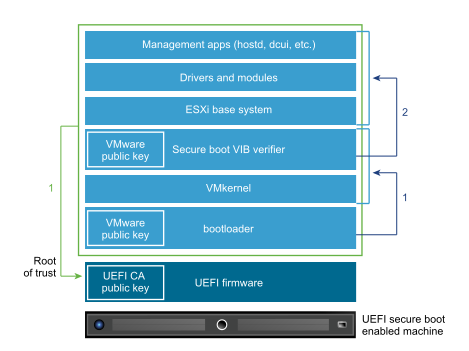
UEFI Secure Boot, a security standard that helps ensure that the server boots using only software that is trusted by the server manufacturer.
Automatic update of the system boot order during ESXi installation.
After installing Windows Server 2022 update KB5022842 (OS Build 20348.1547), guest OS can not boot up when virtual machine(s) configured with secure boot enabled running on vSphere ESXi 6.7 U2/U3 or vSphere ESXi 7.0.x.
In VM vmware.log, there is ‘Image DENIED’ info like the below:
2023-02-15T05:34:31.379Z In(05) vcpu-0 - SECUREBOOT: Signature: 0 in db, 0 in dbx, 1 unrecognized, 0 unsupported alg.
2023-02-15T05:34:31.379Z In(05) vcpu-0 - Hash: 0 in db, 0 in dbx.
2023-02-15T05:34:31.379Z In(05) vcpu-0 - SECUREBOOT: Image DENIED.
To identify the location of vmware.log files:
Establish an SSH session to your host. For ESXi hosts
Log in to the ESXi Host CLI using root account.
To list the locations of the configuration files for the virtual machines registered on the host, run the below command:
#vim-cmd vmsvc/getallvms | grep -i "VM_Name"
The vmware.log file is located in virtual machine folder along with the vmx file.
Record the location of the .vmx configuration file for the virtual machine you are troubleshooting. For example:
Currently there is no resolution for virtual machines running on vSphere ESXi 6.7 U2/U3 and vSphere ESXi 7.0.x. However the issue doesn’t exist with virtual machines running on vSphere ESXi 8.0.x.
How to fix network after adding to vDS. When you add NX6412 to vDS and reboot ESXi. I don’t have uplink for vDS. You could check it with:
# esxcfg-vswitch -l
DVS Name         Num Ports   Used Ports  Configured Ports  MTU     Uplinks
vDS              2560        6           512               9000    vusb0
--cut
  DVPort ID                               In Use      Client
  468                                     0
  469                                     0
  470                                     0
  471                                     0
We will have to note DVPort ID 468 – example. vDS is name of your vDS switch.
esxcfg-vswitch -P vusb0 -V 468 vDS
It is necessary add it to /etc/rc.local.d/local.sh before exit 0. You could have similar script from source Persisting USB NIC Bindings
vusb0_status=$(esxcli network nic get -n vusb0 | grep 'Link Status' | awk '{print $NF}')
count=0
while [[ $count -lt 20 && "${vusb0_status}" != "Up" ]]
do
    sleep 10
    count=$(( $count + 1 ))
    vusb0_status=$(esxcli network nic get -n vusb0 | grep 'Link Status' | awk '{print $NF}')
done

esxcfg-vswitch -R
esxcfg-vswitch -P vusb0 -V 468 vDS

exit 0
TPM_VERSION WARNING: Support for TPM version 1.2 is discontinued. With Apply –no-hardware-warning option to ignore the warnings and proceed with the transaction.
esxcli software profile update -d  /vmfs/volumes/datastore1/_ISO/ESXi-8.0.1-20842819-USBNIC.zip -p ESXi-8.0.1-20842819-USBNIC --no-hardware-warning
Update Result
   Message: The update completed successfully, but the system needs to be rebooted for the changes to be effective.
   Reboot Required: true
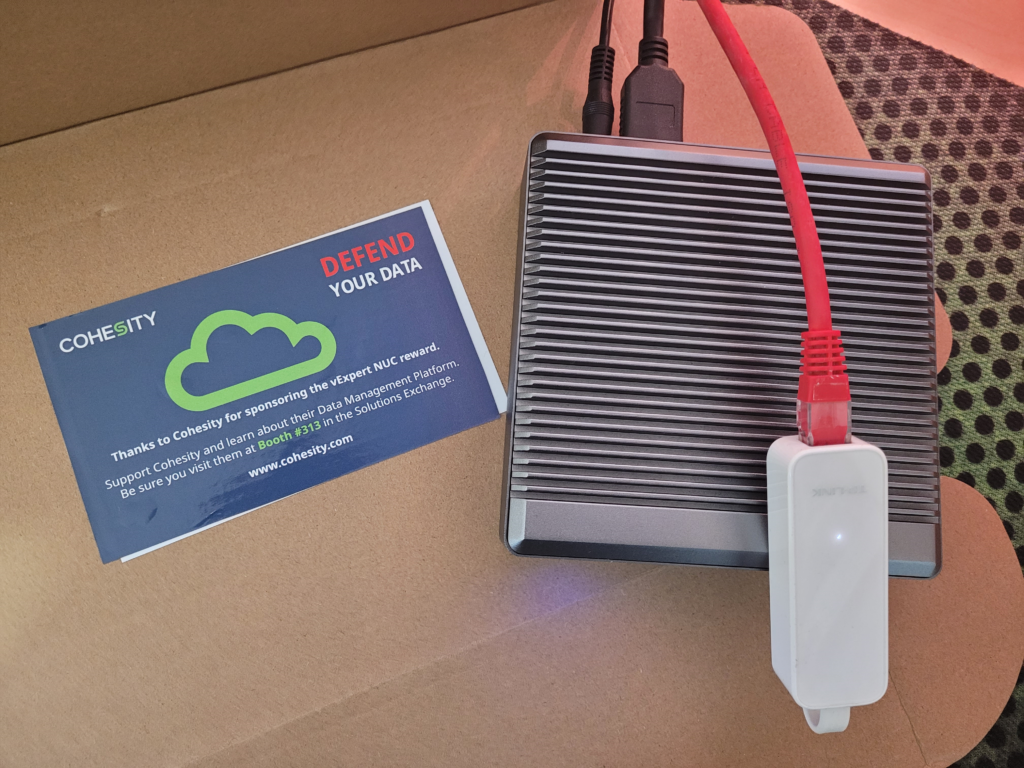
During VMware Explore 2022 Barcelona, I’ve been given a gift as a vExpert. You could read it in my previous article. NX6412 doesn’t support onboard NICs. We will need Custom ISO with USB Network Native Driver for ESXi. Because of problem using latest PowerCLI 13 release Nov 25, 2022 with export ISO. I decided to install Custom ISO ESXi 7u2e and than upgrade to ESXi 8.0 with depot zip.
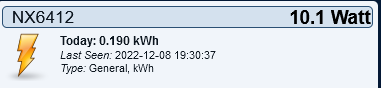
Thank You Cohesity. Power consumpion is only 10 Watts …
How to prepare ESXi Custom ISO image 7U2e for NX6412 NUC?
Currently there is a limitation in ESXi where USB NIC bindings are picked up much later in the boot process and to ensure settings are preserved upon a reboot, the following needs to be added to /etc/rc.local.d/local.sh based on your configurations.
vusb0_status=$(esxcli network nic get -n vusb0 | grep 'Link Status' | awk '{print $NF}')
count=0
while [[ $count -lt 20 && "${vusb0_status}" != "Up" ]]
do
    sleep 10
    count=$(( $count + 1 ))
    vusb0_status=$(esxcli network nic get -n vusb0 | grep 'Link Status' | awk '{print $NF}')
done

esxcfg-vswitch -R
esxcli software profile update -d  /vmfs/volumes/datastore1/_ISO/ESXi-8.0.0-20513097-USBNIC.zip -p ESXi-8.0.0-20513097-USBNIC

Hardware precheck of profile ESXi-8.0.0-20513097-USBNIC failed with warnings: <TPM_VERSION WARNING: TPM 1.2 device detected. Support for TPM version 1.2 is discontinued. Installation may proceed, but may cause the system to behave unexpectedly.>
You could fix TPM_VERSION WARNING: Support for TPM version 1.2 is discontinued. With Apply –no-hardware-warning option to ignore the warnings and proceed with the transaction.
[root@ESXI-8:~] esxcli daemon entitlement add --help
Usage: esxcli daemon entitlement add [cmd options]

Description:
  add                   Add Partner REST entitlements to the partner user.

Cmd options:
  -p|--partner-user-name=<str>
                        Specifies the partner's user name. (required)
  -r|--read-acccess     Grant read access to the partner.
  -w|--write-acccess    Grant write access to the partner.
[root@ESXI-8:~] esxcli daemon entitlement list --help
Usage: esxcli daemon entitlement list [cmd options]

Description:
  list                  List the installed DSDK built daemons.

Cmd options:
  -p|--partner-user-name=<str>
                        Specifies the partner's user name. (required)
[root@ESXI-8:~] esxcli daemon entitlement remove --help
Usage: esxcli daemon entitlement remove [cmd options]

Description:
  remove                Remove Partner REST entitlments from the partner user.

Cmd options:
  -p|--partner-user-name=<str>
                        Specifies the partner's user name. (required)
  -r|--read-acccess     Remove read access from the partner.
  -w|--write-acccess    Remove write access from the partner.
[root@ESXI-8:~] esxcli hardware devicecomponent list --help
Usage: esxcli hardware devicecomponent list [cmd options]

Description:
  list                  List all device components on this host.

Cmd options:
esxcli network ip hosts
[root@ESXI-8:~] esxcli network ip hosts add --help
Usage: esxcli network ip hosts add [cmd options]

Description:
  add                   Add association of IP addresses with host names.

Cmd options:
  -A|--alias=[ <str> ... ]
                        The list of aliases of the host.
  -C|--comment=<str>    Comment line of this item
  -H|--hostname=<str>   The name of the host. (required)
  -I|--ip=<str>         The IP address (v4 or v6) of the host. (required)
[root@ESXI-8:~] esxcli network ip hosts list --help
Usage: esxcli network ip hosts list [cmd options]

Description:
  list                  List the user specified associations of IP addresses with host names.

Cmd options:
[root@ESXI-8:~] esxcli network ip hosts remove --help
Usage: esxcli network ip hosts remove [cmd options]

Description:
  remove                Remove association of IP addresses with host names.

Cmd options:
  -H|--hostname=<str>   The name of the host. (required)
  -I|--ip=<str>         The IP address (v4 or v6) of the host. (required)
esxcli nvme
[root@ESXI-8:~] esxcli nvme device config list
ol stats list
Name          Default   Current   Description
------------  --------  --------  -----------
logLevel      0         0         Log level of this plugin.
adminTimeout  60000000  60000000  Timeout in microseconds of the admin commands issued by this plugin.

[root@ESXI-8:~] esxcli nvme device config set --help
Usage: esxcli nvme device config set [cmd options]

Description:
  set                   Set the plugin's parameter

Cmd options:
  -p|--parameter=<str>  Parameter name (required)
  -v|--value=<str>      Parameter value (required)
[root@ESXI-8:~] esxcli nvme device log get --help
Usage: esxcli nvme device log get [cmd options]

Description:
  get                   Get NVMe log page

Cmd options:
  -A|--adapter=<str>    Adapter to operate on (required)
  -l|--length=<long>    Log page length. (required)
  -i|--lid=<str>        Log page ID. Both decimal number and hexadecimal number are accepted. Hexadecimal number should start with '0x' or '0X'. (required)
  -I|--lsi=<long>       Log specific ID. The default value is 0.
  -s|--lsp=<long>       Log specific field. The default value is 0.
  -n|--namespace=<long> Namespace ID. The default value is 0xFFFFFFFF.
  -o|--offset=<long>    Log page offset. The default value is 0.
  -p|--path=<str>       Log path. If set, the raw log data will be wrote to the specified file. If not set, the log data will be printed in hex format.
  -r|--rae=<long>       Retain asynchronous event. The default value is 0.
  -u|--uuid=<long>      UUID index. The default value is 0.
[root@ESXI-8:~] esxcli nvme device log persistentevent get
Error: Missing required parameter -a|--action
       Missing required parameter -A|--adapter

Usage: esxcli nvme device log persistentevent get [cmd options]

Description:
  get                   Get NVMe persistent event log

Cmd options:
  -a|--action=<long>    Action the controller shall take during processing this command. 0: Read log data. 1: Establish context and read log data. 2: Release context. (required)
  -A|--adapter=<str>    Adapter to operate on (required)
  -p|--path=<str>       Persistent event log path. This parameter is required if the --action parameter is 0 or 1.
[root@ESXI-8:~] esxcli nvme device log telemetry controller get --help
Usage: esxcli nvme device log telemetry controller get [cmd options]

Description:
  get                   Get NVMe telemetry controller-initiated data

Cmd options:
  -A|--adapter=<str>    Adapter to operate on (required)
  -d|--data=<long>      Data area to get telemetry data, 3 is selected if not set
  -p|--path=<str>       Telemetry log path (required)
[root@ESXI-8:~] esxcli nvme device log telemetry host get --help
Usage: esxcli nvme device log telemetry host get [cmd options]

Description:
  get                   Get NVMe telemetry host-initiated data

Cmd options:
  -A|--adapter=<str>    Adapter to operate on (required)
  -d|--data=<long>      Data area to get telemetry data, 3 is selected if not set
  -p|--path=<str>       Telemetry log path (required)
esxcli storage core
[root@ESXI-8:~] esxcli storage core nvme device list --help
Usage: esxcli storage core nvme device list [cmd options]

Description:
  list                  List the NVMe devices currently registered with the PSA.

Cmd options:
  -d|--device=<str>     Filter the output of this command to only show a single device.
  -o|--exclude-offline  If set this flag will exclude the offline devices.
  -p|--pe-only          If set this flag will list the mount points of PE type.
  --skip-slow-fields    Do not show the value of some fields that need more time to fetch. The output will show the value <skipped> for such fields.
[root@ESXI-8:~] esxcli storage core nvme path list --help
Usage: esxcli storage core nvme path list [cmd options]

Description:
  list                  List all the NVMe paths on the system.

Cmd options:
  -d|--device=<str>     Limit the output to paths to a specific device. This name can be any of the UIDs for a specific device.
  -p|--path=<str>       Limit the output to a specific path. This name can be either the UID or the runtime name of the path.
[root@ESXI-8:~] esxcli storage core scsi device list
t10.ATA_____Samsung_SSD_850_EVO_M.2_500GB___________S33DNX0J600488T_____
   Display Name: Local ATA Disk (t10.ATA_____Samsung_SSD_850_EVO_M.2_500GB___________S33DNX0J600488T_____)
   Has Settable Display Name: true
   Size: 476940
   Device Type: Direct-Access
   Multipath Plugin: HPP
   Devfs Path: /vmfs/devices/disks/t10.ATA_____Samsung_SSD_850_EVO_M.2_500GB___________S33DNX0J600488T_____
   Vendor: ATA
   Model: Samsung SSD 850
   Revision: 1B6Q
   SCSI Level: 5
   Is Pseudo: false
   Status: on
   Is RDM Capable: false
   Is Local: true
   Is Removable: false
   Is SSD: true
   Is VVOL PE: false
   Is Offline: false
   Is Perennially Reserved: false
   Queue Full Sample Size: 0
   Queue Full Threshold: 0
   Thin Provisioning Status: yes
   Attached Filters:
   VAAI Status: unsupported
   Other UIDs: vml.0100000000533333444e58304a36303034383854202020202053616d73756e
   Is Shared Clusterwide: false
   Is SAS: false
   Is USB: false
   Is Boot Device: true
   Device Max Queue Depth: 31
   IOs with competing worlds: 31
   Drive Type: unknown
   RAID Level: unknown
   Number of Physical Drives: unknown
   Protection Enabled: false
   PI Activated: false
   PI Type: 0
   PI Protection Mask: NO PROTECTION
   Supported Guard Types: NO GUARD SUPPORT
   DIX Enabled: false
   DIX Guard Type: NO GUARD SUPPORT
   Emulated DIX/DIF Enabled: false
[root@ESXI-8:~] esxcli storage core scsi path list
sata.vmhba0-sata.0:0-t10.ATA_____Samsung_SSD_850_EVO_M.2_500GB___________S33DNX0J600488T_____
   UID: sata.vmhba0-sata.0:0-t10.ATA_____Samsung_SSD_850_EVO_M.2_500GB___________S33DNX0J600488T_____
   Runtime Name: vmhba0:C0:T0:L0
   Device: t10.ATA_____Samsung_SSD_850_EVO_M.2_500GB___________S33DNX0J600488T_____
   Device Display Name: Local ATA Disk (t10.ATA_____Samsung_SSD_850_EVO_M.2_500GB___________S33DNX0J600488T_____)
   Adapter: vmhba0
   Controller: Not Applicable
   Channel: 0
   Target: 0
   LUN: 0
   Plugin: HPP
   State: active
   Transport: sata
   Adapter Identifier: sata.vmhba0
   Target Identifier: sata.0:0
   Adapter Transport Details: Unavailable or path is unclaimed
   Target Transport Details: Unavailable or path is unclaimed
   Maximum IO Size: 33554432
esxcli storage osdata
[root@ESXI-8:~] esxcli storage osdata create --help
Usage: esxcli storage osdata create [cmd options]

Description:
  create                Create an OSData partition on a disk.

Cmd options:
  --clearpartitions     Erase existing partitions and force the operation.
  -d|--diskname=<str>   Target disk device on which to create the OSData partition. (required)
  -m|--mediasize=<str>  The size of the created partition.
                            default: 128 GB
                            max: Use whole device
                            min: 32 GB
                            small: 64 GB
                          (required)
[root@ESXI-8:~] esxcli storage vvol stats get --help
Usage: esxcli storage vvol stats get [cmd options]

Description:
  get                   Get stats for given stats namespace

Cmd options:
  -d|--dump=<str>       Dump the stats in log file with given custom message
  -e|--entity=<str>     entity Id
  -n|--namespace=<str>  node namespace expression
  -r|--raw              Enable raw format output
[root@ESXI-8:~] esxcli storage vvol stats list --help
Usage: esxcli storage vvol stats list [cmd options]

Description:
  list                  List all supported stats

Cmd options:
  -n|--namespace=<str>  node namespace expression
[root@ESXI-8:~] esxcli storage vvol vmstats get --help
Usage: esxcli storage vvol vmstats get [cmd options]

Description:
  get                   Get the VVol information and statistics for a specific virtual machine.

Cmd options:
  -c|--get-config-vvol  Get config VVol stats along with data VVols.
  -v|--vm-name=<str>    Display name of the virtual machine. (required)
esxcli system health report
[root@ESXI-8:~] esxcli system health report get --help
Usage: esxcli system health report get [cmd options]

Description:
  get                   Displays one or more health reports

Cmd options:
  --all-reports         Retrieve all the health reports. The default behavior is to retrieve only the latest health report.
  -f|--filename=<str>   The absolute path on the ESXi host where the health report(s) should be copied. If multiple reports are specified, they will be concatenated to this file.
  -r|--report-names=[ <str> ... ]
                        Specifies one or more health reports to display. The name(s) of the report can be obtained from the 'esxcli system health report list' command. (required)
[root@ESXI-8:~] esxcli system health report list
Name                    Time
----------------------  ----
vmw.memoryHealth        2022-12-08T01:53:01+00:00
vmw.ssdStorageHealth    2022-12-08T01:53:31+00:00
vmw.coreServicesStatus  2022-12-08T01:54:01+00:00
hostd-health            2022-12-08T01:55:01+00:00
vmw.vpxaStatus          2022-12-08T01:54:31+00:00
vmw.PSODCount           2022-12-08T01:20:01+00:00
vmw.autoscaler          2022-12-08T01:55:01+00:00
esxcli system ntp stats get
[root@ESXI-8:~] esxcli system ntp stats get --help
Usage: esxcli system ntp stats get [cmd options]

Description:
  get                   Report operational state of Network Time Protocol Daemon
esxcli system security
[root@ESXI-8:~] esxcli system security keypersistence disable --help
Usage: esxcli system security keypersistence disable [cmd options]

Description:
  disable               Disable key persistence daemon.

Cmd options:
  --remove-all-stored-keys
                        Confirm deletion of all stored keys. This confirmation is required.
[root@ESXI-8:~] esxcli system settings encryption get --help
Usage: esxcli system settings encryption get [cmd options]

Description:
  get                   Get the encryption mode and policy.
[root@ESXI-8:~] esxcli system settings encryption recovery list --help
Usage: esxcli system settings encryption recovery list [cmd options]

Description:
  list                  List recovery keys.
[root@ESXI-8:~] esxcli system settings encryption recovery rotate --help
Usage: esxcli system settings encryption recovery rotate [cmd options]

Description:
  rotate                Rotate the recover key.

Cmd options:
  -k|--keyid=<str>      The ID of the new recovery key. If no value is specified, the system will generate a new key.
  -u|--uuid=<str>       The UUID of the recovery key to be rotated. (required)
[root@ESXI-8:~] esxcli system settings encryption set --help
Usage: esxcli system settings encryption set [cmd options]

Description:
  set                   Set the encryption mode and policy.

Cmd options:
  -m|--mode=<str>       Set the encryption mode.
  -e|--require-exec-installed-only=<bool>
                        Require executables to be loaded only from installed VIBs.
  -s|--require-secure-boot=<bool>
                        Require secure boot.
[root@ESXI-8:~] esxcli system settings gueststore repository get --help
Usage: esxcli system settings gueststore repository get [cmd options]

Description:
  get                   Get GuestStore repository.
[root@ESXI-8:~] esxcli system settings gueststore repository set --help
Usage: esxcli system settings gueststore repository set [cmd options]

Description:
  set                   Set or clear GuestStore repository.

Cmd options:
  --url=<str>           URL of a repository to set; to clear GuestStore repository, set --url "" (required)
esxcli system syslog config logfilter
[root@ESXI-8:~] esxcli system syslog config logfilter add --help
Usage: esxcli system syslog config logfilter add [cmd options]

Description:
  add                   Add a log filter.

Cmd options:
  -f|--filter=<str>     The filter to be added. Format is: numLogs | ident | logRegexp. 'numLogs' sets the maximum number of log entries for the specified log messages. After reaching this number, the specified log messages are filtered and ignored. 'ident' specifies one or more
                        system components to apply the filter to the log messages that these components generate. 'logRegexp' specifies a case-sensitive phrase with Python regular expression syntax to filter the log messages by their content. (required)
[root@ESXI-8:~] esxcli system syslog config logfilter get --help
Usage: esxcli system syslog config logfilter get [cmd options]

Description:
  get                   Show the current log filter configuration values.
[root@ESXI-8:~] esxcli system syslog config logfilter list --help
Usage: esxcli system syslog config logfilter list [cmd options]

Description:
  list                  Show the added log filters.
[root@ESXI-8:~] esxcli system syslog config logfilter remove --help
Usage: esxcli system syslog config logfilter remove [cmd options]

Description:
  remove                Remove a log filter.

Cmd options:
  -f|--filter=<str>     The filter to be removed. (required)
[root@ESXI-8:~] esxcli system syslog config logfilter set --help
Usage: esxcli system syslog config logfilter set [cmd options]

Description:
  set                   Set log filtering configuration options.

Cmd options:
  --log-filtering-enabled=<bool>
                        Enable or disable log filtering. (required)
esxcli vsan hardware vcg
[[root@ESXI-8:~] esxcli vsan hardware vcg add --help
Usage: esxcli vsan hardware vcg add [cmd options]

Description:
  add                   Map unidentified vSAN hardware device with VCG ID.

Cmd options:
  -d|--device-id=<str>  Unidentified Device ID. It can be seen with command "esxcli storage core device list" (e.g. nqn.2014-08.org.nvmexpress_8086_Dell_Express_Flash_NVMe_P4610_1.6TB_SFF_BTLN9443030C1P6AGN). (required)
  -v|--vcg-id=<long>    VCG ID. (required)
[root@ESXI-8:~] esxcli vsan hardware vcg get
Usage: esxcli vsan hardware vcg get [cmd options]

Description:
  get                   Get the vSAN VCG ID for a vSAN hardware device. Output is VCG ID while "N/A" means device ID is not mapped.

Cmd options:
  -d|--device-id=<str>  Unidentified Device ID. It can be seen command "esxcli storage core device list" (e.g. nqn.2014-08.org.nvmexpress_8086_Dell_Express_Flash_NVMe_P4610_1.6TB_SFF_BTLN9443030C1P6AGN). (required)
esxcli vsan storagepool
[root@ESXI-8:~] esxcli vsan hardware vcg add --help
Usage: esxcli vsan hardware vcg add [cmd options]

Description:
  add                   Map unidentified vSAN hardware device with VCG ID.

Cmd options:
  -d|--device-id=<str>  Unidentified Device ID. It can be seen with command "esxcli storage core device list" (e.g. nqn.2014-08.org.nvmexpress_8086_Dell_Express_Flash_NVMe_P4610_1.6TB_SFF_BTLN9443030C1P6AGN). (required)
  -v|--vcg-id=<long>    VCG ID. (required)
[root@ESXI-8:~] esxcli vsan storagepool list --help
Usage: esxcli vsan storagepool list [cmd options]

Description:
  list                  List vSAN storage pool configuration.

Cmd options:
  -d|--device=<str>     Filter the output of this command to only show a single device with specified device name.
  -u|--uuid=<str>       Filter the output of this command to only show a single device with specified UUID.
[root@ESXI-8:~] esxcli vsan storagepool mount --help
Usage: esxcli vsan storagepool mount [cmd options]

Description:
  mount                 Mount vSAN disk from storage pool.

Cmd options:
  -d|--disk=[ <str> ... ]
                        Name of disk to mount from storage pool. e.g.: mpx.vmhba2:C0:T1:L0. Multiple devices can be provided using format -d device1 -d device2 -d device3.
  -u|--uuid=[ <str> ... ]
                        The vSAN UUID of disk to mount from storage pool. e.g.: 52afa1de-4240-d5d6-17f9-8af1ec8509e5. Multiple UUIDs can be provided using format -u uuid1 -u uuid2 -u uuid3.
[root@ESXI-8:~] esxcli vsan storagepool rebuild --help
Usage: esxcli vsan storagepool rebuild [cmd options]

Description:
  rebuild               Rebuild vSAN storage pool disks.

Cmd options:
  -d|--disk=<str>       Name of disk to rebuild for use by vSAN storage pool. E.g.: mpx.vmhba2:C0:T1:L0.
  -m|--evacuation-mode=<str>
                        Action to take upon removing storage pool from vSAN (default noAction). Available modes are
                            EnsureObjectAccessibility: Evacuate data from the disk to ensure object accessibility in the vSAN cluster, before removing the disk.
                            EvacuateAllData: Evacuate all data from the disk before removing it.
                            NoAction: Do not move vSAN data out of the disk before removing it.
  -u|--uuid=<str>       The vSAN UUID of the disk to rebuild for use by vSAN storage pool. E.g.: 5291022a-ad03-df90-dd0f-b9f980cc005e.
[root@ESXI-8:~] esxcli vsan storagepool remove --help
Usage: esxcli vsan storagepool remove [cmd options]

Description:
  remove                Remove physical disk from storage pool usage. Exactly one of --disk or --uuid param is required.

Cmd options:
  -d|--disk=<str>       Specify individual vSAN disk to remove from storage pool. e.g.: mpx.vmhba2:C0:T1:L0.
  -m|--evacuation-mode=<str>
                        Action the vSAN service must take before the disk can be removed (default noAction). Allowed values are:
                        ensureObjectAccessibility: Evacuate data from the disk to ensure object accessibility in the vSAN cluster, before removing the disk.
                        evacuateAllData: Evacuate all data from the disk before removing it.
                        noAction: Do not move vSAN data out of the disk before removing it.
  -f|--force            Forcefully remove unhealthy disk that has run into permanent metadata read/write errors.
                        Use -f|--force option only if remove disk operation failed repeatedly without force option.
                        Only 'noAction' evacuation mode is supported with -f|--force option.
  -u|--uuid=<str>       Specify UUID of vSAN disk to remove from storage pool. e.g.: 52afa1de-4240-d5d6-17f9-8af1ec8509e5.
[root@ESXI-8:~] esxcli vsan storagepool unmount --help
Usage: esxcli vsan storagepool unmount [cmd options]

Description:
  unmount               Unmount vSAN disk from storage pool.

Cmd options:
  -d|--disk=<str>       Name of disk to unmount from storage pool. e.g.: mpx.vmhba2:C0:T1:L0.
  -m|--evacuation-mode=<str>
                        Action to take upon unmounting storage pool from vSAN (default noAction). Available modes are
                            EnsureObjectAccessibility: Evacuate data from the disk to ensure object accessibility in the vSAN cluster, before unmounting the disk.
                            EvacuateAllData: Evacuate all data from the disk before unmounting it.
                            NoAction: Do not move vSAN data out of the disk before unmounting it.
  -f|--force            Forcefully unmount unhealthy disk that has run into permanent metadata read/write errors.
                        Use -f|--force option only if unmount disk operation failed repeatedly without force option.
                        Only 'noAction' evacuation mode is supported with -f|--force option.
  -u|--uuid=<str>       The vSAN UUID of disk to unmount from storage pool. e.g.: 52afa1de-4240-d5d6-17f9-8af1ec8509e5.
The ESXCLI command set allows you to run common system administration commands against vSphere systems from an administration server of your choice. The actual list of commands depends on the system that you are running on. Run esxcli --help for a list of commands on your system.
Namespace
Command
Description
NEW
daemon entitlement
add
Add Partner REST entitlements to the partner user.
1
daemon entitlement
list
List the installed DSDK built daemons.
1
daemon entitlement
remove
Remove Partner REST entitlments from the partner user.
1
hardware devicecomponent
list
List all device components on this host.
1
network ip hosts
add
Add association of IP addresses with host names.
1
network ip hosts
list
List the user specified associations of IP addresses with host names.
1
network ip hosts
remove
Remove association of IP addresses with host names.
1
nvme device config
list
List the configurable parameters for this plugin
1
nvme device config
set
Set the plugin's parameter
1
nvme device log
get
Get NVMe log page
1
nvme device log persistentevent
get
Get NVMe persistent event log
1
nvme device log telemetry controller
get
Get NVMe telemetry controller-initiated data
1
nvme device log telemetry host
get
Get NVMe telemetry host-initiated data
1
storage core nvme device
list
List the NVMe devices currently registered with the PSA.
1
storage core nvme path
list
List all the NVMe paths on the system.
1
storage core scsi device
list
List the SCSI devices currently registered with the PSA.
1
storage core scsi path
list
List all the SCSI paths on the system.
1
storage osdata
create
Create an OSData partition on a disk.
1
storage vvol stats
add
Add entity for stats tracking
1
storage vvol stats
disable
Disable stats for complete namespace
1
storage vvol stats
enable
Enable stats for complete namespace
1
storage vvol stats
get
Get stats for given stats namespace
1
storage vvol stats
list
List all supported stats
1
storage vvol stats
remove
Remove tracked entity
1
storage vvol stats
reset
Reset stats for given namespace
1
storage vvol vmstats
get
Get the VVol information and statistics for a specific virtual machine.
1
system health report
get
Displays one or more health reports
1
system health report
list
List all the health reports currently generated.
1
system ntp stats
get
Report operational state of Network Time Protocol Daemon
1
system security keypersistence
disable
Disable key persistence daemon.
1
system security keypersistence
enable
Enable key persistence daemon.
1
system settings encryption
get
Get the encryption mode and policy.
1
system settings encryption recovery
list
List recovery keys.
1
system settings encryption recovery
rotate
Rotate the recover key.
1
system settings encryption
set
Set the encryption mode and policy.
1
system settings gueststore repository
get
Get GuestStore repository.
1
system settings gueststore repository
set
Set or clear GuestStore repository.
1
system syslog config logfilter
add
Add a log filter.
1
system syslog config logfilter
get
Show the current log filter configuration values.
1
system syslog config logfilter
list
Show the added log filters.
1
system syslog config logfilter
remove
Remove a log filter.
1
system syslog config logfilter
set
Set log filtering configuration options.
1
vsan hardware vcg
add
Map unidentified vSAN hardware device with VCG ID.
1
vsan hardware vcg
get
Get the vSAN VCG ID for a vSAN hardware device. Output is VCG ID while "N/A" means device ID is not mapped.
1
vsan storagepool
add
Add physical disk for vSAN usage.
1
vsan storagepool
list
List vSAN storage pool configuration.
1
vsan storagepool
mount
Mount vSAN disk from storage pool.
1
vsan storagepool
rebuild
Rebuild vSAN storage pool disks.
1
vsan storagepool
remove
Remove physical disk from storage pool usage. Exactly one of --disk or --uuid param is required.