An ESX 9.1 vMotion PSOD is not something you expect from a routine host evacuation. However, Broadcom confirmed one in KB 455306. During vMotion or Cross-vCenter vMotion, an ESX 9.1 host can crash with #GP Exception 13 in world ###:vmotionRecvH. It happens on hosts that use several 25 GbE or 100 GbE uplinks for vMotion. In this post I explain the theory behind vMotion stream helpers, walk through the purple screen, and show the workaround.
Short version: there is no fix yet. To prevent the crash, cap the vMotion stream helpers at 16 on every ESX 9.1 host:
esxcli system settings advanced set -o /Migrate/VMotionStreamHelpers -i 16Symptoms of the ESX 9.1 vMotion PSOD
The host fails at random while a VM migrates to or from it. The purple screen shows this exception:
#GP Exception 13 in world ###:vmotionRecvH IP ###According to the KB, two conditions together point to this issue:
- The host uses several physical NICs as uplinks for the vMotion network.
- Those NICs are 25 GbE or 100 GbE cards.
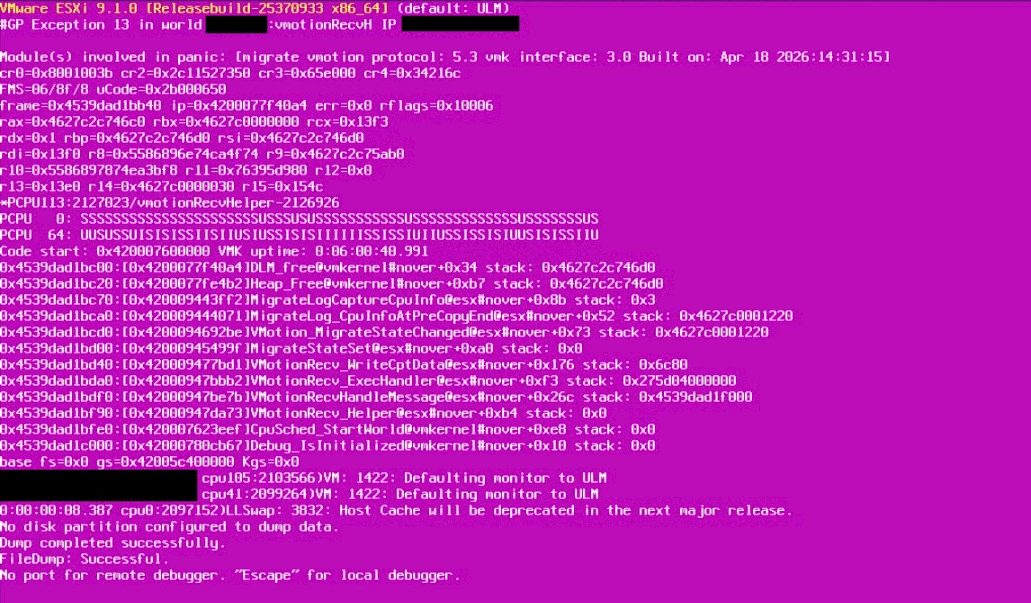
Reading the purple screen
The backtrace says more than the headline. Read from the bottom up, this is the path to the crash:
VMotionRecv_Helper,VMotionRecvHandleMessageandVMotionRecv_ExecHandler: a receive helper thread processes an incoming vMotion message.VMotionRecv_WriteCptData: the message carries checkpoint data, so the migration is leaving pre-copy and moving to switchover.MigrateStateSetandVMotion_MigrateStateChanged: the migration state changes.MigrateLog_CpuInfoAtPreCopyEndandMigrateLogCaptureCpuInfo: vMotion records CPU statistics for its helpers at the end of pre-copy.Heap_FreeandDLM_free: freeing that memory triggers the general protection fault (#GP Exception 13).
This matches the cause in the KB: a defect in the vMotion statistics tracking. My reading is that the per-helper statistics overflow their buffer and corrupt the heap. The damage only shows up when that memory is freed at the end of pre-copy. In this example, the crashed world is a receive helper (vmotionRecvHelper), so the receiving host went down. The KB says the PSOD can hit either side of a migration.
Theory: how vMotion uses streams and helpers
To understand the bug, you need two ideas from Niels Hagoort’s posts The vMotion Process Under the Hood and How to Tune vMotion for Lower Migration Times.
The vMotion phases
- Prepare: vCenter sends a migration specification to both hosts, and the destination reserves resources and creates a masked copy of the VM.
- Pre-copy: page tracers mark memory that the guest changes. vMotion then copies all memory, and in later iterations only the dirty pages. When the dirty rate is higher than the transfer rate, Stun During Page Send (SDPS) slows the vCPUs for microseconds so that the copy can converge.
- Switchover: the source VM is suspended, and its checkpoint data goes to the destination, which resumes the VM. This usually takes 100–200 ms.
The PSOD above happens exactly at the boundary between pre-copy and switchover.
Streams, helpers and RX queues
Each vMotion-enabled VMkernel interface creates a vMotion stream. Each stream has three helpers, and a helper is a kernel thread that can use one CPU core:
- Completion helper: supports the vMotion process.
- Crypto helper: encrypts and decrypts the traffic for encrypted vMotion.
- Stream helper: puts the data on the wire.
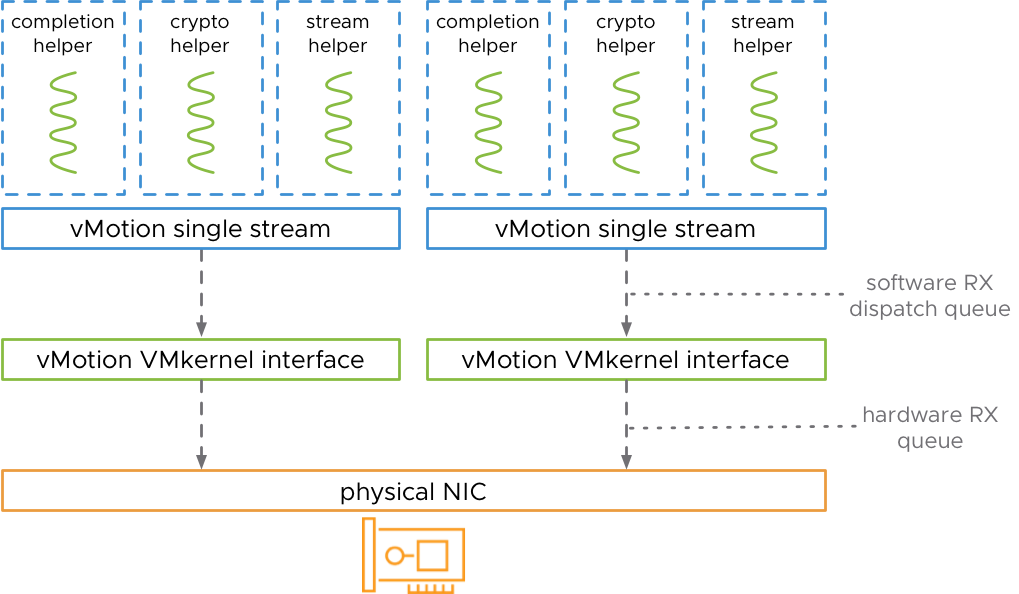
In 2019, one stream moved roughly 15 Gbps, so a single stream could not fill a 25 GbE NIC. A 100 GbE NIC needed about six streams. You had two options to get more streams:
- more vMotion VMkernel interfaces, which also means more IP addresses;
- the advanced settings
Migrate.VMotionStreamHelpersandNet.TcpipRxDispatchQueues, which add streams and RX queues to one interface.
The default value of Migrate.VMotionStreamHelpers is 0, which means ESX decides the number of helpers itself.
Why fast uplinks trigger the ESX 9.1 vMotion PSOD
ESX 9.1 now does this scaling automatically. According to KB 455306, it creates up to 7 stream helpers per physical vMotion uplink, depending on the number of uplinks and their bandwidth. The statistics code in 9.1 only handles 16 helpers, so a host with more than 16 can overflow the buffer.
| vMotion uplinks (25/100 GbE) | Maximum stream helpers | Risk |
|---|---|---|
| 1 | 7 | Below the limit |
| 2 | 14 | Below the limit |
| 3 | 21 | Above 16: exposed |
| 4 | 28 | Above 16: exposed (the example in the KB) |
The bug also explains why the crash looks random. ESX only creates that many helpers when the migration needs the bandwidth, for example during host evacuation or migration of large VMs.
Check if your hosts are exposed
On each ESX 9.1 host, find the vMotion VMkernel interfaces, check the speed of the physical NICs behind them, and read the current helper setting:
esxcli network ip interface tag get -i vmk1
esxcli network nic list
esxcli system settings advanced list -o /Migrate/VMotionStreamHelpers
A host is exposed if it has three or more 25/100 GbE uplinks active for vMotion and Int Value is 0 (the dynamic default). To find the vMotion VMkernel interfaces, check the tags of every vmk, or look at the VMkernel adapters in the vSphere Client.
Workaround 1 (recommended): cap stream helpers at 16
This option needs no change to the physical network. Connect to the host as root over SSH, set the cap, and check it:
esxcli system settings advanced set -o /Migrate/VMotionStreamHelpers -i 16
esxcli system settings advanced list -o /Migrate/VMotionStreamHelpers
For a whole cluster, PowerCLI is faster:
Get-Cluster 'Cluster01' | Get-VMHost |
  Get-AdvancedSetting -Name Migrate.VMotionStreamHelpers |
  Set-AdvancedSetting -Value 16 -Confirm:$false
Keep these points in mind:
- Set it on every host first. A migration involves two hosts, and either one can crash. So apply the cap everywhere before you start evacuations or rolling upgrades, which themselves use vMotion.
- Reboot or not: the KB does not mention a reboot. In 2019, however, the tuning post noted that these settings took effect after a reboot. If you want to see the runtime value,
vsish -e get /config/Migrate/intOpts/VMotionStreamHelpersshows it. - Leave the RX queues alone. The KB only changes
Migrate.VMotionStreamHelpers. Do not changeNet.TcpipRxDispatchQueuesunless Broadcom support asks you to. - Performance: 16 helpers still give vMotion plenty of parallel streams, so the cap mainly limits the largest 4×100 GbE setups.
- Undo later: when Broadcom ships the fix, set the value back to 0 to return to dynamic scaling.
Workaround 2: use only two vMotion uplinks
As an alternative, reduce the active uplinks for the vMotion port group to two. With at most 7 helpers per uplink, the host then stays at 14 helpers or fewer. However, this changes your network design and lowers vMotion bandwidth and redundancy, so the cap is usually the better choice. If you run multi-NIC vMotion, see my older note on multiple-NIC vMotion tuning with 2×40 Gbps.
Fix status
When KB 455306 was published on 22 September 2026, no permanent fix was available, and Broadcom said a fix would come in a future release. Subscribe to the KB to get notified, and check the release notes of the next ESX 9.1 patch before you remove the cap.
FAQ
Does the ESX 9.1 vMotion PSOD affect hosts with 10 GbE vMotion?
The KB lists 25 GbE and 100 GbE uplinks as the condition. With slower links, ESX creates fewer helpers, so the host stays under the limit of 16.
Does encrypted vMotion matter?
The KB does not mention it. The trigger is the number of stream helpers, not encryption.
Is ESX 9.0 affected?
The KB only lists ESX 9.1.
Related on vDan
- How vSphere vMotion Works: Requirements, Networking and Notifications
- VCF 9 SAP HANA Network Design: Why 6 NICs Matter for vMotion and NFS
- Another vMotion-related PSOD: #PF Exception 14 in nsx-cfgagent
- VCF 9.1 Supported Upgrade Paths
- Interactive ESXCLI mindmap, for the
esxcli system settings advancednamespace
Sources: Broadcom KB 455306; Niels Hagoort, The vMotion Process Under the Hood and How to Tune vMotion for Lower Migration Times.
