Short answer: after an upgrade to vCenter Server 8.0 U2, the Events tab can show “Privilege check failed for user VSPHERE.LOCAL\vmware-vsm-… for missing permission Sessions.TerminateSession”. The VsmSvcRole is missing the Sessions → View and stop sessions privilege. Add it under Administration → Roles and the warnings stop, with no service restart needed (KB 94967).
Introduction
Upgrading to the latest version of any software can sometimes introduce unexpected challenges. For administrators of VMware vCenter Server 8.0U2, one such issue is the appearance of privilege-related warnings in the vSphere Client. These warnings can cause concern but can be managed with the right steps.
Symptoms
After upgrading to vCenter Server 8.0U2, administrators may encounter the following warning in the vSphere Client’s Events tab: “Privilege check failed for user VSPHERE.LOCAL\vmware-vsm-… for missing permission Sessions.TerminateSession.”
This warning is flagged when the system checks the permissions associated with the VsmSvcRole role assigned to the solution user account.
Cause
The core of this issue lies in the permissions set for the VsmSvcRole. Despite having several default privileges, it lacks the “Sessions.TerminateSession” permission, which is crucial for certain administrative operations within the vSphere environment.
Immediate Workaround
Until VMware releases an update to address this issue, administrators can manually adjust the role permissions to prevent these warnings. Here’s how to implement this workaround:
- Log in to the vSphere Client with a user account that has administrative privileges.
- Navigate to Administration > Roles.
- Select the VsmSvcRole and click on EDIT.
- In the pop-up window, navigate to Sessions > View and stop sessions.
- Click SAVE to apply the changes. Ensure the role’s privileges now include the ability to terminate sessions.
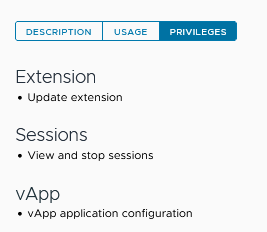
This adjustment does not require any service restarts, making it a straightforward fix that can be implemented immediately.
Long-Term Resolution
VMware has acknowledged the issue and is working on a resolution to be included in a future software update. More info in Broadcom KB 94967; check it for the vCenter build that includes the fix.
