vCLS Retreat Mode removes the vSphere Cluster Services (vCLS) VMs from one cluster. In vSphere 7.0 and 8.0 that has a price: DRS stops working and HA placement becomes suboptimal, which is exactly what the banner “vSphere Cluster Services are disabled by retreat mode” warns you about. From vSphere 9.0, vCLS can be disabled without any impact on DRS or HA. On 7.0 U3o, 8.0 U2 and later you switch it in the vSphere Client in a few clicks.
What “vSphere Cluster Services are disabled by retreat mode” means
When a cluster is in Retreat Mode, vCenter shows one of these messages on the cluster:
vSphere Cluster Services are disabled by retreat mode. vSphere DRS is not functioning and vSphere HA will not perform optimally.

vSphere Cluster Services are disabled by retreat mode. vSphere HA will not perform optimally.
The exact wording depends on which cluster services are enabled. Both mean the same thing: someone (or a script) put the cluster into Retreat Mode, the vCLS VMs were removed, and the cluster is running without them. If that wasn’t intentional, exit Retreat Mode and the vCLS VMs are redeployed automatically.
What vCLS and Retreat Mode are
vCLS runs small agent VMs in every vSphere cluster to keep cluster services such as DRS running independently of vCenter. There are two implementations:
- External vCLS (vSphere 7.0 U1 to 8.0 U2): agent VMs deployed and managed by the ESX Agent Manager (EAM), up to three per cluster.
- Embedded vCLS (vSphere 8.0 Update 3 and later): vCLS VMs based on vSphere Pod technology, managed internally by vpxd instead of EAM, with a redundancy of two VMs per cluster and a minimum of one powered-on VM for DRS (TechDocs: Embedded vCLS).
Retreat Mode tells vCenter to stop running vCLS VMs on one cluster. Embedded vCLS keeps the same per-cluster activate/deactivate capability, so Retreat Mode works the same way on 8.0 U3.
What breaks in Retreat Mode, by version
| vSphere version | DRS | HA | vSAN cluster health |
|---|---|---|---|
| 7.0.x and 8.0.x | Does not function on the cluster | Restarts VMs, but placement is not optimal (HA relies on DRS for placement) | Cluster Service health shows Degraded |
| 9.0 and later | No impact | No impact | – |
Source: Broadcom KB 316514. On 7.0 and 8.0, use Retreat Mode only for a specific task, such as storage maintenance or troubleshooting, and exit it as soon as you’re done.
How to enable vCLS Retreat Mode
vSphere 7.0 U3o, 8.0 U2 and later (vSphere Client)
- In the vSphere Client, go to Hosts and Clusters and select the cluster.
- Open Configure → vSphere Cluster Services → General.
- Click EDIT VCLS MODE (top right).
- Select Retreat Mode (the second option) and click OK.
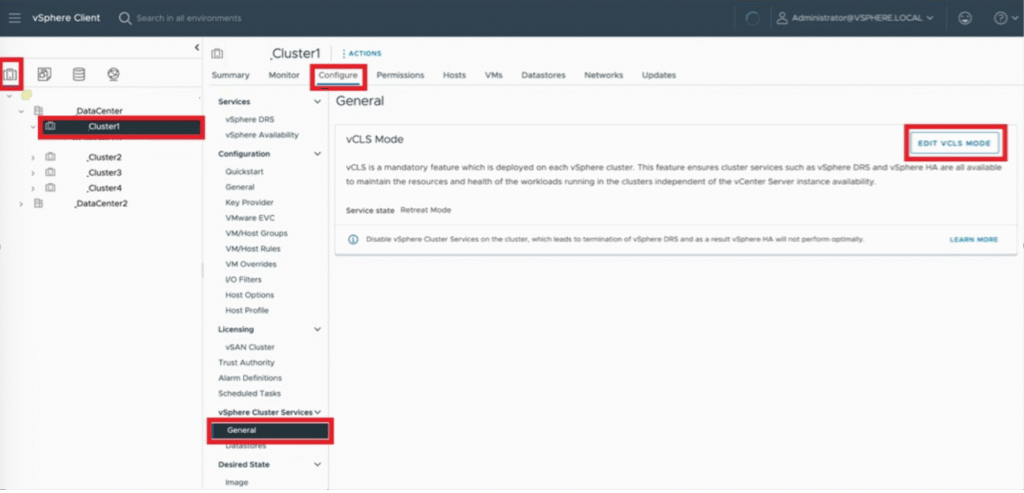
vCenter removes the vCLS VMs from the cluster automatically.
Older versions (before 7.0 U3o / 8.0 U2): advanced setting
- Select the cluster in the vSphere Client and copy its domain ID from the browser URL, for example
domain-c1006. Use only thedomain-c<number>part; a wrong ID can break vCenter. - Select the vCenter Server and open Configure → Advanced Settings → Edit Settings.
- Add the setting below and click Save. vCenter removes the vCLS VMs automatically.
Name:  config.vcls.clusters.domain-c<number>.enabled
Value: False
Many clusters at once: retreatModeConfiguration.py
KB 316514 provides a Python script to change Retreat Mode in bulk:
python retreatModeConfiguration.py -r disable
python retreatModeConfiguration.py -r enable
How to exit Retreat Mode
- vSphere Client (7.0 U3o / 8.0 U2 and later): open EDIT VCLS MODE again and select the first (default) option instead of Retreat Mode.
- Advanced setting: set
config.vcls.clusters.domain-c<number>.enabledback toTrue. - Script: run
retreatModeConfiguration.pywith the opposite option.
vCenter redeploys the vCLS VMs, and on 7.0/8.0 DRS resumes once they are running. Check that the banner has disappeared from the cluster.
How to identify vCLS VMs
- vCLS VMs are named
vCLS-{UUID}, where the UUID is the UUID of the ESXi host, and sit in thevCLSfolder in the VMs and Templates view. - Embedded vCLS VMs (8.0 U3 and later) carry the extra config option
vCLSCRX.agent = true. - You can also check which extension manages a VM in the Managed Object Browser, for example
https://<vCenter>/mob/?moid=vm-1004&doPath=config.managedBy. On vSphere 9 the MOB is disabled by default: see how to enable the MOB in vSphere 9.
Summary
- vSphere 9.0 and later: you can disable vCLS without affecting DRS or HA.
- vSphere 7.0 and 8.0: Retreat Mode also stops DRS and weakens HA placement. Use it for a specific task, then exit it.
Related: Introduction to vSphere Clustering Service (vCLS). If the vCLS VMs exist but fail, for example with “No host is compatible”, see troubleshooting vCLS failures and vCLS VMs that fail to power on. To keep vCLS VMs off one host instead of removing them from the whole cluster, see keep vCLS VMs off an HA failover host. Official reference: Disable vCLS on a Cluster via Retreat Mode (KB 316514).