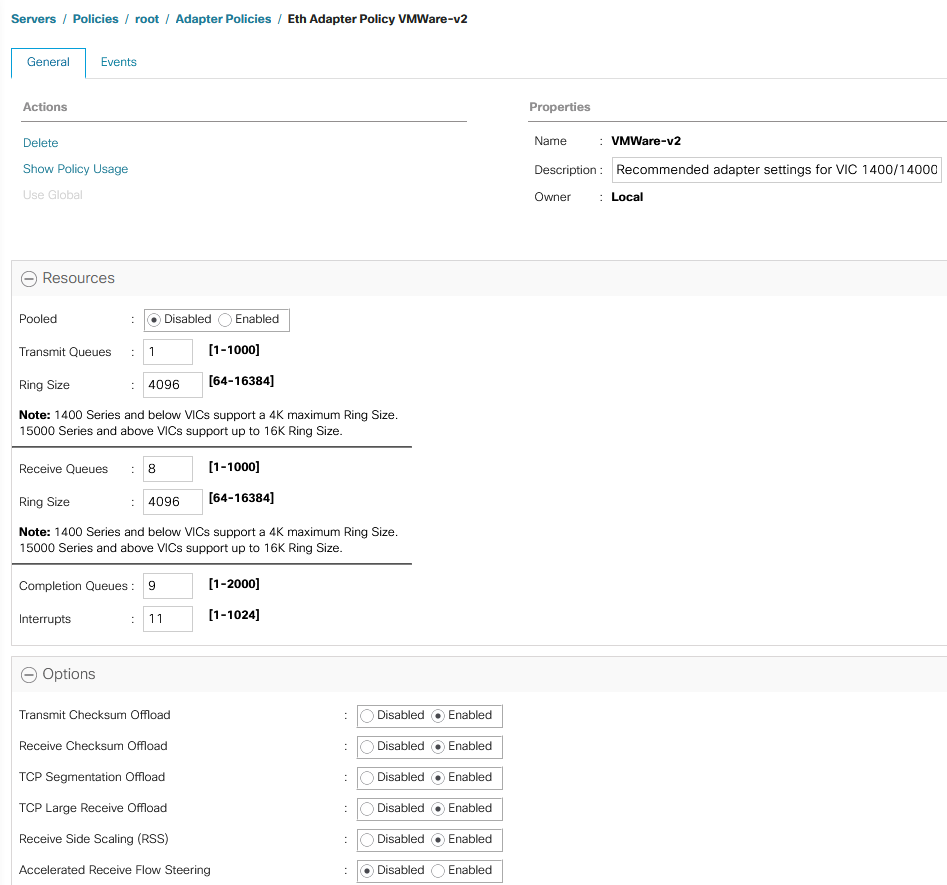
Short answer: The VMware-v2 adapter policy is a system-provided Ethernet adapter policy that Cisco added in UCS Manager 4.3(4a). It builds Cisco’s recommended ESXi settings into a default: 1 TX queue, 8 RX queues, 4096-entry TX and RX rings, 9 completion queues, 11 interrupts and RSS enabled. The release notes cover VIC 1400, 14000 and 15000 adapters. Use it for ordinary ESXi vNICs instead of the old “VMWare” policy. VMWarePassThru is only for VM-FEX.
I wrote this post in October 2024, when 4.3(4a) shipped. We had been running almost the same values in our own custom policy for years; the one difference was 12 interrupts instead of 11. This September 2026 update checks the values against Cisco’s current documentation and adds the upgrade caveats.
What the VMware-v2 adapter policy is
The UCS Manager 4.3 release notes say that from 4.3(4a), “new optimized adapter policies are available for Windows, Linux, and VMware operating systems, for the Cisco UCS VIC 1400, 14000 and 15000 series adapter”. Cisco’s VIC 15000 best-practices white paper explains what that means: the recommended adapter parameters “have now been built into new system provided adapter policies, suffixed with ‘-v2′”. Intersight Managed Mode gained the same policies at the same release level.
The main point is that you no longer need a hand-built custom policy for the standard ESXi RSS configuration. Select VMWare-v2 on the vNIC or vNIC template and you get Cisco’s baseline.
VMware-v2 adapter policy values
These are the ESXi values in Cisco’s “Recommended adapter policy for the best performance with RSS” (VIC 15000 white paper, Table 3). The v2 policies are built from this table.
| Parameter | VMware-v2 / Cisco ESXi recommendation |
|---|---|
| Transmit queues | 1 |
| TX ring size | 4096 |
| Receive queues | 8 |
| RX ring size | 4096 |
| Completion queues | 9 (TX + RX) |
| Interrupts | 11 (CQ + 2) |
| Receive Side Scaling (RSS) | Enabled |
A note on interrupts: the UCS Manager 4.3 Network Management Guide gives the formula as “(Completion Queues + 2) rounded up to nearest power of 2”, which would be 16. The white paper uses 11 for ESXi and gives 16 as its own worked example. Both are Cisco documents. VMware-v2 uses 11. Our custom policy used 12 for years without problems.
Ring size and RX queue limits
- VIC 1400 and 14000 series support a ring size of up to 4096 (4K). This is the maximum, and VMware-v2 already uses it.
- VIC 15000 series and later support ring sizes up to 16384 (16K). If you want more than 4096, you need a custom policy.
- RSS spreads receive processing across CPU cores and is set per vNIC through the adapter policy. Cisco states that most ESXi versions support up to 16 RX queues (ESXi 6.0 supports 8). The Intersight best-practices guide recommends 16 RX queues for ESXi 8.0. Again, going above the v2 default of 8 requires a custom policy.
Which Cisco VIC adapters use it
The release notes and the Network Management Guide name the VIC 1400, 14000 and 15000 series for the 4.3(4a) optimized policies. The VIC 15000 white paper words the v2 policies as being for operating systems “that use VIC 15000 adapters”. Older VIC 1200 and 1300 adapters are not named.
VMware-v2 vs VMWare vs VMWarePassThru
| Policy | Use it for |
|---|---|
| VMWare-v2 | Standard ESXi vNICs (management, vMotion, VM traffic, NFS/iSCSI) on VIC 1400/14000/15000 with UCSM 4.3(4a) or later. RSS with 8 RX queues. |
| VMWare | The older system policy. Keep it only if you deliberately want the old values. Compare both policies under Servers > Policies > root > Adapter Policies before switching. |
| VMWarePassThru | Cisco’s system policy for VM-FEX in high-performance mode (dynamic vNICs). Not for normal static vNICs. |
| Custom policy | Needed for GENEVE offload (disabled by default in every adapter policy), 16 RX queues, or VIC 15000 rings above 4096. |
For NSX host transport nodes, Cisco’s recommended GENEVE policy is different from VMware-v2: 1 TX queue, 8 RX queues, 4096 rings, 16 completion queues, 32 interrupts, RSS on and GENEVE offload enabled.
How to apply the VMware-v2 adapter policy
- Upgrade the UCS domain to 4.3(4e) or later (see the upgrade note below).
- In UCS Manager, open Servers > Policies > root > Adapter Policies and check the values of VMWare-v2.
- In the vNIC template, or in the vNIC of the LAN connectivity policy or service profile, set Adapter Policy to VMWare-v2.
- UCS Manager shows whether the change needs a server reboot. If it does, the reboot follows the service profile’s maintenance policy, so put the ESXi host into maintenance mode first.
- Verify on the ESXi host with the commands in Cisco’s vNIC tuning guide:
vsish -e get /net/pNics/vmnic0/txqueues/info
vsish -e get /net/pNics/vmnic0/rxqueues/info
esxcli network nic ring current get -n vmnic0
Explorer note: the adapter policy decides the queues, the rings and RSS on the VIC. On the ESXi side, RSS is also governed by eight host advanced settings, all at their defaults on a stock host. Each one in the table links to the ESXi Advanced and Kernel Settings Explorer, which shows its description, default, allowed range, the esxcli and PowerCLI commands and the history of the default across 42 ESXi releases. To list their current values on a host:
for o in NetNetqRxRebalRSSLoadThresholdPerc TcpipEnableSendScaling TcpipEnsNetQRSS Vmxnet3ESPRSSAllowed Vmxnet3RSSHashCache Vmxnet3SetRSSHash Vmxnet3UDPRSSAllowed Vmxnet3usePNICHash; do esxcli system settings advanced list -o /Net/$o | grep -E 'Path|Int Value'; doneOr for every host of the vCenter with PowerCLI:
Get-VMHost | Get-AdvancedSetting -Name "Net.*RSS*","Net.TcpipEnableSendScaling","Net.Vmxnet3usePNICHash" | Select-Object Entity, Name, Value | Sort-Object Entity, Name| Setting | Default | Since | What it does |
|---|---|---|---|
Net.NetNetqRxRebalRSSLoadThresholdPerc | 10 (0 to 100) | ESXi 6.5 | Load threshold in percent at which the NetQueue balancer rebalances an RSS queue |
Net.TcpipEnableSendScaling | 1 | ESXi 6.0 | Send-side scaling of the vmkernel TCP/IP stack, requires RSS on the pNIC |
Net.TcpipEnsNetQRSS | 1 | ESXi 8.0 U1 | Request NetQueue RSS for vmknics on ENS (NSX enhanced datapath) switches |
Net.Vmxnet3RSSHashCache | 1 | ESXi 6.0 | RSS hash cache for vmxnet3 guests |
Net.Vmxnet3usePNICHash | 0 | ESXi 6.0 | Reuse the RSS hash computed by the pNIC instead of hashing again for the guest |
Net.Vmxnet3SetRSSHash | 1 (0 in 8.0 and 8.0 U1) | ESXi 8.0 | Set the RSS hash in the packet delivered to a multiqueue vmxnet3 guest |
Net.Vmxnet3UDPRSSAllowed | 1 | ESXi 8.0 | Allow RSS for UDP when the guest asks for it (IP fragments may arrive out of order) |
Net.Vmxnet3ESPRSSAllowed | 1 | ESXi 8.0 | Allow RSS for IPsec ESP over IPv4 when the guest asks for it |
Only one of the eight defaults moved in ten ESXi releases: Net.Vmxnet3SetRSSHash arrived in ESXi 8.0 switched off and is on since 8.0 Update 2. The three Net.Vmxnet3*Allowed and hash settings only matter when the guest asks for RSS (a multiqueue vmxnet3 adapter in the guest), Net.TcpipEnsNetQRSS only for ENS vmknics. With VMware-v2 on the vNIC, leave all eight at their defaults; what you tune is the adapter policy, not the host. What changed between your source and target release is in the explorer’s compare view.
Upgrade note: 4.3(4a) to 4.3(4d) are deprecated
Cisco has deprecated UCS Manager 4.3(4a), 4.3(4b), 4.3(4c) and 4.3(4d), and their firmware files are no longer available. Cisco recommends 4.3(4e) or later. Two field notices are behind this. FN74201: UCS Manager can become inaccessible after an upgrade with integrated S3260 servers. FN74209: virtual Fibre Channel interfaces may flap. At the time of writing the newest 4.3 maintenance release is 4.3(6j), and Cisco also publishes UCS Manager 6.0.
Sources
- Release Notes for Cisco UCS Manager, Release 4.3
- Cisco UCS VIC 15000 Series Best Practices in Ethernet Fabric (white paper)
- Cisco UCS Manager Network Management Guide 4.3: Network-Related Policies
- Cisco Intersight best practices configuration guide
- Cisco: Configure vNIC Tuning on Intersight Managed Mode
- Cisco VM-FEX for VMware configuration guide (VMwarePassThru)
- FN74201 and FN74209
Related on vdan.cz
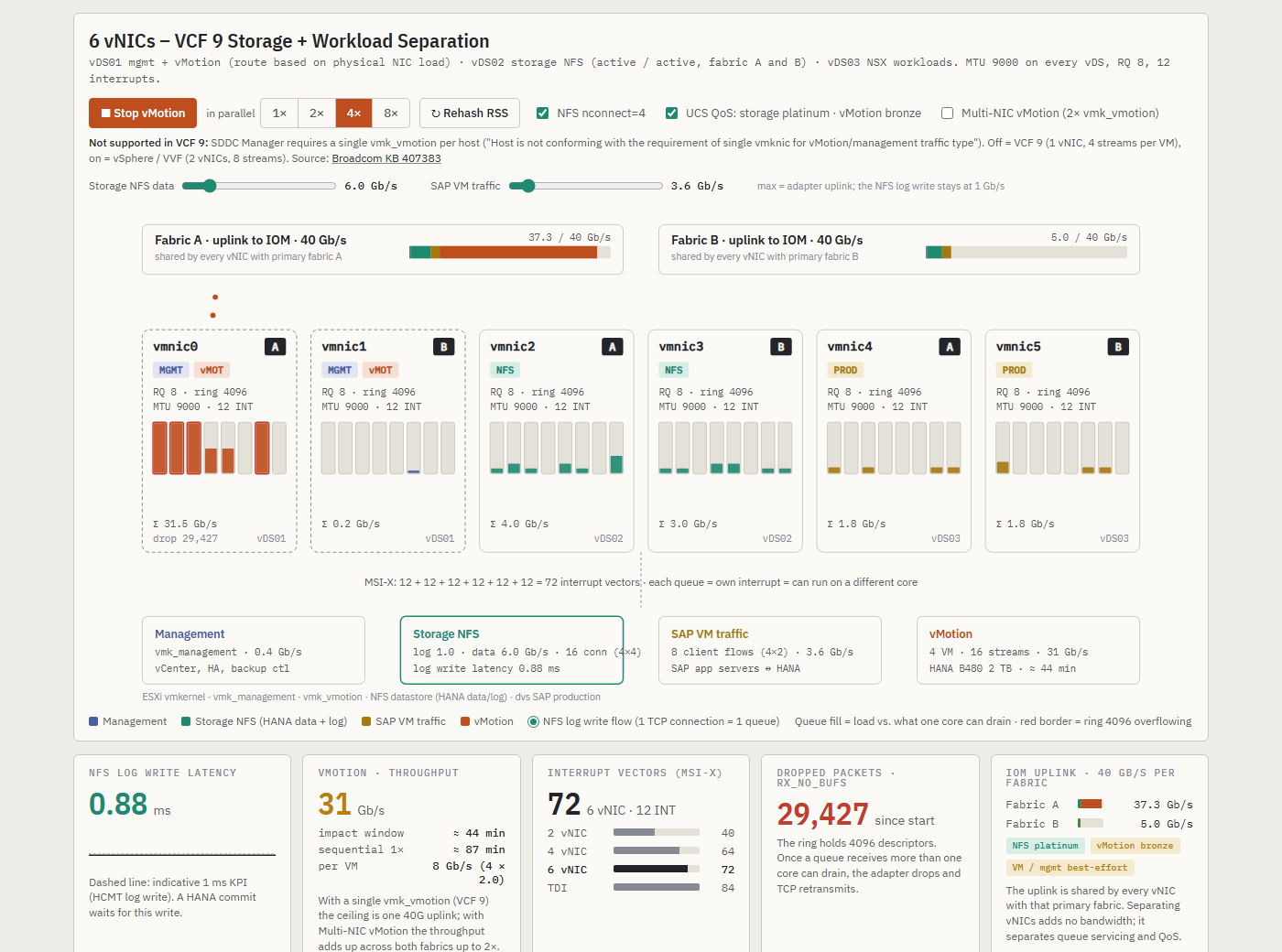
How RX queues per vNIC decide whether a HANA vMotion slows down the NFS log writes on VIC 1380 and VIC 15231 is simulated in SAP HANA on VCF 9: TDI network design and vNIC simulator.
- VCF 9 SAP HANA network design: why 6 NICs matter for vMotion and NFS
- Multiple-NIC vMotion tuning 2x 40Gbps
- NSX Edge on Cisco UCS: design for NSX 4.x and VCF 9
- Cisco nenic driver and Geneve offload on VIC
- Cisco UCS 4.3(5a) security fixes
- UCS Manager CLI interactive mindmap:
create eth-policyunder/organd every other UCSM CLI command from Cisco’s CLI guides