vSphere Virtual TPM (vTPM)
vSphere Virtual TPM (vTPM) enables workloads to securely use advanced security techniques while virtualized.
Daniel Micanek virtual Blog – Like normal Dan, but virtual.
vSphere Virtual TPM (vTPM) enables workloads to securely use advanced security techniques while virtualized.
Holo-Tanzu-vSphere-Pods
Module 3 – vSphere Pods This module shows how to run vSphere Pods on a vSphere Supervisor Cluster that is part of a Cloud Foundation domain. A vSphere Pod is a special type of virtual machine with a small footprint that runs one or more Linux containers. Each vSphere Pod is sized precisely for the workload that it accommodates and has explicit resource reservations for that workload. It allocates
While listening to both The Unexplored Territory and VirtuallySpeaking Podcast, which recently covered the newly announced vSphere 8.0 Update 1 release, The upcoming vSphere 8.0 Update 1 release includes a lot of exciting new features, some of which you can learn about by listening to either […]
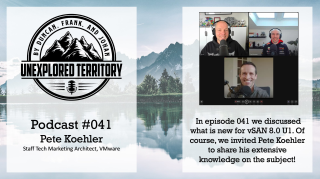
We (the Unexplored Territory team) have just published two brand-new episodes which discuss What’s New with vSphere 8.0 U1 and vSAN 8.0 U1. You can of course listen to them using your favorite podcast app, or you simply use the embedded players below to enjoy the content.
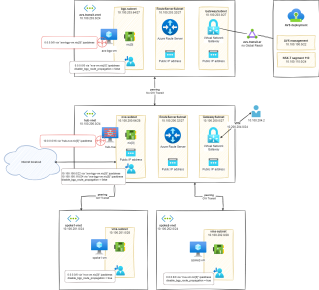
In this step, we will integrate our avs-transit-vnet within the overall h&s topology and rely on the hub-nva VM to manage all the required filtering either for: +Spoke-to-spoke; +Spoke-to-On-Premise (and vice versa); +Internet breakout […]

Personally, here are the recommendations for new ESXi 8.0 installations:

VMware’s recommended workaround is to transition the machine to UEFI boot mode permanently, as discussed in KB article 84233 . There will not be a future ESXi change to allow legacy BIOS to work on this machine again.
VMware’s plans to deprecate support for legacy BIOS in server platforms.
If you upgrade a server that was certified and running successfully with legacy BIOS to a newer release of ESXi, it is possible the server will no longer function with that release. For example, some servers may fail to boot with an “Out of resources” message because the newer ESXi release is too large to boot in legacy BIOS mode. Generally, VMware will not provide any fix or workaround for such issues besides either switching the server to UEFI
UEFI provides several advantages over legacy BIOS and aligns with VMware goals for being “secure by default”. UEFI
List of Knowledge base articles for vSphere 8.0 – [Main KB] – List of vSphere 8.0 Knowledge base articles and Important Links (89756)
Securing Cloud Applications demystifies complex security protocols, algorithms, and patterns, and demonstrates how to put them into practice in everyday development.
In this post we will deploy our Tier-1 site specific gateways and create some network segments for our VMs.
The deployment wizard for VMware Cloud Builder (CB) can accept either an XLSX or JSON configuration file that describes your desired VMware Cloud Foundation (VCF) deployment. Interestingly enough, only an XLSX template is available for users to download, edit and then provide that back as user […]