Short answer: I went through every Broadcom KB article that applies to VCF 9 and ESX 9 and pulled out the ones that tell you to change an ESX advanced or kernel setting. There are 25 of them, touching 17 settings, and they fall into five groups: workarounds for a defect until a patch ships (vMotion stream helpers, vSAN ESA UNMAP throttling, 10G resync scheduling), undoing a bad value that a script, a shutdown or an old hardening guide left behind (vSAN unicast updates, paused vSAN components, disabled vMotion, password rules), opt-in features that are off by default (NFSv3 Unmap, memory tiering size), settings that do not do what you think (syslog target, shell warning) and boot options you only touch at install or recovery time. For each setting below you get the default from the 9.0.1 data, the value the KB wants, why, the exact command and a link to the ESXi Advanced and Kernel Settings Explorer.
This post is the production counterpart to William Lam’s ESXi advanced and kernel settings for labs. There the rule was “your lab, your risk”. Here every value comes from a published Broadcom KB, with a reason and, usually, an end date: once the fix ships, the workaround should go. Still on ESXi 7.x or 8.x? The companion post ESXi advanced and kernel settings in ESXi 8.x: what 25 Broadcom KBs change and why covers the KBs for those releases.
How I found them
I searched the Broadcom knowledge base for articles that apply to VCF 9, ESX 9, vSphere 9 or vSAN 9 and that name an ESX advanced or kernel setting, run esxcli system settings advanced|kernel or esxcfg-advcfg, or edit boot options (kernelopt, boot.cfg, Shift+O). Then I checked every setting against the ESX 9.0.1 data in my ESXi Advanced and Kernel Settings Explorer.
One surprise from the cross-check: six of the settings Broadcom asks you to change, including all five vSAN ones and /NFS/UnmapEnabled, are not in the 9.0.1 list the vSphere API returns. They are hidden options. You will not find them in Advanced System Settings in the vSphere Client, only on the host with esxcfg-advcfg -g. I added these six, plus the two NFS Unmap tuning options, to the explorer as hidden options, each with its Broadcom KB as the source.
All settings at a glance
Click a setting name to open it in the ESXi Advanced and Kernel Settings Explorer with its 9.0.1 description, default, range and history across ESXi releases. The Change column shows the value you start from and the value the KB asks for.
| Setting (explorer) | Change | Why | KB |
|---|---|---|---|
Migrate. | 0 → 16 | ESX 9.1 PSOD in vmotionRecvH details | KB 455306 |
VSAN.VSAN.hidden option | hidden → 1 | vSAN ESA latency spikes and guest hangs during UNMAP details | KB 453944 KB 458794 |
VSAN.hidden option | hidden → 1 (10 GbE only) | ESA resync starves VM I/O on 10 GbE details | KB 410662 KB 372309 |
Mem. | 5 → 32 | VM loses its vNIC after vMotion, NSX Edge details | KB 318766 |
NFS.hidden option | 0 → 1 | opt-in NFSv3 Unmap through VAAI-NAS details | KB 401327 |
Mem. | 100 → 1 to 400 | memory tiering Tier 1 size details | KB 458653 |
VSAN.hidden option | 1 → 0 | new host partitioned in vSAN details | KB 413293 KB 451271 |
VSAN.hidden option | 1 → 0 | left at 1 after a vSAN graceful shutdown details | KB 454324 |
Migrate. | 0 → 1 | Hot migration is disabled in vmkernel details | KB 447181 |
Migrate. | 20 → 300 | vMotion timeouts on 1 GbE details | KB 375717 |
Security. | 99999 → 9999 | host upgrade fails with PASSWORD_VALIDATION_EXECUTION_FAILED details | KB 454682 |
Security. | five values in min= | pam_passwdqc parse error on passwd details | KB 449751 |
Syslog. | remove ?formatter=RFC-1364 | daily Aria Operations for Logs alert details | KB 453058 |
UserVars. | 1 does not help | Host Client shell banner stays details | KB 453654 |
tty1Port | com1 → default | Jumpstart restore-configuration-files message details | KB 452737 |
execInstalledOnly | keep TRUE | encrypted host configuration fails to boot details | KB 312109 |
systemMediaSizeinstaller boot option, not in explorer (Broadcom docs) | default or max | min and small removed in ESX 9 details | KB 345195 |
“Hidden option” means the option exists on the host, but the vSphere API does not list it, so the vSphere Client does not show it. Read and set those with esxcfg-advcfg on the host; the explorer shows them with a hidden badge and the KB they come from.
1. Workarounds for a defect: set it, then remove it after the fix
These are the ones to track. Each KB describes a bug, gives a setting that sidesteps it, and expects a patch to make the setting unnecessary. Write the KB number into the host or cluster notes so somebody removes the value later.
Migrate.VMotionStreamHelpers = 16 (KB 455306)
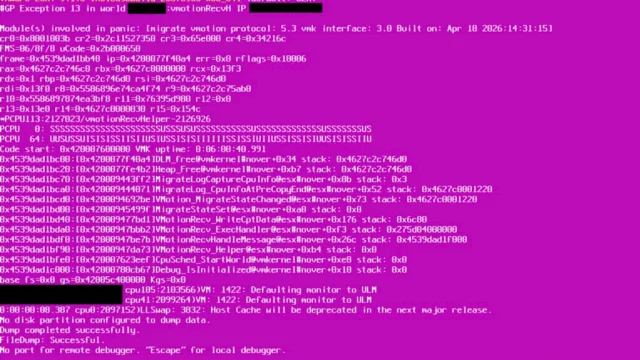
ESX 9.1 hosts can PSOD with #GP Exception 13 in world ###:vmotionRecvH during vMotion. A statistics tracking defect overflows a buffer once vMotion uses more than 16 stream helpers, which is what you get with several 25 or 100 GbE vMotion uplinks (four 100 GbE uplinks give 28). The default 0 lets ESX pick the number, so the cap has to be explicit. I wrote this one up in detail in PSOD #GP Exception 13 in vmotionRecvH on ESX 9.1.
esxcli system settings advanced set -o /Migrate/VMotionStreamHelpers -i 16
esxcli system settings advanced list -o /Migrate/VMotionStreamHelpers
VSAN.zDOMUnmapTimeoutMsec and zDOMUnmapMaxTimeoutMsec = 1 (KB 453944, KB 458794)
On vSAN ESA, small-block rewrite workloads combined with guest TRIM/UNMAP cause read and write latency spikes from 400 ms to over 2 seconds (KB 453944). KB 458794 is the nastier variant: a burst of UNMAP fills all 64 PVSCSI queue slots while vSAN throttles them, so the guest stalls, VMware Tools heartbeats time out and databases freeze, although vSAN write latency looks fine. Both KBs give the same pair of hidden options on every host in the cluster, and both ask you to open a case.
esxcfg-advcfg -s 1 /VSAN/zDOMUnmapTimeoutMsec
esxcfg-advcfg -s 1 /VSAN/zDOMUnmapMaxTimeoutMsec
esxcfg-advcfg -g /VSAN/zDOMUnmapTimeoutMsec
VSAN.DOMNetworkSchedulerThrottleComponent = 1, 10 GbE only (KB 410662, KB 372309)
On vSAN ESA over 10 GbE, resync after maintenance mode, rebalance or a policy change can take far more than the 20% Adaptive Resync target and push guest latency up. Setting this hidden option to 1 on every host lets the scheduler balance resync and VM traffic again. KB 410662 is explicit: do not set it on 25 GbE or faster. The two KBs disagree on the fix: KB 372309 says 9.1 resolves it natively, KB 410662 says no released version has an automated fix yet. On 9.1 with 10 GbE, check your own resync latency before you remove it.
esxcfg-advcfg -s 1 /VSAN/DOMNetworkSchedulerThrottleComponentMem.ShareCOSBufSize = 32 (KB 318766)
An old one that still applies to ESX 9.x. A VM that asks for a larger VMX device allocation (SVGA, 3D) can overflow the P2M buffer while shared pages are broken up. The VM powers off with reservation failed after max retries or loses its network adapter after vMotion, and NSX Edge VMs are a known victim. 32 is the maximum (default 5, range 2 to 32). No host reboot is needed, but the value only applies to VMs powered on or migrated onto the host afterwards, so evacuate the host first.
esxcli system settings advanced set -o /Mem/ShareCOSBufSize -i 322. Undo a bad value: the default was right
This group is the most common in my list and the cheapest to prevent. In every case something moved the setting away from its default (a script, a graceful shutdown that did not finish, an old hardening baseline) and the KB just says: put it back.
VSAN.IgnoreClusterMemberListUpdates back to 0 (KB 413293, KB 451271)
A newly added host shows as partitioned even though vmkping works. With this option at 1 the existing hosts ignore the unicast member list that vCenter pushes, so they never learn about the new host. It is typically set during a manual unicast recovery and then forgotten. KB 461005 (vSAN data-in-transit encryption) also checks it as one of the first steps.
esxcfg-advcfg -g /VSAN/IgnoreClusterMemberListUpdates
esxcfg-advcfg -s 0 /VSAN/IgnoreClusterMemberListUpdates
VSAN.DOMPauseAllCCPs back to 0 (KB 454324)
The vSAN graceful shutdown sets this to 1 to pause component I/O. If the restart path does not reset it, the datastore stays paused, the management VMs drift in time, JWT tokens expire and VCF Operations shows a blank Fleet view, 502/503 errors and Unable to fetch license. Check it after every cluster power-on.
esxcfg-advcfg -g /VSAN/DOMPauseAllCCPs
esxcfg-advcfg -s 0 /VSAN/DOMPauseAllCCPs
Migrate.Enabled back to 1 (KB 447181)
Hot migration is disabled in vmkernel on host in VCF 9.1 means the migrate module was administratively disabled. The KB checks it with vsish and fixes it there or in Advanced System Settings, then restarts hostd and vpxa.
vsish -e get /config/Migrate/intOpts/Enabled
vsish -e set /config/Migrate/intOpts/Enabled 1
/etc/init.d/hostd restart && /etc/init.d/vpxa restart
Security.PasswordMaxDays = 9999 (KB 454682)
This is the odd one, because the “bad” value is the shipped default. In the 9.0.1 data the default is 99999, which means never expire, and KB 454682 says vCenter cannot validate that value: VCF Operations host upgrades fail with PASSWORD_VALIDATION_EXECUTION_FAILED. The KB fix is 9999 days (about 27 years, so still effectively no expiry) plus checking that the password SDDC Manager stores matches the real one. The setting is API only, so use the vSphere Client or PowerCLI rather than esxcli.
Get-VMHost | Get-AdvancedSetting -Name Security.PasswordMaxDays |
  Set-AdvancedSetting -Value 9999 -Confirm:$false
Security.PasswordQualityControl with five min values (KB 449751)
Any password change, root included, fails with pam_passwdqc: Error parsing parameter “min=…” when the min= list does not have exactly five comma-separated values. It usually comes from a hand-written hardening value. Fix it in Advanced System Settings, not in /etc/pam.d/passwd, which does not survive a reboot. The default is retry=3 min=disabled,disabled,disabled,7,7; the KB example for a 15-character minimum is retry=3 min=disabled,disabled,disabled,disabled,15. The key is API only (it is not in esxcli system settings advanced list), so on the host use vim-cmd, which goes through hostd like the vSphere Client.
# on the host over SSH: read the value and the PAM line it generates
vim-cmd hostsvc/advopt/view Security.PasswordQualityControl
grep passwdqc /etc/pam.d/passwd

# set five min values (here: 15 characters minimum)
vim-cmd hostsvc/advopt/update Security.PasswordQualityControl string "retry=3 min=disabled,disabled,disabled,disabled,15"

# test it: the password change must no longer fail with "Error parsing parameter"
passwd root
Or for all hosts with PowerCLI:
Get-VMHost | Get-AdvancedSetting -Name Security.PasswordQualityControl |
  Select-Object @{n='Host';e={$_.Entity.Name}}, Value

Get-VMHost | Get-AdvancedSetting -Name Security.PasswordQualityControl |
  Set-AdvancedSetting -Value 'retry=3 min=disabled,disabled,disabled,disabled,15' -Confirm:$false
3. Opt-in features: off by default on purpose
NFS.UnmapEnabled = 1 (KB 401327)
vSphere 9.0 added guest Unmap for NFSv3 datastores through the VAAI-NAS plugin. It is disabled by default and only works on thin disks, with a vendor plugin that supports Unmap, and only while the VM has no snapshots. NFSv4.1 is not supported in 9.0. Two tuning options come with it: /NFS/UnmapBatchWindowTimeoutMs (default 5 ms, range 2 to 100) and /NFS/UnmapMaxQueueDepth. Guests that do not see Unmap after you enable it need a reboot to query the disk again.
esxcfg-advcfg -g /NFS/UnmapEnabled
esxcfg-advcfg -s 1 /NFS/UnmapEnabled
Mem.TierNvmePct, 1 to 400 (KB 458653)
After you configure Memory Tiering on an NVMe device, Tier 1 shows exactly the DRAM size. That is expected: the default is 100% of DRAM and you can raise it to 400%. Broadcom recommends keeping 100 unless you have checked that the active memory of your workloads fits in DRAM. In 9.1 the supported way is esxcli memtier rather than the raw advanced setting.
esxcli memtier config set --tier-size-pct 200Migrate.NetTimeout, 1 GbE only (KB 375717)
On 1 GbE vMotion networks large migrations can time out. Among the mitigations, the KB suggests raising Migrate.NetTimeout (default 20 seconds) to around 300 and lowering Migrate.NetRetries. The real fix in the same KB is 10 GbE and a dedicated vMotion stack, so treat the timeout as a stopgap.
4. Syslog, shell warning and other “it does not do what you think” cases
Syslog.global.logHost and ?formatter=RFC-1364 (KB 453058, KB 453703, KB 414852)
ESX 9.x appends ?formatter=RFC-1364 to the syslog target. Aria Operations for Logs 8.x does not understand it and raises a daily vCenter auto-configuration failed alert (KB 453058): disable automatic host configuration in Logs and remove the suffix. Two related KBs fail on the same key for other reasons: in VCF 9.1 with Log Assist the update task fails until you restart vmsyslogd on each host (KB 453703), and if the syslog target is an FQDN the host cannot resolve, every update fails with Internal error (KB 414852).
esxcli system syslog config get
/etc/init.d/vmsyslogd restart
UserVars.SuppressShellWarning = 1 does not hide the Host Client banner (KB 453654)
Known issue without a workaround: the shell warning on the Host Client summary page stays even with the setting at 1. Do not waste time re-applying it.
esxcli system settings advanced list -o /UserVars/SuppressShellWarning
esxcli system settings advanced set -o /UserVars/SuppressShellWarning -i 1
tty1Port = com1 and the Jumpstart message (KB 452737)
If tty1 is redirected to a serial port, the boot console shows Jumpstart plugin restore-configuration-files activation failed because the keymap cannot load. The KB calls it expected and harmless. Set it back to default if the serial redirect was temporary.
esxcli system settings kernel list -o tty1Port
esxcli system settings kernel set -s tty1Port -v default
# kernel settings take effect after a reboot
5. Kernel and boot options: install and recovery time
execInstalledOnly stays TRUE (KB 312109)
With an encrypted host configuration bound to the TPM, ESX refuses to boot after a board, TPM or disk change, or when execInstalledOnly no longer matches the value it was sealed with. Keep it TRUE, check TPM 2.0 and UEFI Secure Boot are unchanged, and if the TPM really was replaced, recover with the recovery key as a boot option. Get that key now, while the host is healthy. KB 410638 adds a trap: a mistyped trailing “O” in bootUUID (from repeated Shift+O) leaves the host asking for the key on every boot and unable to save its configuration.
esxcli system settings kernel list -o execInstalledOnly
esxcli system settings encryption recovery list
bootOption -poC
systemMediaSize: only default and max in ESX 9 (KB 345195)
In 7.x and 8.x the installer boot option accepted min (33 GB), small (69 GB), the default 138 GB and max. ESX 9.0 keeps only default (138 GB) and max. Old kickstart files or USB images with systemMediaSize=small need to be updated before you reinstall hosts for VCF 9. Add it with Shift+O at the installer or in the kernelopt line of boot.cfg.
# installer: press Shift+O within 5 seconds and append
systemMediaSize=max

# or in boot.cfg of the install media (keep the options already on the line)
kernelopt=runweasel cdromBoot systemMediaSize=max

# after the install: check the size of the OSDATA volume
esxcli storage filesystem list | grep -i osdata
VCF 9: set them through vSphere Configuration Profiles
Most VCF 9 workload domains manage hosts with vSphere Configuration Profiles. A value you set on one host with esxcli is then drift, and remediation puts the profile value back. KB 424082 maps every advanced setting to its profile path (for example Cpu.CoschedCostopThreshold becomes esx > advanced_options > cpu > cosched_costop_threshold). Settings marked NA there have no profile equivalent and stay per-host. The hidden vSAN options are not in that list, so for those, script the change and re-check after host remediation or reimaging.
Audit your hosts in two minutes
The visible settings in one PowerCLI call across all hosts:
$keys = 'Migrate.VMotionStreamHelpers','Mem.ShareCOSBufSize','Migrate.Enabled','Migrate.NetTimeout',
        'Mem.TierNvmePct','Security.PasswordMaxDays','Security.PasswordQualityControl',
        'Syslog.global.logHost','UserVars.SuppressShellWarning'
Get-VMHost | Get-AdvancedSetting -Name $keys |
  Select-Object @{n='Host';e={$_.Entity.Name}}, Name, Value |
  Sort-Object Name, Host | Format-Table -AutoSize
The hidden ones on each host over SSH:
for o in /VSAN/IgnoreClusterMemberListUpdates /VSAN/DOMPauseAllCCPs \
         /VSAN/zDOMUnmapTimeoutMsec /VSAN/zDOMUnmapMaxTimeoutMsec \
         /VSAN/DOMNetworkSchedulerThrottleComponent /NFS/UnmapEnabled; do
  esxcfg-advcfg -g $o
done
esxcli system settings kernel list -o execInstalledOnly
Anything that differs from the default should map to a KB from the table above. If it does not, somebody owes you an explanation.
FAQ
Four reasons: to work around a defect until a patch ships (Migrate.VMotionStreamHelpers for the ESX 9.1 vmotionRecvH PSOD, the vSAN ESA UNMAP and 10G resync options), to put back a value a script or shutdown changed (VSAN.IgnoreClusterMemberListUpdates, VSAN.DOMPauseAllCCPs, Migrate.Enabled), to enable an opt-in feature (NFS.UnmapEnabled, Mem.TierNvmePct) and to set boot options at install or recovery time (systemMediaSize, execInstalledOnly).
They are hidden options. They are not in the list the vSphere API returns for ESX 9.0.1, so the vSphere Client does not show them. Read and set them on the host with esxcfg-advcfg -g and -s, for example esxcfg-advcfg -g /VSAN/DOMPauseAllCCPs. The vDan ESXi settings explorer lists them as hidden options with the Broadcom KB as the source.
Yes, for the defect workarounds. Migrate.VMotionStreamHelpers=16, the vSAN zDOMUnmap timeouts and DOMNetworkSchedulerThrottleComponent exist only until a fix ships. Record the KB number with the change and return the setting to its default once the release notes list the fix.
According to KB 454682, yes: vCenter cannot validate 99999 (never expire), so VCF Operations host upgrades fail with PASSWORD_VALIDATION_EXECUTION_FAILED. Set it to 9999 and check that the password SDDC Manager stores matches the real one.
Related on vDan
- ESXi Advanced and Kernel Settings Explorer: defaults, ranges and history for every visible setting since ESXi 6.0
- ESXi Advanced and Kernel Settings in ESXi 8.x: what 25 Broadcom KBs change and why
- William Lam’s ESXi advanced and kernel settings: 21 lab recommendations
- ESX 9.1 vMotion PSOD in vmotionRecvH (KB 455306)
- VCF 9.1.1 known issues: October 2026 KB roundup
- ESXCLI changes in ESX 9.0 and 9.1