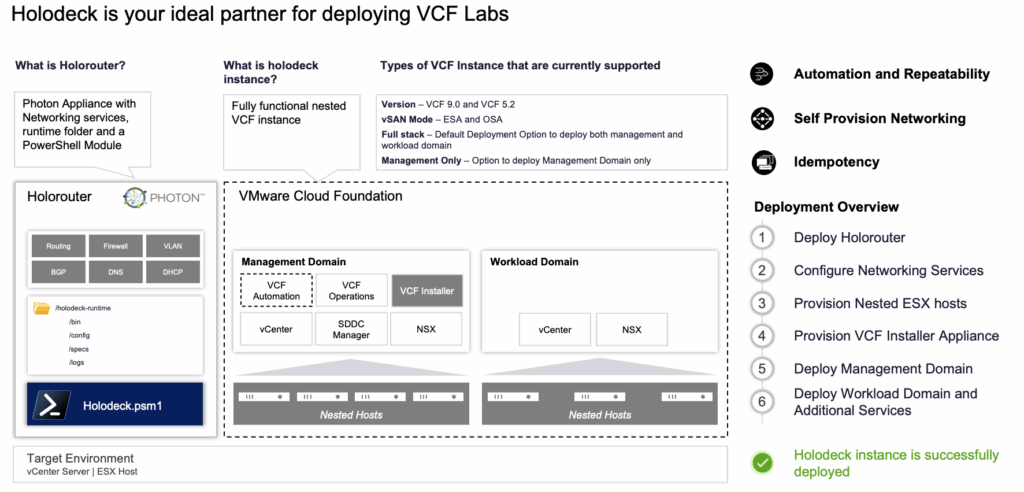
Short answer: Holodeck is VMware’s free toolkit for deploying a nested VCF lab. A Holodeck VCF 9 lab runs on a single ESX host or on a vSphere cluster. The current release, Holodeck 9.1, deploys VCF 9.1.0.0, 9.0.x and 5.2.x, plus VVF. You download the HoloRouter OVA from the Broadcom Support Portal and upload the VCF Installer and ESX binaries to it. Then you run New-HoloDeckConfig and New-HoloDeckInstance in PowerShell on HoloRouter. It is a lab tool only; VMware does not support it.
Holodeck VCF 9: which release deploys which VCF version
The table below is taken from the official Holodeck release notes. Each release lists the minimum ESX version for the physical host.
| Holodeck release | Released | VCF versions it deploys | Minimum ESX on target |
|---|---|---|---|
| 9.1 | 2026 (release notes: May 2026) | 9.1.0.0, 9.0.2.0, 9.0.1.0, 9.0.0.0, 5.2.4, 5.2.3, 5.2.2, 5.2.1, 5.2 (plus VVF 9.x) | 8.0 U3 |
| 9.0.2 | February 2026 | 9.0.2.0, 9.0.1.0, 9.0.0.0, 5.2.2, 5.2.1, 5.2 | 8.0 U3 |
| 9.0.1 | October 2025 | 9.0.1.0, 9.0.0.0, 5.2.2, 5.2.1, 5.2 | 8.0 U3 |
| 9.0 | June 2025 | 9.0, 5.2.x | 8.0 U3 |
Version notes from the docs:
- For VCF 9.0.0.0, 9.0.1.0 and 9.0.2.0, the docs recommend VCF Installer 9.0.2.0. VCF Installer 9.0.0.0 is no longer supported for nested deployments.
- If you want 9.1.0.0, use VCF Installer 9.1.0.0.
- Starting with 9.0.2,
-InstanceIDis mandatory. The Day 2 tasks that used to run with-Interactivenow live inUpdate-HoloDeckInstance.
What is HoloRouter?
HoloRouter is a Photon OS appliance, delivered as an OVA, and it is the backbone of every Holodeck lab. The Holodeck PowerShell module comes built into it. HoloRouter provides these services to the nested environment:
- DNS, DHCP and NTP
- L3 routing between the nested VLANs and a firewall
- BGP peering with the NSX Tier-0 gateway
- A proxy for the VCF Installer
- Job scheduling
- An optional webtop desktop on port 30000 of the management IP
Holodeck 9.1 adds several services, all on the fixed vcf.lab domain behind HTTPS: Technitium DNS, HashiCorp Vault, Authentik SSO, an internal CA, and an optional GitLab (“Enable GitOps”) that can trigger deployments from a pipeline.
Default networking uses the 10.1.0.0/20 range for Site A and 10.2.0.0/20 for Site B. The VLANs are 0 and 10–25 for Site A and 40–58 for Site B. You can pass your own /20 CIDR, a VLAN start value and a DNS domain instead. The deployment runs against a centralized JSON config and is idempotent: if it fails, you rerun the same command and it continues where it stopped.
VCF 9 home lab requirements for Holodeck
These are the recommended physical host resources from the official pre-requisites. Holodeck 9.1 applies soft validation: it warns you instead of blocking when you are below them.
| Target | Single site CPU / RAM / disk | Dual site CPU / RAM / disk |
|---|---|---|
| VCF 9.1 | 48 / 650 GB / 2.2 TB | 96 / 1.5 TB / 5 TB |
| VCF 9.0 (VCF Automation, vSAN OSA) | 24 / 325 GB / 1.1 TB | 48 / 768 GB / 2.5 TB |
| VCF 9.0 (VCF Automation, vSAN ESA) | 32 / 325 GB / 1.1 TB | 64 / 768 GB / 2.5 TB |
| VVF 9.1 | 24 / 512 GB / 2 TB | 48 / 1 TB / 4 TB |
| VVF 9.0 | 12 / 256 GB / 1 TB | 24 / 512 GB / 2 TB |
| VCF 5.2 | 16 / 384 GB / 2 TB | 32 / 1 TB / 4 TB |
Other requirements from the docs:
- Target: a stand-alone ESX host or a vCenter-managed cluster. vSphere 8.0 U3 and 9.0 are tested. Use SSD/NVMe storage and have NTP running on every target host.
- Switch: MTU 9000 on the vSS, vDS or NSX segment.
- Port group: a dedicated trunk port group (VLAN 4095 on a vSS) with Promiscuous mode, MAC address changes and Forged transmits set to Accept. An NSX overlay segment with matching segment profiles also works.
- HoloRouter: 6 vCPU, 12 GB RAM and 75 GB disk, plus one external IP per Holodeck environment.
- Memory tiering: not recommended for nested labs.
- Licensing: VCF 9.x runs in “License Later” mode for 90 days (60 days for 5.2.x). After that you must license or redeploy.
Holodeck 9.0 / 9.1 deployment flow
- Download. Get the HoloRouter OVA (and optionally the Offline Depot OVA) from the Holodeck product files on the Broadcom Support Portal. The docs say you must be signed in with an entitled account. The VCF Installer OVA and the ESX ISO come from the VCF downloads and need a Broadcom account with VCF entitlement.
- Deploy HoloRouter. Deploy the OVA to the ESX host or the vCenter. Connect one external port group for management and the trunk port group for Site A/B. Set the password, and enable SSH and webtop if you want them.
- Stage the binaries. Copy the binaries into the matching version folder, for example
/holodeck-runtime/bin/9.0.2.0/or/holodeck-runtime/bin/9.1.0.0/. - Create a config and deploy. SSH to HoloRouter and run the commands shown below.
scp /<local-path>/<ESX ISO File Name> root@<Holorouter-IP>:/holodeck-runtime/bin/9.0.2.0/
scp /<local-path>/<VCF Installer OVA File Name> root@<Holorouter-IP>:/holodeck-runtime/bin/9.0.2.0/
ssh root@<holorouter-ip>
pwsh
New-HoloDeckConfig -Description <Description> -TargetHost <vCenter/ESX IP or FQDN> -Username <user> -Password <password>
New-HoloDeckInstance -Version "9.0.2.0" -InstanceID <id> -ManagementOnly -vSANMode OSA
If you leave out -ManagementOnly, you get a full stack: a 4-host management domain plus a 3-host workload domain. Optional switches add more components:
-NsxEdgeClusterMgmtDomainadds an NSX Edge cluster in the management domain.-DeployVcfAutomationdeploys VCF Automation.-DeploySupervisorMgmtDomainor-DeploySupervisorWkldDomaindeploys a Supervisor.-DepotType Offlineuses the offline depot.-ProvisionOnlydeploys only the nested hosts and the VCF Installer, for a manual greenfield install. For that manual install, my VCF Installer JSON spec builder builds and validates the deployment spec for VCF 9.0, 9.1 and 9.1.1 in the browser.-VVFdeploys VVF instead of VCF.
In a new PowerShell session, reload the config with Get-HoloDeckConfig and then Import-HoloDeckConfig -ConfigId <id> -Site a. In 9.1, -Site is mandatory. Use one config per deployment.
Known issues worth knowing before you start
- Pre-check error “No trunk port groups found”. Create the trunk port group (VLAN 4095 plus the three security settings) and rerun the check.
- Pre-check error “NTP service is not running on target host”. Configure and start NTP on the physical host.
- DNS resolution fails during deployment. This happens if you gave HoloRouter an upstream DNS server as an FQDN instead of an IP address. Use an IP. The release notes include a DNSMASQ ConfigMap fix.
- VVF 9.0.0.0 with VCF Installer 9.0.2.0 fails at “Generate Workload Domain Runtime Data Model”. Download the vCenter 9.0.2.0 bundle as well, then resume.
- VCF 5.2.x ends with “No route to host” at Sync-HolodeckComponents. You can ignore it; VCF 5.2 has no VCF Operations to query.
- vSAN ESA uses more nested storage than expected. Plan disk space above the minimum.
- Older 9.0/9.0.1 issues are fixed in 9.0.2. These include the expired NSX Edge OVF certificate (Broadcom KB 424034) and “Validate NSX Install Image is Available”. Use the current release.
I hit a different problem myself: Holodeck 9.0.2 stuck at the VCF Installer bundle step. The fix is in the related post below.
Holodeck was presented at VMware Explore 2025 in session CODEQT1247LV, “Automagically Deploy VMware Cloud Foundation 9.0 in Homelab Using VMware Cloud Foundation Holodeck Toolkit”:
Sources
- Official Holodeck documentation: Getting Started
- Holodeck Release Notes (9.1, 9.0.2, 9.0.1, 9.0, known issues)
- Holodeck Downloads (links to the Broadcom Support Portal)
- Holodeck FAQ (pre-check errors)
- GitHub: vmware/Holodeck
- VMware VCF blog: Announcing the General Availability of Holodeck 9.1
- Broadcom KB 424034 (NSX Edge OVF certificate expired)