Short answer: the NVIDIA Tesla P40 is a 2016 Pascal data-center GPU with 24 GB GDDR5, a 250 W power limit and a dual-slot, 10.5-inch PCIe Gen3 card with no fan of its own. It’s one of the cheapest ways to get 24 GB of VRAM for local LLMs in a homelab. It runs fine with ESXi PCIe passthrough and in my tests was 16–26× faster than the CPU in llama.cpp. The catch in 2026: CUDA 13 no longer targets Pascal, so you stay on CUDA 12.x.
Tesla P40 specifications
| Architecture / GPU | Pascal, GP102 |
| CUDA cores | 3,840 |
| Compute capability | 6.1 |
| Memory | 24 GB GDDR5, 384-bit |
| Max power | 250 W |
| Form factor | Dual-slot, 10.5-inch, full height, PCI Express Gen3 x16 |
| Cooling | No fan: designed for server airflow |
| INT8 inference | 47 TOPS |
Source: NVIDIA Tesla P40 datasheet; compute capability as reported by CUDA in the benchmark output below.
Why I picked the P40
For Private AI in HomeLAB, I was searching for budget-friendly GPUs with a minimum of 24GB RAM. Recently, I came across the refurbished NVIDIA Tesla P40 on eBay, which boasts some intriguing specifications:
- GPU Chip: GP102
- Cores: 3840
- TMUs: 240
- ROPs: 96
- Memory Size: 24 GB
- Memory Type: GDDR5
- Bus Width: 384 bit

Fitting and cooling the P40 in a homelab
Since the NVIDIA Tesla P40 comes in a full-profile form factor, we needed to acquire a PCIe riser card.
A PCIe riser card, commonly known as a “riser card,” is a hardware component essential in computer systems for facilitating the connection of expansion cards to the motherboard. Its primary role comes into play when space limitations or specific orientation requirements prevent the direct installation of expansion cards into the PCIe slots on the motherboard.
Furthermore, I needed to ensure adequate cooling, but this posed no issue. I utilized a 3D model created by MiHu_Works for a Tesla P100 blower fan adapter, which you can find at this link: Tesla P100 Blower Fan Adapter.
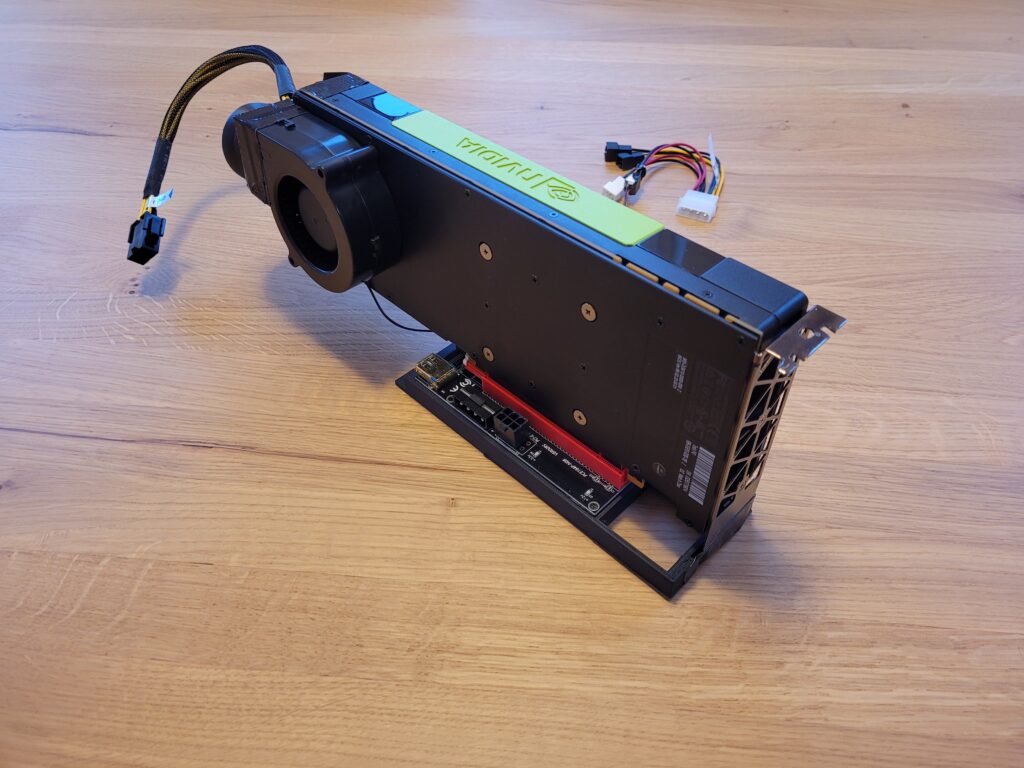
As for the fan, the Titan TFD-B7530M12C served the purpose effectively. You can find it on Amazon: Titan TFD-B7530M12C.
ESXi PCIe passthrough settings
Currently, I am using a single VM with PCIe pass-through. However, it was necessary to implement specific Advanced VM parameters:
pciPassthru.use64bitMMIO = truepciPassthru.64bitMMIOSizeGB = 64
If the P40 later disappears from the VM and nvidia-smi can no longer reach the driver, see Tesla P40 passthrough GPU disappears: “PCIe link to the device is down”. A VM reboot doesn’t help there; only a host reboot brings the card back.
llama.cpp benchmark: P40 vs CPU
Now, you might wonder about the performance. It’s outstanding, delivering speeds up to 16x-26x times faster than the CPU. To provide you with an idea of the performance, I conducted a llama-bench test:
| pp 512 | CPU t/s | GPU t/s | Acceleration |
| llama 7B mostly Q4_0 | 9.50 | 155.37 | 16x |
| llama 13B mostly Q4_0 | 5.18 | 134.74 | 26x |
./llama-bench -t 8
| model                          |       size |     params |
| ------------------------------ | ---------: | ---------: |
| llama 7B mostly Q4_0           |   3.56 GiB |     6.74 B |
| llama 7B mostly Q4_0           |   3.56 GiB |     6.74 B |
| backend    |    threads | test       |              t/s |
| ---------- | ---------: | ---------- | ---------------: |
| CPU        |          8 | pp 512     |      9.50 ± 0.07 |
| CPU        |          8 | tg 128     |      8.74 ± 0.12 |
./llama-bench -ngl 3800
ggml_init_cublas: GGML_CUDA_FORCE_MMQ: no
ggml_init_cublas: CUDA_USE_TENSOR_CORES: yes
ggml_init_cublas: found 1 CUDA devices:
Device 0: Tesla P40, compute capability 6.1
| model | size | params |
| ------------------------------ | ---------: | ---------: |
| llama 7B mostly Q4_0 | 3.56 GiB | 6.74 B |
| llama 7B mostly Q4_0 | 3.56 GiB | 6.74 B |
| backend | ngl | test | t/s |
| ---------- | --: | ---------- | ---------------: |
| CUDA | 3800 | pp 512 | 155.37 ± 1.26 |
| CUDA | 3800 | tg 128 | 9.31 ± 0.19 | ./llama-bench -t 8 -m ./models/13B/ggml-model-q4_0.gguf
| model | size | params |
| ------------------------------ | ---------: | ---------: |
| llama 13B mostly Q4_0 | 6.86 GiB | 13.02 B |
| llama 13B mostly Q4_0 | 6.86 GiB | 13.02 B |
| backend | threads | test | t/s |
| ---------- | ---------: | ---------- | ---------------: |
| CPU | 8 | pp 512 | 5.18 ± 0.00 |
| CPU | 8 | tg 128 | 4.63 ± 0.14 |./llama-bench -ngl 3800 -m ./models/13B/ggml-model-q4_0.gguf
ggml_init_cublas: GGML_CUDA_FORCE_MMQ: no
ggml_init_cublas: CUDA_USE_TENSOR_CORES: yes
ggml_init_cublas: found 1 CUDA devices:
Device 0: Tesla P40, compute capability 6.1
| model | size | params |
| ------------------------------ | ---------: | ---------: |
| llama 13B mostly Q4_0 | 6.86 GiB | 13.02 B |
| llama 13B mostly Q4_0 | 6.86 GiB | 13.02 B |
| backend | ngl | test | t/s |
| ---------- | --: | ---------- | ---------------: |
| CUDA | 3800 | pp 512 | 134.74 ± 1.29 |
| CUDA | 3800 | tg 128 | 8.42 ± 0.10 |Feel free to explore this setup for your Private AI in HomeLAB.
Is the Tesla P40 still worth it in 2026?
- CUDA: CUDA Toolkit 13.0 removed offline compilation and library support for Maxwell, Pascal and Volta. You can keep building for the P40 with CUDA 12.x, but newer toolkits can’t target it (CUDA 13.1 release notes).
- Still good for: running quantized models that need a lot of VRAM on a budget, where 24 GB matters more than raw speed.
- Plan for: power (250 W) and your own airflow, because the card has no fan.
Related: vGPU management in VMware environments.