Short answer: this is the ESXi 7.x and 8.x companion to my VCF 9 list of KB-driven ESX settings. I went through the Broadcom KB articles for ESXi 7.0 and 8.0 (and vSAN 7 and 8) that tell you to change an advanced or kernel setting and that the VCF 9 post does not already cover. There are 25 of them. They fall into six groups: workarounds for a defect (AMD Zen NUMA migration, NVIDIA passthrough, memory tiering, two vSphere Replication bugs), tuning under load (VMXNET3 receive queues, NetApp NFS queue depth, the vsanmgmtd memory cap), vSAN switches you set temporarily or find left behind, lifecycle and host configuration leftovers, logging, and two settings that do not fix what they look like they should. Each one has the default from the ESXi 8.0 U3g data, the KB value, the reason, the command and a link to the ESXi Advanced and Kernel Settings Explorer.
If your hosts run VCF 9, read the VCF 9 post first; several settings there (vMotion stream helpers, vSAN ESA UNMAP, Security.PasswordMaxDays) also matter on 8.0 U3. For lab-only tweaks, see William Lam’s ESXi advanced and kernel settings.
How I found them
I searched the Broadcom knowledge base for articles that apply to ESXi 7.x, ESXi 8.x, vSAN 7.x or vSAN 8.x and that name an ESX advanced or kernel setting or run esxcli system settings advanced|kernel, esxcfg-advcfg or vsish. I checked every setting against the ESXi 8.0 U3g data in the explorer, left out the KBs already in the VCF 9 post, dropped the ones that only mention a setting in passing, confirmed that all 25 still open on the public portal and read them in full.
Five of the settings are hidden: HBR.UnmapDeltaSyncQueueSize, HBR.ChecksumRegionMaxReadAhead, VSAN.VsanMgmtdMaxMemoryInMB, VSAN.DomCompResyncThrottle and UserVars.ImageCachedSystem are not in the 8.0 U3g list the vSphere API returns. I added them to the explorer as hidden options with the KB as the source, next to the vSAN hidden options from the VCF 9 post.
All settings at a glance
Click a setting name to open it in the ESXi Advanced and Kernel Settings Explorer at ESXi 8.0 U3g, with its description, default, range and history across releases. The Change column shows the value you start from and the value the KB asks for.
| Setting (explorer) | Change | Why | KB |
|---|---|---|---|
Numa. | 1 → 0 | AMD Zen VMs crash with a double fault details | KB 396667 |
enablePCIEHotplugkernel | TRUE → FALSE | NVIDIA GPU passthrough VM fails to power on details | KB 384765 |
VMkernel. | TRUE → FALSE | PVSCSI hot-add fails with memory tiering on 8.0 U3 details | KB 440292 |
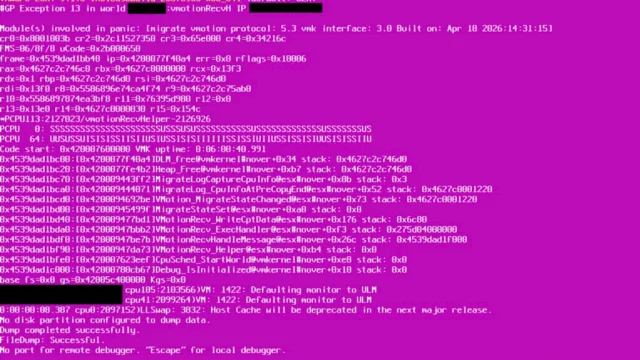
HBR.hidden option | → 0 | PSOD #PF Exception 14 in hbr_filter details | KB 460948 |
HBR.hidden option | → 0 | VM hangs during replication full sync details | KB 447828 |
Net.Net. | 256 → 512 / 1024 | VMXNET3 packet loss in bursts details | KB 427211 |
NFS.NFS41.Net. | unlimited → 64, heap 8 → 32 | APD and NetPort lock failures with NetApp NFS details | KB 439931 |
VSAN.hidden option | 204 → 270 | vsanmgmtd MemoryError in high-resolution stats details | KB 460027 |
VSAN. | 0 → 1, then back | snapshots fail after a controller failure details | KB 398995 |
VSAN.hidden option | → 0 | Resync Operations Throttling alarm details | KB 326963 |
VSAN.hidden option | 1 → 0 | maintenance mode stops at 87% details | KB 403613 |
VSAN.hidden option | 0 → 1 → 0 | set during cluster rebuilds, reset for encryption details | KB 452604 KB 320790 KB 447409 |
VSAN.hidden option | 1 (OSA) | Windows TRIM does not free vSAN space details | KB 461102 |
UserVars.hidden option | stateless → removed | unsupportedPXEHost after stateless to stateful details | KB 460241 |
ScratchConfig. | NFS → local VMFS | Lifecycle Manager scan hangs at 55% details | KB 460149 |
execInstalledOnlykernel | TRUE → FALSE (7.0) | baseline upgrade fails with execInstalledOnly details | KB 318467 |
DCUI. | users must exist | host profile fails at 22% details | KB 306411 |
Config. | info → verbose, then back | more hostd detail for a case details | KB 403966 KB 316627 |
Syslog.Syslog. | set a target | remote syslog and persistent logs details | KB 318939 KB 451275 |
Net. | keep 60 | NIC taken down by link flapping details | KB 324499 |
Net. | does not help | slow NFC/NBDSSL backups on port 902 details | KB 461601 |
“Hidden option” means the option exists on the host but the vSphere API does not list it, so the vSphere Client does not show it. Read and set those with esxcfg-advcfg or esxcli system settings advanced list/set -o on the host; the explorer shows them with a hidden badge and the KB they come from.
1. Workarounds for a defect: set it, then remove it after the fix
Each of these KBs describes a bug and gives a setting that avoids it until a patch ships. Note the KB number on the host or cluster, so the setting gets removed after the fixed build is installed.
Numa.MonMigEnable = 0 on AMD Zen hosts (KB 396667)
Windows or Linux VMs on AMD Zen hosts can crash with a double fault because of a rare race condition while the hypervisor migrates a VM’s internal data between NUMA nodes. It affects ESXi 7.0 U2 and later, including 8.0 U3; ESX 9.1 is not affected, and an 8.0 U3 fix is planned. No reboot is needed. Broadcom quotes a possible performance impact of up to 5%.
esxcli system settings advanced set -o /Numa/MonMigEnable -i 0
esxcli system settings advanced list -o /Numa/MonMigEnable
enablePCIEHotplug = FALSE for NVIDIA GPU passthrough (KB 384765)
A VM with an NVIDIA Tesla GPU in passthrough fails to power on with Module DevicePowerOn power on failed: the GPU reset at power-on raises PCIe hot-plug interrupts and the device is hot-removed. The workaround has two parts, the kernel setting and the reset method in /etc/vmware/passthru.map, followed by a host reboot. With the setting at FALSE, ESXi no longer enables hot-plug at boot even on hardware that supports it.
esxcli system settings kernel set -s enablePCIEHotplug -v FALSE
cp /etc/vmware/passthru.map /etc/vmware/passthru.map.bak
# in /etc/vmware/passthru.map change the NVIDIA line
#   10de ffff bridge false   ->   10de ffff default false
# reboot, then check
esxcli system settings kernel list -o enablePCIEHotplug
VMkernel.Boot.memoryTiering = FALSE when PVSCSI hot-add fails (KB 440292)
On ESXi 8.0 U3 with Software Memory Tiering, hot-adding a PVSCSI controller fails with vim.fault.GenericVmConfigFault. The hot-add triggers Fast Suspend and Resume, which memory tiering does not support in vSphere 8.x; vSphere 9.0 adds that support. You can turn tiering off for one VM (powered off, sched.mem.enableTiering = "FALSE") or for the whole host (maintenance mode, kernel setting, reboot).
# per host (maintenance mode, reboot required)
esxcli system settings kernel set -s memoryTiering -v FALSE
esxcli system settings kernel list -o memoryTiering
HBR.UnmapDeltaSyncQueueSize = 0 against the hbr_filter PSOD (KB 460948)
Hosts running replicated VMs can PSOD with #PF Exception 14 in the hbr_filter module: an UNMAP request races with the completion of a Lightweight Delta sync and dereferences a NULL pointer. ESXi 8.0.3k does not fix it. The workaround stops the queuing of UNMAP requests on the host.
esxcli system settings advanced set -o /HBR/UnmapDeltaSyncQueueSize -i 0
esxcli system settings advanced list -o /HBR/UnmapDeltaSyncQueueSize
HBR.ChecksumRegionMaxReadAhead = 0 against replication hangs (KB 447828)
While vSphere Replication runs a full sync, VMs can hang during snapshot removal, power-off or restart, and replication reports No connection to VR Server: Disk size mismatch. A race between checksum throttling and full-sync cancellation deadlocks hbr_filter. The KB lists vSphere Replication 9.0 to 9.0.2.3 and VMware Live Recovery 9.0.4 to 9.0.5.1; the fix is planned for Protection and Recovery 9.1.2. Set it on every source and target host; no restart is needed.
esxcli system settings advanced set -o /HBR/ChecksumRegionMaxReadAhead -i 0
esxcli system settings advanced list -o /HBR/ChecksumRegionMaxReadAhead
2. Tuning under load: the default is too small for this workload
Net.Vmxnet3RxPollBound and Vmxnet3RxQueueBound (KB 427211)
VMs with VMXNET3 drop packets during traffic bursts even with the guest ring buffers at maximum, because the host-side receive queue (default 256) overflows. On ESXi 7.x one option controls both the batch and the queue; on 8.0 they are separate, and the KB recommends a queue twice the poll size. The vNIC only picks up the new values after a VM power cycle (shut down the guest, then power on).
esxcfg-advcfg --get /Net/Vmxnet3RxPollBound
esxcfg-advcfg --get /Net/Vmxnet3RxQueueBound

# ESXi 7.x
esxcfg-advcfg --set 512 /Net/Vmxnet3RxPollBound

# ESXi 8.0 and later
esxcfg-advcfg --set 1024 /Net/Vmxnet3RxQueueBound
esxcfg-advcfg --set 512 /Net/Vmxnet3RxPollBound
NFS.MaxQueueDepth = 64 and a larger TCP/IP heap for NetApp NFS (KB 439931)
On ESXi 8.0 with NetApp NFS (v3 or 4.1), a high queue depth can saturate the storage controller. The controller answers with TCP Zero Window, and the host logs NetPort lock and memory admission failures followed by APD events of 30 to 60 seconds. The KB caps the queue depth at 64 for both protocols and raises the TCP/IP heap; Net.TcpipHeapMax is already 1024 on 8.0 U3g, so only Net.TcpipHeapSize really changes (8 to 32). The reboot is mandatory.
esxcfg-advcfg -s 64 /NFS/MaxQueueDepth
esxcfg-advcfg -s 64 /NFS41/MaxQueueDepth
esxcfg-advcfg -s 32 /Net/TcpipHeapSize
esxcfg-advcfg -s 1024 /Net/TcpipHeapMax
# reboot the host
VSAN.VsanMgmtdMaxMemoryInMB = 270 (KB 460027)
With the vSAN Performance Service in High Resolution Mode and a large stats object, vsanmgmtd can exceed its memory cap (typically 204 MB) during rollups and crash with a MemoryError; vmkernel.log shows admission failures. Raise the cap on every host of the cluster and restart the service. The value survives reboots.
esxcfg-advcfg -g /VSAN/VsanMgmtdMaxMemoryInMB
esxcfg-advcfg -s 270 /VSAN/VsanMgmtdMaxMemoryInMB
/etc/init.d/vsanmgmtd restart
3. vSAN switches: set them briefly, or find them left behind
VSAN.ClomForceProvisionPlacements = 1, temporarily (KB 398995)
When a storage controller fails and a host has no usable devices left, the default policy needs three fault domains but finds two, and snapshots fail with Out of resources. Setting this option to 1 on all hosts lets vSAN place the objects anyway, which is risky: set it back to 0 as soon as the snapshot or backup is done, and get the controller repaired.
esxcfg-advcfg -s 1 /VSAN/ClomForceProvisionPlacements
# take the snapshot / run the backup, then
esxcfg-advcfg -s 0 /VSAN/ClomForceProvisionPlacements
VSAN.DomCompResyncThrottle = 0 (KB 326963)
The Resync Operations Throttling alarm means somebody set a manual resync bandwidth limit, often below 20 Mbps. Resyncs crawl, VM latency rises and snapshot deletions take hours, and the value can flip back and forth because vCenter tries to reset it. Turn throttling off at cluster level, where it persists, and on the host if it keeps coming back.
# cluster level (PowerCLI)
Get-Cluster -Name "Cluster01" | Get-VsanClusterConfiguration |
  Set-VsanClusterConfiguration -ResyncThrottlingMbps 0

# host level
esxcfg-advcfg -s 0 /VSAN/DomCompResyncThrottle
esxcli vsan resync throttle set --level=0
VSAN.DOMPauseAllCCPs back to 0 when maintenance mode stops at 87% (KB 403613)
The same option as in the VCF 9 post, with a different symptom on vSAN 8: entering maintenance mode fails at 87% with an internal vSAN error and some objects are inaccessible, because a host still has component I/O paused. Check every host, not just the one you are evacuating.
esxcfg-advcfg -g /VSAN/DOMPauseAllCCPs
esxcfg-advcfg -s 0 /VSAN/DOMPauseAllCCPs
VSAN.IgnoreClusterMemberListUpdates: 1 during a rebuild, 0 afterwards (KB 452604, KB 320790, KB 447409)
Two KBs set this option to 1 on purpose: recreating a vSAN cluster object when vCenter treats an ESA cluster as OSA (KB 452604), and rebuilding the FCD catalog for a CNS volume (KB 320790). With 1, vCenter cannot push a member list that removes hosts while you work. KB 447409 (encryption consistency warning) checks the opposite: it must be 0 before you remediate. The risk is the step in between: if it stays at 1, the next host you add shows as partitioned.
# before the rebuild, on all hosts
esxcfg-advcfg -s 1 /VSAN/IgnoreClusterMemberListUpdates
# after it, on all hosts
esxcfg-advcfg -s 0 /VSAN/IgnoreClusterMemberListUpdates
esxcfg-advcfg -g /VSAN/IgnoreClusterMemberListUpdates
VSAN.GuestUnmap and the TRIM checklist (KB 461102)
Deleting files in a Windows VM does not shrink vSAN usage until the whole chain works: Guest TRIM/UNMAP enabled on the cluster, VM hardware 11 or later, a supported SCSI controller, a storage policy that allows it and a full power cycle of the VM. The KB checks the host side with the hidden VSAN.GuestUnmap option; on vSAN ESA guest UNMAP is on by default. Do not run a large retrim on many VMs at once.
esxcli system settings advanced list -o /VSAN/GuestUnmap
# in Windows after the power cycle
Optimize-Volume -DriveLetter C -ReTrim -Verbose
4. Lifecycle and host configuration leftovers
UserVars.ImageCachedSystem after leaving Auto Deploy (KB 460241)
Hosts moved from Auto Deploy stateless caching to a stateful install keep ImageCachedSystem = "stateless", so vCenter compliance scans reject them with an unsupportedPXEHost fault. Remove the option (recommended) or set it to stateful, then rerun the scan.
esxcli system settings advanced remove -o ImageCachedSystem
esxcli system settings advanced list -o /UserVars/ImageCachedSystem
# expected: Unable to find option ImageCachedSystem
ScratchConfig.ConfiguredScratchLocation on local storage (KB 460149)
vSphere Lifecycle Manager compliance scans hang at 55% when the scratch location is on an NFS share with intermittent connectivity, locks or latency; lifecycle.log shows sqlite disk I/O error. Point scratch to an existing folder on a local VMFS datastore and reboot the host in maintenance mode.
mkdir /vmfs/volumes/local-ds01/.locker-esx01
vim-cmd hostsvc/advopt/update ScratchConfig.ConfiguredScratchLocation string /vmfs/volumes/local-ds01/.locker-esx01
# reboot in maintenance mode, then
vim-cmd hostsvc/advopt/view ScratchConfig.CurrentScratchLocation
execInstalledOnly = FALSE for baseline upgrades on 7.0 (KB 318467)
The opposite of the VCF 9 advice: with execInstalledOnly enforced, baseline-based (VUM) compliance and remediation fail on ESXi 7.0 because the upgrade agent is blocked. Image-based cluster management is not affected, so moving to images is the better fix. The KB workaround turns enforcement off, which needs an evacuated host and a reboot. Turn it back on after the upgrade.
esxcli system settings encryption set --require-exec-installed-only=False
esxcli system settings kernel set -s execInstalledOnly -v FALSE
# evacuate the host, reboot, run the upgrade
DCUI.Access users must exist on the target host (KB 306411)
A host profile fails at 22% with Error setting advanced options on the host when the reference host lists custom users in DCUI.Access (for example admin) that do not exist on the target; hostd logs vim.fault.UserNotFound. Create the missing users on the target host (Host Client, Manage > Security and Users, with shell access), then apply the profile again.
# on the reference host: which users does the profile carry?
vim-cmd hostsvc/advopt/view DCUI.Access
# on the target host: which local users exist?
esxcli system account list
5. Logging: raise it for a case, then put it back
Config.HostAgent.log.level and the hostd log rotation (KB 403966, KB 316627)
For a support case you may need hostd at verbose or trivia. Since 7.0 U2 the value lives in ConfigStore, so either change Config.HostAgent.log.level in the vSphere Client or edit hostd.json with configstorecli, then restart hostd. KB 316627 also covers the size and number of rotated files (Syslog.loggers.hostd.size, Syslog.loggers.hostd.rotate, where 0 uses the global syslog default). Broadcom warns that verbose and trivia levels cost performance: go back to info when the case is closed.
configstorecli config current get -c esx -g services -k hostd -outfile hostd.json
# edit "level" in the "log" section, then
configstorecli config current set -c esx -g services -k hostd -infile hostd.json
/etc/init.d/hostd restart
Syslog.global.logHost and logDir (KB 318939, KB 451275)
KB 318939 is the reference for remote and persistent syslog: create the logDir target first, set Syslog.global.logDir and Syslog.global.logHost, reload, and open the syslog firewall ruleset for standard ports; from 8.0 U2b non-standard ports get dynamic firewall rules automatically. KB 451275 is the trap on old hosts: VCF Operations 9.1 appends ?formatter=RFC_5424&framing=octet_counting to the URI, and ESXi 7.x reads that as part of the port, so the update fails with Invalid port. Turn off the VCF Operations log collection for those hosts.
esxcli system syslog config set --logdir=/vmfs/volumes/ds01/logs --logdir-unique=true
esxcli system syslog config set --loghost=udp://syslog.example.com:514
esxcli system syslog reload
esxcli network firewall ruleset set -r syslog -e true
esxcli system syslog config get
6. Settings that do not fix what they look like they should
Net.LinkFlappingThreshold: fix the link, not the threshold (KB 324499)
When a physical NIC flaps more than Net.LinkFlappingThreshold times a minute (default 60), ESXi takes it down as Down by linkflapping, which can cut host connectivity and push guest file systems read-only. The KB does not tell you to raise the threshold: the cause is a NIC fault, a driver reset such as tx Hang, cabling or the switch port. Fix that, then bring the NIC up again.
esxcli network nic list
grep -i "linkflapping\|link down" /var/log/vmkernel.log
esxcli network nic up -n vmnic2
Net.TcpipAutoScaleRcvBufSize does not speed up NFC on port 902 (KB 461601)
Backups and restores over NFC/NBDSSL on TCP port 902 stay slow on ESXi 8.0 U3 even with the TCP autoscale settings at maximum (Net.TcpipAutoScaleRcvBufSize default 16 MB). NFC does not use receive buffer autoscaling: its socket buffer is fixed at about 654 KB, sized for 1 Gbps. There is no workaround in the KB; NFC bandwidth parameters and socket buffer autotuning arrive in 9.1.0. Do not spend time tuning the TCP/IP stack for this.
Audit your hosts
The visible settings in one PowerCLI call:
$keys = 'Numa.MonMigEnable','Net.Vmxnet3RxPollBound','Net.Vmxnet3RxQueueBound','NFS.MaxQueueDepth',
        'NFS41.MaxQueueDepth','Net.TcpipHeapSize','VSAN.ClomForceProvisionPlacements',
        'ScratchConfig.ConfiguredScratchLocation','Config.HostAgent.log.level','Net.LinkFlappingThreshold'
Get-VMHost | Get-AdvancedSetting -Name $keys |
  Select-Object @{n='Host';e={$_.Entity.Name}}, Name, Value |
  Sort-Object Name, Host | Format-Table -AutoSize
The hidden and kernel ones on each host over SSH:
for o in /HBR/UnmapDeltaSyncQueueSize /HBR/ChecksumRegionMaxReadAhead /VSAN/VsanMgmtdMaxMemoryInMB \
         /VSAN/DomCompResyncThrottle /VSAN/DOMPauseAllCCPs /VSAN/IgnoreClusterMemberListUpdates; do
  esxcfg-advcfg -g $o
done
esxcli system settings kernel list | grep -E "enablePCIEHotplug|memoryTiering|execInstalledOnly"
esxcli system settings advanced list -o /UserVars/ImageCachedSystem
FAQ
Among others: Numa.MonMigEnable=0 on AMD Zen hosts (KB 396667), enablePCIEHotplug=FALSE for NVIDIA passthrough (KB 384765), Net.Vmxnet3RxPollBound and Vmxnet3RxQueueBound for VMXNET3 packet loss (KB 427211), NFS.MaxQueueDepth=64 for NetApp NFS (KB 439931), HBR.UnmapDeltaSyncQueueSize=0 against the hbr_filter PSOD (KB 460948) and VSAN.VsanMgmtdMaxMemoryInMB=270 (KB 460027).
Most advanced settings apply at once (Numa.MonMigEnable, the HBR options, the vSAN options). Kernel settings such as enablePCIEHotplug, memoryTiering and execInstalledOnly need a reboot, KB 439931 asks for a reboot after the NFS and heap changes, and the VMXNET3 queue sizes apply after a VM power cycle.
It is a hidden option: the vSphere API does not list it on ESXi 8.0 U3g, so the vSphere Client does not show it. Read and set it on the host with esxcli system settings advanced list/set -o /HBR/UnmapDeltaSyncQueueSize. The vDan ESXi settings explorer lists it as a hidden option with KB 460948 as the source.
It covers ESXi 7.x and 8.x KBs that the VCF 9 post does not. If you run 8.0 U3, read both: several VCF 9 KBs, such as the vSAN ESA UNMAP throttle and Security.PasswordMaxDays, apply to 8.0 hosts as well.
Related on vDan
- ESXi Advanced and Kernel Settings in VCF 9: what 25 Broadcom KBs change and why
- ESXi Advanced and Kernel Settings Explorer: defaults, ranges and history for every setting since ESXi 6.0
- William Lam’s ESXi advanced and kernel settings: 21 lab recommendations
- ESXi shell commands you actually use
- Tesla P40 passthrough: GPU disappears with “PCIe link down”